Superb quality and spec AB-Com PULSe 4K SE. Crazy offer! Only £99! FREE UK DELIVERY! 4K UHD, Enigma 2, Multiboot 4 images & more!...
Superb quality and spec AB-Com PULSe 4K Rev II Twin Satellite tuner only £149! FREE UK DELIVERY! 4K UHD, Enigma 2, SATA HDD facility, Multiboot 4 images & more!...

Dreambox dm900/dm920 multiboot facility

i guess i shouldnt use the term "real flash". how do you call an image that you flash with rescue loader that doesnt have a linuxrootfs1?
maybe we should call it flash-image and the others slot-image.
 
When you install via rescue it install directly on the dedicated 1gb partition thats why dont have linuxrootfs generated. But for the linux OS behind it is exactly the same like slot images. Think of it as a different bootloader that load images from different partitions. You can call them anyway you want but they are not different than the one via rescue loader. Only representation is different....
 
i have a flash image installed. now, when i install a second image into slot 1 i will have 2 images installed in the 1 gb partition. the slot image in /linuxrootfs1.
the flash image is still there but inaccessible... dead code so to speak.
you can verify it by checking the used space of the partition. after flash image installation it is about 40% full. after the slot1 installation it is 80% full.
 
i have a flash image installed. now, when i install a second image into slot 1 i will have 2 images installed in the 1 gb partition. the slot image in /linuxrootfs1.
the flash image is still there but inaccessible... dead code so to speak.
you can verify it by checking the used space of the partition. after flash image installation it is about 40% full. after the slot1 installation it is 80% full.
Well, if you mount mmcblk0p2 (mkdir /tmp/m2 and mount mmcblk0p2 /tmp/m2 ) and then use filezilla to look at the mounted partition I think you will find only linuxrootfs1 directory … at least thats true of mine.
 
i have a flash image installed. now, when i install a second image into slot 1 i will have 2 images installed in the 1 gb partition. the slot image in /linuxrootfs1.
the flash image is still there but inaccessible... dead code so to speak.
you can verify it by checking the used space of the partition. after flash image installation it is about 40% full. after the slot1 installation it is 80% full.
Hmmm doesnt happen to me on dm920....
 
anyway... i dont like this multiboot.
tomorrow i will flash 6.8.003 into slot2 and select slot2 for boot.... and will leave slot1 alone. that will hopefully work.
p.s. will 004 be fixed, so that it can be flashed again via rescue loader?
 
Nope. It can not be fixed. Original dreambox rescue loader does not support recent images and that can not be fixed.
 
now i flashed 003 into slot2, rebooted, hung. power off/on, still hung.
flashed 003 using rescue loader, box boots fine with 003.
i have no idea where it got flashed... well, about info says slot2.
on /data i have linuxrootfs1 and linuxrootfs2. is something in there that identifies the image version?
 
I experienced the exact same problems that 2stein is reporting. Less headache to just flash an image you want to use.

Hopefully once the image teams iron out the mounting automatically, the issue will get resolved. In my opinion, so long as some teams do not want to allow the extra partition to be used and insist on users having to manually mount devices, there will always be issues.

Code:
Welcome to openATV for dm900
openatv 7.6.0 dm900

dm900 login: root
root@dm900:~# passwd
New password:
Retype new password:
passwd: password updated successfully
root@dm900:~# df -Th
Filesystem           Type            Size      Used Available Use% Mounted on
none                 devtmpfs      490.9M     80.0K    490.8M   0% /dev
/dev/mmcblk0p2       ext4          960.4M    405.6M    489.2M  45% /
tmpfs                tmpfs          64.0K         0     64.0K   0% /media
tmpfs                tmpfs         498.9M    152.0K    498.7M   0% /var/volatile
/dev/mmcblk0p3       ext4            2.5G     32.0K      2.4G   0% /data
/dev/mmcblk1p1       ext4           59.1G     32.0K     59.1G   0% /media/mmc
/dev/sda1            ext4          145.7G    992.8M    137.2G   1% /media/sda1
/dev/sdb1            vfat            7.2G      6.6G    610.3M  92% /media/sdb1
none                 tmpfs         498.9M         0    498.9M   0% /dev/shm
/dev/mmcblk1p1       ext4           59.1G     32.0K     59.1G   0% /media/hdd
root@dm900:~#
 
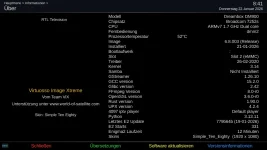
i noticed that in about there is no boot device listed... doesnt look right.
 

Attachments

  • about.webp
    about.webp
    60.4 KB · Views: 8
Last edited:
i noticed that in about there is no boot device listed... doesnt look right.
Should be there…..post the 1 st couple of pages of the debug log after start from standby/boot so I can see what its doing

you could in terminal mount mmcblk0boot1 (mkdir /tmp/m2 and mount mmcblk0boot1 /tmp/m2 ) and then use filezilla to look if the STARTUP files are in the mounted partition

If not you could unzip attached file, copy across and reboot
 

Attachments

Last edited:
Code:
root@dm900:~# mount /dev/mmcblk0boot1 /tmp/m2
root@dm900:~# ls -la /tmp/m2
drwxr-xr-x    2 root     root           512 Jan  1  1970 .
drwxrwxrwt    3 root     root           180 Jan 22 13:02 ..
-rwxr-xr-x    1 root     root            61 Jan  1  1980 STARTUP
-rwxr-xr-x    1 root     root            61 Dec 29 13:46 STARTUP_1
-rwxr-xr-x    1 root     root            61 Dec 29 13:46 STARTUP_2
-rwxr-xr-x    1 root     root            61 Dec 29 13:46 STARTUP_3
-rwxr-xr-x    1 root     root            61 Dec 29 13:46 STARTUP_4
-rwxr-xr-x    1 root     root            61 Dec 29 13:46 STARTUP_5
-rwxr-xr-x    1 root     root            61 Dec 29 13:46 STARTUP_6
root@dm900:~# cd /tmp/m2
root@dm900:/tmp/m2# cat STARTUP
kernel=/dev/3.14 root=/dev/mmcblk0p3 rootsubdir=linuxrootfs2
root@dm900:/tmp/m2# cat STARTUP_1
kernel=/dev/3.14 root=/dev/mmcblk0p2 rootsubdir=linuxrootfs1
root@dm900:/tmp/m2# cat STARTUP_2
kernel=/dev/3.14 root=/dev/mmcblk0p3 rootsubdir=linuxrootfs2
root@dm900:/tmp/m2# cat STARTUP_3
kernel=/dev/3.14 root=/dev/mmcblk0p3 rootsubdir=linuxrootfs3
root@dm900:/tmp/m2# cat STARTUP_4
kernel=/dev/3.14 root=/dev/mmcblk0p3 rootsubdir=linuxrootfs4
root@dm900:/tmp/m2# cat STARTUP_5
kernel=/dev/3.14 root=/dev/mmcblk0p3 rootsubdir=linuxrootfs5
root@dm900:/tmp/m2# cat STARTUP_6
kernel=/dev/3.14 root=/dev/mmcblk0p3 rootsubdir=linuxrootfs6
root@dm900:/tmp/m2#
 
here's another info i found in dream land. they claim that open uses outdated flash scripts.... and should be using the latest dream ones.
in fact i had to update the flash scripts when the box hang during boot, after flashing the dream recovery image and before i could flash a new uptodate dreamos or open image.
without the latest flash script i just could flash ancient images (from 2020 or so).
 
and here's a boot log... thanks for looking into it.
Thanks - so where did this kernel come from (3.14 ). ??? dev/3.14', 'root': '/dev/mmcblk0p3', 'rootsubdir': 'linuxrootfs6'
should be kernel=/dev/mmcblk0p1
 
i dont know. maybe its the dreamos kernel? i didnt manually modify any of the settings.
but i had to reinstall the dreamos emergency image to get the box to boot again...
currently the box is working, although /dev/3.14 does not exist.
 
Last edited:
i dont know. maybe its the dreamos kernel? i didnt manually modify any of the settings.
but i had to reinstall the dreamos emergency image to get the box to boot again...
currently the box is working, although /dev/3.14 does not exist.
Can you mount dev/mmcblk0boot1 and change the Startup files - you can copy over mine as its from a dm900 but change STARTUP to point to the correct slot…. And reboot
 
will do it later or tomorrow. do you have an idea what could have corrupted the files... and why the box is booting and working fine... at least for slot2. the slot selection in the power-off menu only offers slot2.
 
will do it later or tomorrow. do you have an idea what could have corrupted the files... and why the box is booting and working fine... at least for slot2. the slot selection in the power-off menu only offers slot2.
Yes, STARTUP files are wrong - my fault - a typo - will correct
The power off menu only offers filled slots
 
Last edited:

OpenViX Feeds Status

Back
Top