Superb quality and spec AB-Com PULSe 4K SE. Crazy offer! Only £99! FREE UK DELIVERY! 4K UHD, Enigma 2, Multiboot 4 images & more!...
Superb quality and spec AB-Com PULSe 4K Rev II Twin Satellite tuner only £149! FREE UK DELIVERY! 4K UHD, Enigma 2, SATA HDD facility, Multiboot 4 images & more!...

[DM900] Dreambox DM920/DM900 Recovery Mode

Status
Not open for further replies.

dreamsaudi

Forum Supporter
Donated Member
Joined
Jun 12, 2025
Messages
6
Reaction score
0
Points
1
What type of support thread are you creating?
Support question
What OpenViX Image build number are you using?
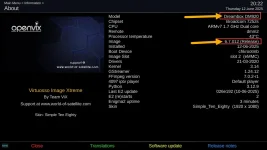
Openvix.6.7-012-Release-Dm900-Mmc
Have you tried re-flashing WITHOUT settings restore?
YES
Have you tried re-flashing WITH a settings restore?
YES

Hi​

Dreambox DM920 / DM900​

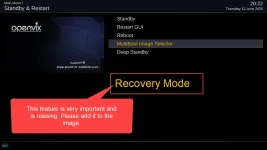
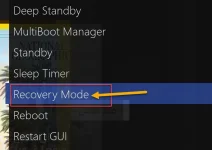
This feature is very important.​

MENU / Standby / Restart / Recovery Mode​

Please add this feature to the image for Dreambox devices.​


0.webp11.webp12.webp
 
I presented the issue to the team, but they said it’s not important, and the discussion took a different direction.

Sadly, the OpenViX team seems unreceptive to user feedback and contributions.
 
You were not able to demonstrate why someone would need to access the recovery mode.

The discussion resulted in following conclusions:
If your box is stuck/unresponsive, you can't access the menu.
You can flash the box easily using image manager.

Your only remaining point was if you were setting the box up for someone, I asked why you would then want to use the recovery menu, you were not able to provide a reason.

You were even asked to submit a pull request and it would be merged if the decision makers agree.

Please do not distort the facts. I am closing this thread. If anyone else wants to elaborate on why you would want to access the recovery menu using the remote, please continue in the other thread.

 
Status
Not open for further replies.

OpenViX Feeds Status

Back
Top