Superb quality and spec AB-Com PULSe 4K SE. Crazy offer! Only £129! FREE UK DELIVERY! 4K UHD, Enigma 2, Multiboot 4 images & more!...
Superb quality and spec AB-Com PULSe 4K Rev II Twin Satellite tuner only £179! FREE UK DELIVERY! 4K UHD, Enigma 2, SATA HDD facility, Multiboot 4 images & more!...

Editing SD / HD channel numbers since $ky killed off HD

Status
Not open for further replies.
It will pal.

I like the Sky Black XML guys. Only problem I have with it, which is more of an issue than fta channels being sd listed first. Is that with the Black bouquets, if you use the sections, like movies or sports, the HD versions are listed first in them.

All channels bouquet is spot on, but the sections are hd listed first. We use the sections for going to kids, movies, sports etc.
 
Will that file you just uploaded work with vix image

Yes but you will need to be running a newer version of ABM as it wont work with older versions, so if you are not already, update the image to one of the latest in the Apollo series first.
 
DaMacFunkin,

I'm in the same boat with Channel 5 HD being listed on 105 and obviously not working. I need to swap 105 and 171, I've tried editing the xml myself (no success!) by copying one of the swap lines and adding the channels I need swapping....

I'm using Merdian South East Region.

Can you help?
 
Please try this one.

Downsides:
Ripped out all the HD regions
To enable the swap the all channels section must be created. This adds lag to the EPG system.
Swap only affects the all chanenls bouquetr, not the other bouquets.
 

Attachments

Last edited:
Please try this one.

Downsides:
Ripped out all the HD regions
To enable the swap the all channels section must be created. This adds lag to the EPG system.
Swap only affects the all chanenls bouquetr, not the other bouquets.

Works great with my Solo2, no noticable lag so far. Thanks very much mate.

The only thing i have noticed is a couple of the kids channels (CBBC HD and CBeebies HD) are still active. Is there a write up on how to edit the xml file to swap these channels?
 
Is there a write up on how to edit the xml file to swap these channels?

The write up is:
Use a linux comptible editor like Notepad++. Do not confuse with windows notepad.
Use a different name for teh file/provider to the official ones
Backup file before trying edits.
Backup image before trying something new.

If you look at the xml, there is a section with the following. (I have deliberately ignored the filters. These are the regions which are allowed to have swap. Do not touch these)
Code:
<swapchannels>        
        <channel number="141" with="101" />
        <channel number="142" with="102" />
        <channel number="178" with="103" />
        <channel number="230" with="104" />
        <channel number="210" with="115" />
        <channel number="211" with="116" />
        <channel number="342" with="315" />
        <channel number="426" with="413" />
        <channel number="427" with="414" />
        <channel number="433" with="417" />
        <channel number="516" with="501" />
        <channel number="570" with="503" />
        <channel number="518" with="512" />
</swapchannels>
It should be intuitive as to what it means. That is the status of it as I had uploaded. You are quite correct. I missed the kids one. For the kids ones that I missed, we would have to add
Code:
        <channel number="633" with="613" />
        <channel number="624" with="614" />

I have attached an updated one.

Lriazer's one is more user customiseable. If you dont mind the first large bouquet, you can make the swaps for numbering as well as sort channels in the other bouquets. I used to have the most used ones at the top of each bouquet with the rest in alphabetical order.
 

Attachments

I was so close on my own haha! I had the channel numbers round the wrong way!

I love being able to do things for myself, I just wish I had some programming skills. I bet this is all pretty basic stuff for you boys?

You'll have to excuse us 'old' folk who only had a zx81 to work with back in the day!
 
Do we think that SD will go eventually as well?? What are the people in the knows thoughts??

Some providers are totally secure and you cant share a thing, others are okay,,,,, cant understand the difference. Sly UK was one of the most secure but has somehow drifted back a bit and maybe now this is them getting back to the top....
 
It there a tool to do this. Also on future release would it not be nice to move the changes up or down for the sections
 
Brilliant. Working well on a GigaBlue Quad HD. No noticeable lag on EPG either.

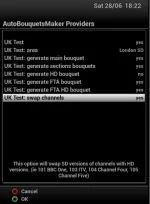
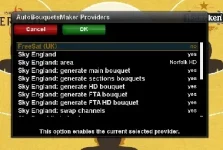
My first mistake was to enable ONLY the UK Test provider in ABM - which resulted in an empty EPG even after re-scan and a box restart. Went back into ABM and enabled Sky England with HD (that might not be the precise description...) along with the UK Test XML / provider as well and it's working a treat. Many thanks!
 
Sorry i have been away from this thread for a few days but I don't know what the big ooh ahh is about, my XML doesn't place CH5 HD at channel 105, and mine places the HD channels well up the channel list.
 
Uusing your XML everything is fine for me except CH5.

On the EPG I have (in this order from the top) BBC1HD, BBC2HD, ITVHD, CH4HD all of which work fine as they're unaffected by $ky's recent change of course. Next comes CH5HD which goes to CH171 (HD) and that doesn't clear any more. I'd like the CH5 entry in my EPG to be CH5-SD - is there something daft I'm doing / not doing in the ABM settings?

For example should I be using an Sky England HD or SD region? And should I be generating an HD bouquet? Screenshot of my ABM Settings attached...

Cheers,

Steve

ABM.webp
 
So here is another custom XML...

Features:
blacklist - always remove these channels from channel list
whitelist - do not auto delete
auto delete - removes all HD channels that are not on the whitelist and are not FTA
channel swap - most common FTA HD channels are swapped.

To use:
install supplied XML
select your region in SD only (no point in having HD channel order)
select if you want to channel swap


EDIT by Abu Baniaz:
Attachment moved to its own thread here. Makes sense to have files in one place.
http://www.world-of-satellite.com/showthread.php?39704-ZoomZoomLuke-s-Custom-28-2-xml-file
 
Last edited by a moderator:
Hi guys, is there an easy way to delete the non working channels from the sky SD bouquet, so only the working channels are listed in the EPG?

As a quick work around, I went through and added all the working channels to "Favourites" only to find only one channel added :confused: I pressed down (Large circular button), clicked on "All Channels", highlighted the channel, pressed "Menu", then 7 "Add service to bouquet". I then pressed back to the channel list and carried on. I tried ABM S etc but "Favourites" still had only 1 channel. Any Ideas?

Having tried adding the working channels to Favourites, I think rather than go through and add hundreds of channels again, I think it would be easier to be able to delete the dozen non working ones?

Thanks for any suggestions.
 
And use Custom"Your Region" when you setup in Provides with ABM. Simples.


Sent from my iPhone using Tapatalk
 
Sorry I don't think I explained what I'm trying to achieve. I want to create a bouquets without the sly channels that don't work any more. How do I delete the non working sly channels ones from the EPG?
 
Huveos and Andy have already stated what you need to do.
Use autobouquetmaker to scan for your channels. Select region(custom). Change swap channels to yes.
Start scan.
 
Sorry I don't think I explained what I'm trying to achieve. I want to create a bouquets without the sly channels that don't work any more. How do I delete the non working sly channels ones from the EPG?

Using "CustomRegion) DOES get rid of all the unwanted channels.


Sent from my iPhone using Tapatalk
 
Status
Not open for further replies.

OpenViX Feeds Status

Back
Top