K
klappstuhl
Guest
Hi guys!
I have been testing the latest VIX-Team-Image and I like it a lot so far. I have only one little thing that I seem unable to find. I need the option "enable high bitrate" to receive a few channels. Where do I find that option in the VIX-Image? I have gone trough all the menu options but I couldnt find it I read that the latest release has the support built in so it should be there somewhere right?
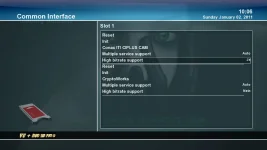
I attached a screenshot where you can see how this setting looked on my old (vti) Image. It was under Menu->Setup -> Commin Interface
I have been testing the latest VIX-Team-Image and I like it a lot so far. I have only one little thing that I seem unable to find. I need the option "enable high bitrate" to receive a few channels. Where do I find that option in the VIX-Image? I have gone trough all the menu options but I couldnt find it
I read that the latest release has the support built in so it should be there somewhere right?I attached a screenshot where you can see how this setting looked on my old (vti) Image. It was under Menu->Setup -> Commin Interface