Superb quality and spec AB-Com PULSe 4K SE. Crazy offer! Only £129! FREE UK DELIVERY! 4K UHD, Enigma 2, Multiboot 4 images & more!...
Superb quality and spec AB-Com PULSe 4K Rev II Twin Satellite tuner only £179! FREE UK DELIVERY! 4K UHD, Enigma 2, SATA HDD facility, Multiboot 4 images & more!...

Engima 2 - Samsung SMART TV Streaming app

E2Stream v2.5 has been released and is available to download from the following link:
Code:
http://www.pembo.co.uk/2014/12/04/e2stream-v2-5/

Change log
Code:
v2.5 - 04/12/2014
* Fixed image paths on series F onwards
* Added Mute icon to show when mute is enabled
* Fixed minor issue in installer causing build problems

v2.4 - 04/12/2014
* Attempt to fix slow startup for some people
 
Hi pembo,

I will test tonight on the H TV and let you know
 
Hi Pembo,

I had a quick spin of v2.5. My set up being gigablue 800SE+ running Apollo 096 and Samsung H series. Getting good success rate on channels compared to previous versions, picons showing for the first time... and the bad news ... Enter button still not working :(
 
Hi Pembo, thanks mate loads really fast now about 6 seconds, but got no icons showing or recording list. Thanks for the hard work.
 
Nasser007 - does the first channel in your list in the app shows have a picon on the enigma2 set top box.
Can you tell me what picon mode it shows in the about screen?

I'll PM you for some debug info on the recordings list.
 
Last edited:
Most channels working fine. Some have audio and no picture. An odd one goes back to channel list. Thanks for all the good work.
 
Hi Pembo, no icon showing at all in the enigma2 set top box, thanks for the debug info but I am really new to this and do not fully understand it, so sorry I can`t help but your work is grate and will donate towards your hard work.
 
Hi Pembo, no icon showing at all in the enigma2 set top box, thanks for the debug info but I am really new to this and do not fully understand it, so sorry I can`t help but your work is grate and will donate towards your hard work.

Thanks :)
If you get some picons installed on the set top box, then they should show in the smart tv app.
The about screen in the app (the blue 'D' button) shows the picon mode.

It will say either
- None
- Service Name
- Service ID

Which depends on whether it could find the first channel icon on the box and what type of icons you've installed
 
Hi Pembo, the about button says picons mode none found, I am using on my vu+solo2 image openvix Apollo 096 and carbon -maggy-style-XPicons the skin I am using is sky by fraggle 121
which displays picons on the top of the right hand screen.
 
Login to openwebif on a browser and click the epg in there.
Let me know if you have any picons showing.

If you don't there's something not quite right with your setup.
If you do, then what about the very first channel in the list, does that have a picon?

If it does I'll need you to run a couple of openwebif queries for me to determine if there's another bug or some issue with your setup.
 
Hi just login to openwebif and all picons showing up ok on there.
 
Hello pembo, viewing recordings ok now just had to change location on sat box.
 
Hi pembo,

I have been testing on the H-series TV

1.Enter button still not working
2.Loading now takes less than 10 seconds
3.Still issue when you install app and run it for the first time sits on processing channels. You have to power off the tv and then it loads without any issues
4. Picons are working fine
5. streams work but not transcode just returns back to menu
 
E2Stream v2.7 is available to download from here:
Code:
http://www.pembo.co.uk/2014/12/07/e2stream-v2-7/

Change log:
Code:
v2.7 - 07/12/2014
* Added OSD for Volume controls
* Modified CMD file to start installer to try and locate
  a compatible JRE to use
* Added Exit to the installer menu

e2streamv27.webp
 
Last edited:
E2Stream v3.0 is now available to download from here:
Code:
http://www.pembo.co.uk/2014/12/10/e2stream-v3-0/

Changelog
Code:
v3.0 - 10/12/2014
* Modified navbar icons to now show play button to 
  start channel stream. Enter still continues to function 
  as before for non H-series TVs.
* Added experimental audio channel switching by pressing
  red button when in full screen mode to cycle through
  audio channels 
* Detection of stream errors and display of screen to
  show error with option to retry or return to channel list
* Automated build process to simplify distribution
  
v2.8 - 08/12/2014
* Attempted to fix picon issues with 'unusual' responses
  from openwebif from some users
 
E2Stream v3.5 is now available.
This version has been through quite a few changes to help with debugging as well as resolving issues:

You can download this from here:
Code:
http://www.pembo.co.uk/2014/12/15/e2stream-v3-5/

Changelog
Code:
v3.5 - 14/12/2014
 * Finalised audio channel switching.  Red button changes
   the audio channel during video playback when more than
   one audio stream is available.
 * Notification to inform when change of audio stream
 * If more than one audio stream is available this is
   highlighted in the infobar
 * Implementation of a debug window/version to collect
   information from users when issues occur that are
   difficult to diagnose.  Press 'tools' to turn on 
   debug log.  For issues on startup you'll need to
   download the debug enbled build.
 * Removed superfluous logging from all classes
   and standardised everywhere to use the new debug class
 * Modified way the infobar timer works to fix an issue
   during change of channel where the infobar would close
   prematurely based on the timer from the previous channel
 * Improved error handling in various scenarios
 * Removed the number prefix question on startup to simplify
   the startup process.  This is still present in the 
   settings UI
 
Thanks for all the hard work, all picons showing working really well now.:)
 
E2Stream v3.6 has been released and can be downloaded from here:
Code:
http://www.pembo.co.uk/2014/12/19/e2stream-v3-6/

Change log

Code:
 v3.6 - 19/12/204
 * Implemented zap to channel for those who want to force
   the channel change or have a single tuner
 * Resolved further startup issues to resolve picon/stalling
   issues on startup
 * Added more error handling to network communications to
   catch errors and allow for retry when failed
 * Stopped settings screen losing focus when moving down from
   last field on initialisation
 
Hi pembo, I have tested on a F6500 tv and the audio channels and volume screen display stays on the screen. I don't know why you need your mute and volume up and down on the screen as it does not work as the TV mute,volume up and down screen display works fine
 
E2Stream v3.7 is now available to download from here:
Code:
http://www.pembo.co.uk/2014/12/21/e2stream-v3-7/

Change log
Code:
v3.7 - 21/12/2014
 * Resolved minor issue on settings screen. < & > were in 
   the wrong location following introduction of the zap 
   option
 * Prevented Bouquet Description from wrapping when the
   description is unusually long
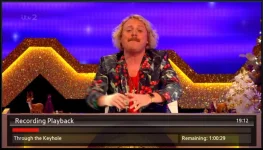
 * Modified info bar for recordings to tidy up the progress
   bar and style it like the rest of the info bar, but also
   to resize recording description and show the time 
   remaining
 * Corrected progress bar length to prevent run over out of
   the container
 * Fixed buffering complete notification issue which
   prevented skip from working in recordings
 * Introduced 'alert bar' to alert on conditions, the first
   of these being 'Cannot skip whilst buffering'
 * Improved speed of EPG retrieval my making multiple async
   requests for now/next rather than one large request
 * Blocked a number of the remote control keys when in full
   screen playback to prevent issues
 * Modified start-up to avoid double load of channels/picon
   status check to speed things up and avoid issues with
   picon checks/display
 * Improved picon handling by resolving some filename issues
   and avoiding a double check when changing from channels
   to recordings and back again
 * Separated REST calls over different XMLHttpRequest objects
   to avoid the race conditions created with the introduction
   of the asynchronous timer code
 * Separated AV Player implementation to allow future 
   switching to the legacy player.  These changes are not
   available yet as further modifications are required to
   re-enable the legacy player implementation
 * Re-introduced the legacy player class but not enabled yet
   as the Samsung APIs clash meaning a change in player will
   need a restart of the app and this is still to be implemented 
 * With the above, implementation of an advanced settings
   screen (yet to be enabled due to some issues) to select 
   the player

Recordings InfoBar v3.7
3_7.webp
 
Last edited:

OpenViX Feeds Status

Back
Top