Superb quality and spec AB-Com PULSe 4K SE. Crazy offer! Only £129! FREE UK DELIVERY! 4K UHD, Enigma 2, Multiboot 4 images & more!...
Superb quality and spec AB-Com PULSe 4K Rev II Twin Satellite tuner only £179! FREE UK DELIVERY! 4K UHD, Enigma 2, SATA HDD facility, Multiboot 4 images & more!...

[ViX_Misc] EPG program info not showing up

rigg63

Forum Supporter
Donated Member
Joined
Jan 9, 2015
Messages
19
Reaction score
0
Points
0
Age
63
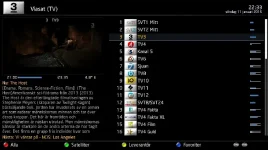
EPG program info is not showing up in one of the EPG page. On all other places, including the graphical page it shows correctly. Tried both original skin and Magic-HD-noir. See attached image.

1_0_1_44C_3_56_300000_0_0_0.webp
 
Something corrupt in your EPG?
Try the new delete EPG option...
Menu -> Setup -> System -> EPG -> Load/Save/Delete -> Delete EPG.

Then download it again...
 
Something corrupt in your EPG?
Try the new delete EPG option...
Menu -> Setup -> System -> EPG -> Load/Save/Delete -> Delete EPG.

Then download it again...

Sorry, it doesn't help. It's even worse... Now a few channels, that showed EPG in graphic EPG and infobar is empty on all places that shows EPG.
 
Have you redownloaded your required EPG?
 
Yep.. dowwnloaded again. Checked before downloading that all EPG was empty... I was about to edit my previous comment, as the missing EPG on other pages suddenly showd up after a couple of minutes.

But still... All EPG program info is missing on the EPG page in my picture, all other EPG pages is correct.
 
I got some new information about this, as I for a moment had a working epg, but I messed it up:

This is what I did:

Factory restore
Fixed the necessary things with softcam
channel search
checked the EPG page, program information displayed correctly
Continued to make settings
Messed up A / V settings Accidently with a resolution that is not supported by the TV which was very clumsy. The TV screen went black so I could not even navigate menus
USB flashed the box
Restored my last backup

Conclusion: The defect is in a setting that is wrong in the backup, or corrupt file in the region that is deleted at the factory reset. The fault is with my backup

questions:
* Does anyone have a theory of what may be wrong,
* Or can someone tell me what file I can save and restore order to avoid having to make a new channel scan in over 30 minutes when I factory reset again when the rest of the job to restart relatively quickly.
 
Dropped the line telling that the error returned when I restored the backup.
 

OpenViX Feeds Status

Back
Top