Superb quality and spec AB-Com PULSe 4K SE. Crazy offer! Only £129! FREE UK DELIVERY! 4K UHD, Enigma 2, Multiboot 4 images & more!...
Superb quality and spec AB-Com PULSe 4K Rev II Twin Satellite tuner only £179! FREE UK DELIVERY! 4K UHD, Enigma 2, SATA HDD facility, Multiboot 4 images & more!...

ET9000 ViX 2.3 image queries

Tried that ....and am sticking with ViX Night :)...everything about it is great ...large readable fonts, no minimization of the tv screen while in OSD mode..."Now", "Next" in the listings...BUT for the infobar which as I mentioned earlier is a bit too cluttered.
Very easy to solve that: make a skin_user file and place the desired infobar screen in there.
I can help if you want to.
 
Here are my settings for Timeshift. No rewind happens when i press the << button. It goes on pause, then when I unpause, it seems to enable time shift...please help..this is one feature i would definitely like to use on my ET9000
Hmmmm, settings are fine, should work just fine.
 
Would love to try go under the bonnet....am tech savvy but not familiar with enigma2...would really appreciate a bit of hand-holding...

I'm presuming it would some xml that I would need to modify and replace to knock off the stuff that I don't want on the info bar. Or is there a way to use Magic-HD Light infobar with ViX Night image ? That would be cool !! :)

Very easy to solve that: make a skin_user file and place the desired infobar screen in there.
I can help if you want to.
 
Last edited:
Very easy to solve that: make a skin_user file and place the desired infobar screen in there.
I can help if you want to.
Would love to try go under the bonnet....am tech savvy but not familiar with enigma2...would really appreciate a bit of hand-holding...

I'm presuming it would some xml that I would need to modify and replace to knock off the stuff that I don't want on the info bar. Or is there a way to use Magic-HD Light infobar with ViX Night image ? That would be cool !! :)
Yes, that indeed is very well possible. I will help you tomorrow (and PM me if I forgot that by the end of the day).
 
Would love to try go under the bonnet....am tech savvy but not familiar with enigma2...would really appreciate a bit of hand-holding...
I'm presuming it would some xml that I would need to modify and replace to knock off the stuff that I don't want on the info bar. Or is there a way to use Magic-HD Light infobar with ViX Night image ? That would be cool !! :)
Yes, that indeed is very well possible. I will help you tomorrow (and PM me if I forgot that by the end of the day).
Ok. here you go:
1- Install Magic-HD. You don't have to use it, just download it from the feeds;
2- Unzip the attached file user_skin.xml and FTP it to "etc/enigma2"; then restart the GUI

That's all! If you want; you could add others screens to the user_skin.xml. Just copy the desired ones form another skin (and make sure you have downloaded that skin as well).
In this file I also added the SecondInfoBar, as they are more or less two of a pair. To use it, you must enable SecondInfoBar in the user settings.

Good luck, and let me know if you need any other help.
 

Attachments

Wow..that was simple....it seems to work fine except when I press the << button to browse EPG i.e. current events on other channels..that's when the old infobar starts showing up.

Btw, looking at the xml, I see that each component/item on the infobar is defined as a widget .... does that mean there is a skin_user.xml for the ViX Night image ? If that's the case, I can edit that xml and remove the widgets I don't want.
 
Am able to record fine...even timeshifting seems to work after I pause it once...
Have done a recent reflash so am pretty sure its not that..also I had the same behavior on ViX2.2 (See THIS thread)

Am I pressing the right button "<<" or do I need to press any other button to rewind back in PTS ?


Are you able to record ok? If so no. Maybe do a fresh re-flash.
 
Wow..that was simple....it seems to work fine except when I press the << button to browse EPG i.e. current events on other channels..that's when the old infobar starts showing up.
OK, added Quick-EPG to the User skin as well (attached). It's always the same: once you start modding a skin there's no end to it :D


Btw, looking at the xml, I see that each component/item on the infobar is defined as a widget .... does that mean there is a skin_user.xml for the ViX Night image ? If that's the case, I can edit that xml and remove the widgets I don't want.
Nope, there's a skin (in this case look at the skin file in "/usr/share/enigma2/ViX_Night_HD").
Changing items there is possible, but on every update your changes will be removed again. That's the reason to use the skin-User.xml: the skin_user.xml overrides the items from the skin.
So a better way is: copy the screen you like from any skin, and add them to the skin_user.xml (as we are doing right now). That will never be changed by the system, and even be backed up by a settings backup.
 

Attachments

The updated skin_user.zip seems to hang the box. The earlier one worked well but didn't have the Quick-EPG :confused:
 
Not a crash ...no green screen or stuff like that but nothing works on the remote...I tried accessing the webinterface and was able to reboot from there...at this point it again got into a similar state...next I ftped into the box and removed the skin_user.xml and did a reboot and everything went to normal
 
Not a crash ...no green screen or stuff like that but nothing works on the remote...I tried accessing the webinterface and was able to reboot from there...at this point it again got into a similar state...next I ftped into the box and removed the skin_user.xml and did a reboot and everything went to normal
You're right, there was something wrong in that file. I corrected that in the attached version: works fine on my box, so please try that.
I'm very sorry for the inconvenience caused.
And please don't hesitate to come back here if things are not OK again, or if you have additional wishes.
 

Attachments

Thanks !! That worked like a charm. May I request one final tweak ?? (I know your earlier statement..once you get on modding a skin there's not end to it :) )

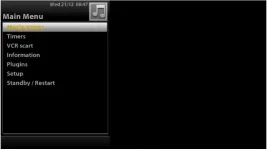
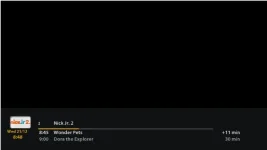
After putting this image the font color of the highlighted/selected text on the other menus has turned to yellow making it hard to read. It works fine for the infobar though. See attached images.
Capture screen.webpnewinfo bar.webp

Can we fix this so that the font color of selected menu item does not change to yellow?
 
Thanks !! That worked like a charm. May I request one final tweak ?? (I know your earlier statement..once you get on modding a skin there's not end to it :) )
I knew it, I knew it, I should never have started this.........:cool:


After putting this image the font color of the highlighted/selected text on the other menus has turned to yellow making it hard to read. It works fine for the infobar though. See attached images.
Sorry, I don't know how to "fix" that :confused:
 
Last edited:
Sorry, I don't know how to "fix" that :confused:
Couldn't stand that, so I've been struggling with colors.......
Please try the attached version. It's not ideal, but I think it's better then it was.
And maybe there's a real skinner reading this who might help out?
 

Attachments

OpenViX Feeds Status

Back
Top