Superb quality and spec AB-Com PULSe 4K SE. Crazy offer! Only £129! FREE UK DELIVERY! 4K UHD, Enigma 2, Multiboot 4 images & more!...
Superb quality and spec AB-Com PULSe 4K Rev II Twin Satellite tuner only £179! FREE UK DELIVERY! 4K UHD, Enigma 2, SATA HDD facility, Multiboot 4 images & more!...

[VU+ Duo2] Getting forbidden on web interfaces

finbarr

Forum Supporter
Donated Member
Joined
Jan 23, 2014
Messages
211
Reaction score
1
Points
0
I am away from the house all week and I remotely upgraded the box using the virtual remote on Openwebif.

After upgrade I cannot access any of the web interfaces including fan control, lcd4linux, etc.

I get the following message in the browser:

"Forbidden

403.6 IP address rejected"

I am able to ssh to the box but couldn't find anything in the logs about this. Any ideas? Does the latest update use access control lists for accessing it?
 
There was an OpenWebIF merge from upstream. Best thing would be raise an issue on github.
 
I have just opened a GitHub issue here

Code:
https://github.com/E2OpenPlugins/e2openplugin-OpenWebif/issues/467
 
Won't fix: This is the desired behaviour.
You can no longer have the OWIF wide open to the net without at least a login/password.

No login -> local use only.

Gesendet von meinem Siemens C25 mit Tapatalk
 
Won't fix: This is the desired behaviour.
You can no longer have the OWIF wide open to the net without at least a login/password.

No login -> local use only.

Gesendet von meinem Siemens C25 mit Tapatalk

oK BUT how i set a log in and password. I tried that when i upgraded and i still could not access my box remotely.
 
OWIF has new security settings, have you changed them as well?
 
OWIF has new security settings, have you changed them as well?

I will try again when i get home. I remember setting a log in and password. I changed this on the app too and i still could not access remotely. When i tried using my laptop remotely, it kept saying IP address forbidden. It does not do that with the version i am now.
 
Menu/Plugins/OpenWebif has settings that need changing if you've not already done it.
 
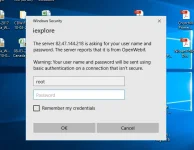
I have the same issue even I have changed the setting in Menu/Plugins/OpenWebif to enable HTTP auth to yes. But my user/password not accepting.
 

Attachments

  • sec.webp
    sec.webp
    27.8 KB · Views: 42

OpenViX Feeds Status

Back
Top