Superb quality and spec AB-Com PULSe 4K SE. Crazy offer! Only £129! FREE UK DELIVERY! 4K UHD, Enigma 2, Multiboot 4 images & more!...
Superb quality and spec AB-Com PULSe 4K Rev II Twin Satellite tuner only £179! FREE UK DELIVERY! 4K UHD, Enigma 2, SATA HDD facility, Multiboot 4 images & more!...

[ViX_Misc] Graphical EPG Settings

  • Thread starter Thread starter Deleted member 86165
  • Start date Start date
D

Deleted member 86165

Guest
Hi All,

I have been searching in the settings of the Graphical EPG and cannot find what I am looking for so hopefully someone can point me in the right direction.....

As per the screenshot, on the preview window there is the name of the channel that is been displayed...is it possible to remove this name?
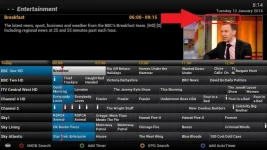
Screen Name.webp

Also, is it possible that when you are entering a channel number that the channel is changed straight away without any delay?

Many Thanks - Jason
 
I don't think you can remove it - not sure why you would want to but each to their own. :)

The delay is built into the image if you want to change channels quicker press the ok button after entering the numbers.
 
i dont like how the preview lets you view the station, but when you press exit you end up on the original channel maybe i just need to remember to press OK. but exit just makes sense for me
 
When I press exit, it goes to what ever is in the preview??


Sent from my iPad using Tapatalk

Doesn't for me pressing exit goes back to the original channel, need to press ok again to zap to the channel in preview.
 
Doesn't for me pressing exit goes back to the original channel, need to press ok again to zap to the channel in preview.

Menu>Setup>System>EPG> GraphicalEPG settings>Channel preview mode ----- change from YES to NO
 
huh that will turn the preview mode off - actually want the option where clicking on Exit on preview mode lets you watch that channel

Menu>Setup>System>EPG> GraphicalEPG settings>Channel preview mode ----- change from YES to NO
 
As per the screenshot, on the preview window there is the name of the channel that is been displayed...is it possible to remove this name?
I believe it is, as I once had a crash when there was no free tuner when this was displayed, and someone else couldn't reproduce it because they didn't have it showing.
I might have to delve a bit to find out what the option is, though...

Mind you, I can't see anything that obviously switches it off - so it might be skin dependent.
 

OpenViX Feeds Status

Back
Top