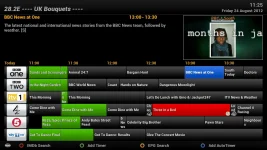
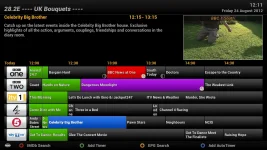
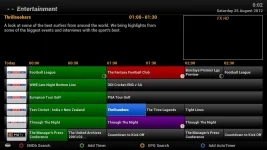
Folks, now that we have the option for Graphics in EPG (VIX 3.x) - EPG button -> Menu button -> View mode -> Graphics or Text
Just wondering if any of you have come up with a nice graphics EPG view?
My attempt, attached.
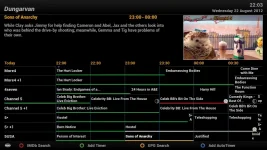
For now, the Graphics EPG images need to be over written, so be aware that on image update, you will loose your customisations.
Attached graphics go in
If using the default skin.
9 images are used for graphics view:
CurrentEvent.png - The current event being viewed while in EPG.
CurrentService.png - The current channel being viewed while in EPG.
OtherEvent.png - Any event or channel that isn't being currently viewed.
RecordEvent.png - Any event set to record.
SelectedCurrentEvent.png - Any event currently on & highlighted in EPG.
SelectedEvent.png - Any selected event in EPG
SelectedRecordEvent.png - When you highlight an event that's set to be recorded.
SelectedZapEvent.png - When you select an event that's set to ZAP.
ZapEvent.png - Any event that's set to ZAP.
For best optimisation, all images should be saved as 1px wide by 100px tall & saved in .png format.
So, any graphics folks want to share your EPG?
View attachment epg.zip
Just wondering if any of you have come up with a nice graphics EPG view?
My attempt, attached.
For now, the Graphics EPG images need to be over written, so be aware that on image update, you will loose your customisations.
Attached graphics go in
Code:
/usr/share/enigma2/ViX_Night_HD/epg/9 images are used for graphics view:
CurrentEvent.png - The current event being viewed while in EPG.
CurrentService.png - The current channel being viewed while in EPG.
OtherEvent.png - Any event or channel that isn't being currently viewed.
RecordEvent.png - Any event set to record.
SelectedCurrentEvent.png - Any event currently on & highlighted in EPG.
SelectedEvent.png - Any selected event in EPG
SelectedRecordEvent.png - When you highlight an event that's set to be recorded.
SelectedZapEvent.png - When you select an event that's set to ZAP.
ZapEvent.png - Any event that's set to ZAP.
For best optimisation, all images should be saved as 1px wide by 100px tall & saved in .png format.
So, any graphics folks want to share your EPG?
View attachment epg.zip
Last edited: