
Superb quality and spec AB-Com PULSe 4K SE. Crazy offer! Only £129! FREE UK DELIVERY! 4K UHD, Enigma 2, Multiboot 4 images & more!...
Superb quality and spec AB-Com PULSe 4K Rev II Twin Satellite tuner only £179! FREE UK DELIVERY! 4K UHD, Enigma 2, SATA HDD facility, Multiboot 4 images & more!...
You are using an out of date browser. It may not display this or other websites correctly.
You should upgrade or use an alternative browser.
You should upgrade or use an alternative browser.
[ET8500] Have to reboot via rear switch at back every morning!
- Thread starter danlou
- Start date


birdman
Moderator
Not it you are relying on the page layout to be the same.It's a bit like a word document written in Word 2010 software but then opened in a later release - it will still work...
I've known of people who had to keep and old PC running just to run an old version of Word so that they could comply with regulatory requirements of being able to refer to line x on page y.
birdman
Moderator
One would hope so, but it's also possible that the old version was working "by accident" and the change has removed that fortuity.Ok, but one would think that any newer updates would make things backward-compatible?

techygirl
New member
- Joined
- Aug 7, 2016
- Messages
- 80
- Reaction score
- 0
- Points
- 0
Right, I still have the standby problem. I am on version 4.2.021
I changed the ABM scan to 9am.
Last night it was put on standby and this morning at 7.30 it would not switch on. Here is my log.
I don't know if this makes any difference but the debug log today is tiny in size compared to the previous day. (added this one also.)
I changed the ABM scan to 9am.
Last night it was put on standby and this morning at 7.30 it would not switch on. Here is my log.
I don't know if this makes any difference but the debug log today is tiny in size compared to the previous day. (added this one also.)
Attachments
Last edited:

Andy_Hazza
Moderator
Right, I still have the standby problem. I am on version 4.2.021
I changed the ABM scan to 9am.
Last night it was put on standby and this morning at 7.30 it would not switch on. Here is my log.
I don't know if this makes any difference but the debug log today is tiny in size compared to the previous day. (added this one also.)
Its not going to be an ABM issue, most likely how you grab your EPG data is the issue. How have you got your EPG setup?
Sent from my iPhone using Tapatalk
techygirl
New member
- Joined
- Aug 7, 2016
- Messages
- 80
- Reaction score
- 0
- Points
- 0
Its not going to be an ABM issue, most likely how you grab your EPG data is the issue. How have you got your EPG setup?
Sent from my iPhone using Tapatalk
I know that it won't be right as I just muddled through my setup (the plus side of having all the problems I have had is that I have learnt loads). I think that I just added things just in case.
What do you need to know? EPG location is HDD.
Is there a way of just clearing the EPG and setting that up properly?

So you have 3 tuners with a motorised setup?
You also seem to be running ABM, crossepg and epgimport as scheduled tasks - correct?
On the 1st log (I,m No expert!) it looks like Crossepg starts but I don,t see it finishing ... so will it be using the motorised dish for Crossepg (it seems to) or one of the others?
You also seem to be running ABM, crossepg and epgimport as scheduled tasks - correct?
On the 1st log (I,m No expert!) it looks like Crossepg starts but I don,t see it finishing ... so will it be using the motorised dish for Crossepg (it seems to) or one of the others?
Andy_Hazza
Moderator
I know that it won't be right as I just muddled through my setup (the plus side of having all the problems I have had is that I have learnt loads). I think that I just added things just in case.
What do you need to know? EPG location is HDD.
Is there a way of just clearing the EPG and setting that up properly?
For your ABM, set that up to run a daily scan at 04:00 am and save that with the green button. (Menu > Setup > Service Searching > ABM (AutoBouquetsMaker) > Configure)
For your EPG, lets do the following first n see where that takes us. Menu > Setup > System > EPG. In Settings set the EPG location to /media/hdd & then green button to save that.
Then go into Load-Save-Delete & press ok on the Delete EPG and say yes when prompted with the pop-up box.
Then go into CrossEPG > Configure & schedule a daily download at say 04:15 am then the green button to save.
Then go into OpenTV providers & click ok on Sky UK OpenTV (a tick should appear) then the green button to save that.
What is your current setup for retrieving Freeview (terrestrial) EPG?
Exit out of everything and run CrossEPG Downloader, to do this press the blue button and press ok on CrossEPG Downloader.
As a test for the above ABM & EPG settings you could set the times to say ABM at 09:45 am & EPG at 10:00 am and put the box into standby and see what happens if you are free now to test, or you can just leave until the morning to see how it goes or a time to suit you to test, but I would go back to my suggested times for the scheduled runs.
Also another thing can you try the following before the above. Menu > Setup > System > Customise and set preferred tuner to Tuner B (Make sure its not the motorised tuner if you have one, so if Tuner A is fixed and Tuner B is motorised set Tuner A (fixed) to the preferred tuner) and press the green button to save.
Let me know how you get on please. Thanks.
Sent from my iPhone using Tapatalk
Last edited:
techygirl
New member
- Joined
- Aug 7, 2016
- Messages
- 80
- Reaction score
- 0
- Points
- 0
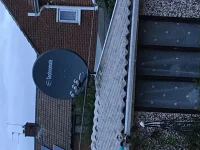
No it is not motorised. (see attached picture)
My ET8500 has 1 DVB and 2 sat tuners. (digi roof aerial is not connected). 1 cable comes in from the dish into tuner B and then loop through to tuner C.
Day to day this all works well and everything appears to work (recording, timeshift, watch another channel etc) although we don't really use these.
Yes to ABM, not sure what I have done with the EPG/ crossepg.
Andy_Hazza I will work through that now. Thanks.
(just as an aside at 9am it did its ABM scan and came up with the Timer lock (which I think that it has always done that - I know that I had major issues when I first set everything up but it doesn't appear to affect anything.)
My ET8500 has 1 DVB and 2 sat tuners. (digi roof aerial is not connected). 1 cable comes in from the dish into tuner B and then loop through to tuner C.
Day to day this all works well and everything appears to work (recording, timeshift, watch another channel etc) although we don't really use these.
Yes to ABM, not sure what I have done with the EPG/ crossepg.
Andy_Hazza I will work through that now. Thanks.
(just as an aside at 9am it did its ABM scan and came up with the Timer lock (which I think that it has always done that - I know that I had major issues when I first set everything up but it doesn't appear to affect anything.)
Attachments
Andy_Hazza
Moderator
Thats a big en. [emoji4]
With regards the Preferred Tuner, set that to the fixed 28.2 Tuner please and save and then test accordingly with my setup instructions please.
Sent from my iPhone using Tapatalk
With regards the Preferred Tuner, set that to the fixed 28.2 Tuner please and save and then test accordingly with my setup instructions please.
Sent from my iPhone using Tapatalk
techygirl
New member
- Joined
- Aug 7, 2016
- Messages
- 80
- Reaction score
- 0
- Points
- 0
Thats a big en. [emoji4]
With regards the Preferred Tuner, set that to the fixed 28.2 Tuner please and save and then test accordingly with my setup instructions please.
Sent from my iPhone using Tapatalk
 Woe betide anything that gets between Hubby and his beloved Juventus!
Sorry I was a bit keen and didn't set the preferred tuner so will let it run through and then will do it again if it doesn't work.
techygirl
New member
- Joined
- Aug 7, 2016
- Messages
- 80
- Reaction score
- 0
- Points
- 0
It appears to have got stuck. Up until about 5 minutes ago, it whizzed through various things parsing events, etc but now is is stuck on the following:
Parsing events -47/100 -47%
And there is the spinning VIX in the corner.
Parsing events -47/100 -47%
And there is the spinning VIX in the corner.
@techygirl .... I saw a rotor command issued in the log. So assumed motorised!
Crossepg downloads 28.2E, then rytec Germany, austria and swiss and seems to stop ... is there anything else for it to do? Because the log basically ends at this point with no more Cross entries.
So if there is another download remove it and try without.
If not just try it with the 28.2 download?
Crossepg downloads 28.2E, then rytec Germany, austria and swiss and seems to stop ... is there anything else for it to do? Because the log basically ends at this point with no more Cross entries.
So if there is another download remove it and try without.
If not just try it with the 28.2 download?
Last edited:
Andy_Hazza
Moderator
Can you try with preferred Tuner set to your fixed 28.2 one and rerun the test please.
Sent from my iPhone using Tapatalk
Sent from my iPhone using Tapatalk
techygirl
New member
- Joined
- Aug 7, 2016
- Messages
- 80
- Reaction score
- 0
- Points
- 0
Can you try with preferred Tuner set to your fixed 28.2 one and rerun the test please.
Sent from my iPhone using Tapatalk
Yup, just about to do this. I have set preferred tuner to B.
Tuner B is set up as
port A 13.0E
port B 19.2E
port C 28.2E
So is it ok to leave it like that?
Andy_Hazza
Moderator
Yup, just about to do this. I have set preferred tuner to B.
Tuner B is set up as
port A 13.0E
port B 19.2E
port C 28.2E
So is it ok to leave it like that?
Yeah try Tuner B and have it so you are on a 28.2E channel.
Sent from my iPhone using Tapatalk
Last edited:
Andy_Hazza
Moderator
I meant Tuner B, I edited it after when I realised my Typo error. Also disable EPG Importer if you have this enabled. [emoji4]
Sent from my iPhone using Tapatalk
Sent from my iPhone using Tapatalk
techygirl
New member
- Joined
- Aug 7, 2016
- Messages
- 80
- Reaction score
- 0
- Points
- 0
I meant Tuner B, I edited it after when I realised my Typo error. Also disable EPG Importer if you have this enabled. [emoji4]
Sent from my iPhone using Tapatalk
No still stops and freezes. Done it twice, 2nd time disabled the EPG Importer.
When I first set up, I think I may have just selected everything, providers, etc. Is there a way to check and disable all providers except, say, one, and then add only the ones I need one at a time? Or does it not work like that?
You mentioned Juventus, so I assume you have Italy in the download list ...... if so Crossepg doesn,t reach that point . Only 28.2E is complete and the german speaking countries look as if that download is complete.
Similar threads
- Replies
- 9
- Views
- 4K
- Replies
- 4
- Views
- 4K
[GiGaBlue QUAD]
Quad not booting!
- Replies
- 36
- Views
- 14K

- Replies
- 0
- Views
- 1K