Superb quality and spec AB-Com PULSe 4K SE. Crazy offer! Only £99! FREE UK DELIVERY! 4K UHD, Enigma 2, Multiboot 4 images & more!...
Superb quality and spec AB-Com PULSe 4K Rev II Twin Satellite tuner only £149! FREE UK DELIVERY! 4K UHD, Enigma 2, SATA HDD facility, Multiboot 4 images & more!...

Help Creating Transparent Picons

WhiteNoiseMaker

New member
Joined
Dec 3, 2012
Messages
4
Reaction score
0
Points
0
Hi,

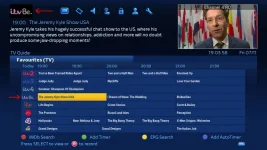
I'm a fan of OCRAM transparent picons and i'm trying to fill in the new channels by creating the missing picons myself. However when I add my new picons to my box they do not display correctly. If you see the screenshot below the ITVBe icon is transparent on the EPG list, however at the top of the screen it has a black background! None of the original OCRAM picons do this so how do I make these new picons display correctly in both locations?

screenshot.webp
itvbe.webp
 
Because that picon doesn't actually have a transparent background, try this edited version and let me know
itvbe.webp
 
It's still the same as before. The file i originally uploaded does have a transparent background in photoshop, i'm not sure why the uploaded file is not showing that.
 
I got it working by creating a new file from scratch in Photoshop... I was editing an existing picon file!
 
The file i have posted has a transparent background in photoshop, yours doesn't, if you upload mine, overwriting your old one (remember you will need the service reference for sky or virgin depending, then restart enigma 2 it should work.
1_0_1_275B_7FC_2_11A0000_0_0_0.webp
Service reference for sky..
 
The file i have posted has a transparent background in photoshop, yours doesn't, if you upload mine, overwriting your old one (remember you will need the service reference for sky or virgin depending, then restart enigma 2 it should work.
View attachment 38299
Service reference for sky..

Hiya, thanks for that. I have ftp'd this into the picon folder on my Vu+ solo2 but still not showing, is it because I am using the ocram ipk version?
 
The file i have posted has a transparent background in photoshop, yours doesn't, if you upload mine, overwriting your old one (remember you will need the service reference for sky or virgin depending, then restart enigma 2 it should work.
View attachment 38299
Service reference for sky..

I downloaded your file and after deleting mine and replacing it with yours it still didn't work. The way i got it to work was create a new file and then using the option to "save for web" then saving as PNG-8.
 

OpenViX Feeds Status

Back
Top