W
wolfg
Guest
Any chance that someone can help me out here. I have the latest VIX F/W installed on a Mutant 2400HD done a channel search all OK installed all necessary CAMs etc.
Downloaded and installed dreambox edit and connected to the Mutant, downloaded all the sat info all was fine in the viewing screen. So far so good.
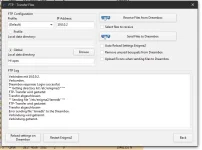
Now the problems start, when I edit the list to create section etc and save the new layout, so far so good, every time I try to upload the new edited files to the Mutant it reports error uploading the lame db file to the mutant box, and the operation does nothing. So basically I'm left with the same sat list as before. This is really annoying. When I had my old DB back in the day this was such an easy process.
This has happened before with a VU+ box. So I'm thinking is it my PC, is it a problem with dreambox edit or is there another issue. Does anyone have any ideas ? or could someone recommend a different editor that I can try.
Help would be much appreciated.
Downloaded and installed dreambox edit and connected to the Mutant, downloaded all the sat info all was fine in the viewing screen. So far so good.
Now the problems start, when I edit the list to create section etc and save the new layout, so far so good, every time I try to upload the new edited files to the Mutant it reports error uploading the lame db file to the mutant box, and the operation does nothing. So basically I'm left with the same sat list as before. This is really annoying. When I had my old DB back in the day this was such an easy process.
This has happened before with a VU+ box. So I'm thinking is it my PC, is it a problem with dreambox edit or is there another issue. Does anyone have any ideas ? or could someone recommend a different editor that I can try.
Help would be much appreciated.