Superb quality and spec AB-Com PULSe 4K SE. Crazy offer! Only £129! FREE UK DELIVERY! 4K UHD, Enigma 2, Multiboot 4 images & more!...
Superb quality and spec AB-Com PULSe 4K Rev II Twin Satellite tuner only £179! FREE UK DELIVERY! 4K UHD, Enigma 2, SATA HDD facility, Multiboot 4 images & more!...

How to size picons?

  • Thread starter Thread starter TomD
  • Start date Start date
T

TomD

Guest
Hi

I've got my picons nicely on my usb and displaying on my epg (i'm using cool tv on the Black Hole image). My problem is that whilst I've set up a good sized left space (175 in menu settings), the picons are only filling half the width, which on my little 36inch box makes them difficult to see. I have tried other settings in the menus but cant get the picons any wider?

Any advice would really be appreciated.

Thanks
Tom
 
Tom,

can you take a screen grab? What size are the picons you're downloading? (100x60?) and what size do you want them to be?

I suspect you don't actually need to 'resize' them yourself...they're being scaled on the settings you've enabled in CTV!
 
Tom,

can you take a screen grab? What size are the picons you're downloading? (100x60?) and what size do you want them to be?

I suspect you don't actually need to 'resize' them yourself...they're being scaled on the settings you've enabled in CTV!

Hi Sandman

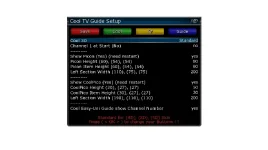
I've grabbed screenshots of both the guide and the settings:

TV Guide.webp

Cool Settings.webp

I'm actually using your picons (thank you), which as you know are 100x60.

Thanks
Tom
 
Tom,

to fit the picons your width and height need to be 100 x 60! Anything else will result in the spacing you have...

If you want to expand the picons to fit your custom spacing then yes...you'll need to resize them all but they will be distorted unless you keep the 5:3 aspect ratio and even then since they were created for 100x60, you will get pixelation!
 

OpenViX Feeds Status

Back
Top