Hi all
Don't get me wrong but I do consider myself a noob for a bit longer. However I learn best through breaking things and rebuilding them - but importantly, learning from my mistakes! (That's my ass covered )
)
I have had my Solo2 for some months now as I'm not out of contract with Sly until then end of this month (Sept). I started with Blackhole but TBH found this over complicated with too many options and most important, no documentation.
Enter OpenViX! Wow, this is great! A manual and a far simpler interface. I struggled with both BH and OpenViX TBH with the bouquet creation and scanning of channels but the ABM makes things so much simpler!
So - My hat off to you guys as I'm staying with OpenViX
Now my problem.
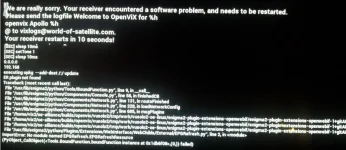
I have a backup from the weekend that work fine but since then (Sunday) I downloaded what may of been an incompatible wallpaper. Now my box errors after a few seconds, displays a dump error on screen and reboots/re-starts the Enigma engine. This loop just continues until I hard power off the receiver.
Because of the continuous loop I do not get the option to blow the firmware from a power-on in stand-by mode. If I hard power of the receiver the option to blow the firmware is not available.
I've seen a thread to ftp to the box but does the ftp daemon stay up during an Enigma reboot?
TIA
Kenny
Don't get me wrong but I do consider myself a noob for a bit longer. However I learn best through breaking things and rebuilding them - but importantly, learning from my mistakes! (That's my ass covered
)I have had my Solo2 for some months now as I'm not out of contract with Sly until then end of this month (Sept). I started with Blackhole but TBH found this over complicated with too many options and most important, no documentation.
Enter OpenViX! Wow, this is great! A manual and a far simpler interface. I struggled with both BH and OpenViX TBH with the bouquet creation and scanning of channels but the ABM makes things so much simpler!
So - My hat off to you guys as I'm staying with OpenViX
Now my problem.
I have a backup from the weekend that work fine but since then (Sunday) I downloaded what may of been an incompatible wallpaper. Now my box errors after a few seconds, displays a dump error on screen and reboots/re-starts the Enigma engine. This loop just continues until I hard power off the receiver.
Because of the continuous loop I do not get the option to blow the firmware from a power-on in stand-by mode. If I hard power of the receiver the option to blow the firmware is not available.
I've seen a thread to ftp to the box but does the ftp daemon stay up during an Enigma reboot?
TIA
Kenny