Superb quality and spec AB-Com PULSe 4K SE. Crazy offer! Only £99! FREE UK DELIVERY! 4K UHD, Enigma 2, Multiboot 4 images & more!...
Superb quality and spec AB-Com PULSe 4K Rev II Twin Satellite tuner only £149! FREE UK DELIVERY! 4K UHD, Enigma 2, SATA HDD facility, Multiboot 4 images & more!...

[ViX_Misc] Initial, First, Startup Screen

B4RTJ

Forum Supporter
Donated Member
Joined
Feb 3, 2019
Messages
8
Reaction score
0
Points
0
Location
internet
Dear Team,
Can someone advice how/where to change setting to show full screen when turning on?
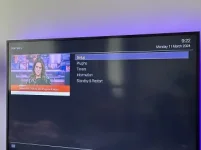
At the moment, when I turn on zgemma h7s with remove (from stand-by?) it goes to a small screen with menu selection on the right, and every time I need to press "exit" to get normal viewing mode.
Tried various changes in menu and they even ended in numerous re-flashes as i couldn't re-trace my steps :)
Thank you in advance.
IMG_5313.webp
 
Last edited:
What is
- Image version ?
- Skin ?
 
Last edited:
Anyone with idea?

While watching TV what does holding down (long press) the power button on the remote do?
Does it bring up the power menu - or something else?

The power menu gives the options
i) Standby
ii) Restart GUI
iii) Reboot
iv) Deep standby

(On some Zgemmas there may be an additional option)

Have you tried a power remove cold boot? Sometimes when the software gets lost a cold boot is required. Just putting you box into standby or deep standby doesn't do this.

IMPORTANT First put your box into deep standby (a long press of the power button when watching TV and then select the option Deep Standby)
Wait for perhaps 30 seconds while you box goes into Deep Standby.
Remove the mains power (switch off the wall wart)
Wait a couple of minutes to allow all internal voltages in the box to discharge
Switch the mains back on.

Note: To prevent disk corruption etc always put the box into Deep Standby before removing power.
 
Dear Team,
Can someone advice how/where to change setting to show full screen when turning on?
At the moment, when I turn on zgemma h7s with remove (from stand-by?) it goes to a small screen with menu selection on the right, and every time I need to press "exit" to get normal viewing mode.
Tried various changes in menu and they even ended in numerous re-flashes as i couldn't re-trace my steps :)
Thank you in advance.
View attachment 66218

Do you get the same if you use the remote in the webif (Web interface)?


Find the ip of your box, menu/information/network/ip = xxx.xxx.xxx.xx

Type this IP into the address bar of your internet browser on your PC

The webif should appear - toward the LH top corner of that page there should be a virtual remote control. You may have to click on it to expand it to get more buttons.

Now put your box into standby via the physical remote control.
Then hit the on/off button in the webif virtual remote control.

Do you see the same problem?
 
Long hold of remote power button brings „menu screen”. Short - put in stand by.
 
Looks like the box thinks you are pressing the [MENU] key immediately after the Red power button.
Is it any better if you use the built in power button under the cover of the card and CAM slots?
If so, maybe the power button on the remote has been configured to bring you out of standby and then press [MENU]?
 

OpenViX Feeds Status

Back
Top