Superb quality and spec AB-Com PULSe 4K SE. Crazy offer! Only £129! FREE UK DELIVERY! 4K UHD, Enigma 2, Multiboot 4 images & more!...
Superb quality and spec AB-Com PULSe 4K Rev II Twin Satellite tuner only £179! FREE UK DELIVERY! 4K UHD, Enigma 2, SATA HDD facility, Multiboot 4 images & more!...

[VU+ Duo] Initial Questions - Duo

  • Thread starter Thread starter wl1
  • Start date Start date
Pan and Scan, Just Scale, and Letterbox mode - I have played about with these settings, and I am not entirely happy.

Has any one got any definitions of what is happening with each, ie how the box is treating the incoming signal? I have noticed jerky/choppy pictures at times. Slow pans horizontally are worst affected. It can be seen with football during goal kicks etc.
Be aware that an HD-service won't be able to be influenced by this setting (as the signal is always 16:9).

Resolution - I have it to 1080i letting my TV convert to Progressive. Which should be fine for HD content. But does this setting upscale SD content to 1080i as well? I am not sure which scaler is in this Duo, but a "native", unprocessed option, would be better. Again, any pointers on where to go for this info would be great.
Yes: the selected output applies to all contents.
You can use the AutoReolution plugin for having the output matched to the contents.


VIX upgrade today - I seem to have lost the ability to schedule the Deep Standby. I was sure it was in the Vix settings under Power Manager. Any ideas?
Powermanager has been replaced by PowerTimers.
 
Thanks for all the help - I am getting there.......
:D

My Duo seems quieter with the attached silicone Zalman pins on the fan.
zalman_pins_ebay.webp


I have started looking at dreamboxedit to edit bouquets. But everytime I download, directly selecting channels are out by 100.

i.e. select 101 for BCC HD, and get 201 Syfy.

I worked this out to be because I had moved "interactive and anytime" bouquet from the top of the "TV Use Bouquets" to the bottom (I don't like these near the top).

So I guess my question is how these lists work - i there an offset I need to change to get channels aligned.

Just to be clear, the bouquet menus worked fine, it was just the directly input RC commands that are selecting the wrong channels. Any pointers?:confused:
 
I think it was version 3 - somebody else gave me the link. I have since downloaded the version you mention, but not checked if that resolved (wasn't expecting it to be the software, thought it was me).
 
I have tried that version of dbedit, and it still does not aligns directly input channel numbers coorectly.
So 101 now brings up channel 172. Again, it is OK if using the EPG or Bouquets. is there an explanantion of how these things work or are linked?

I am missing something simple here - ideas anyone?
 
What's the point of using a settingseditor in relation to ABM?
As I said before"use any settingeditor you want to make your personal settings and when uploaded to the box let ABM do the hard work.
 
I wasn't referring to ABM - as I have not been able to get that working.

I was just trying to do things manually. I am happy to get either working - is there anywhere I can go to read more on the specific reason why the direct input RC channel is offset?

To reiterate, I have restored a version which works, pulled it up to DBE, and pushed it back. And it fails. Last time out by 73 channels.

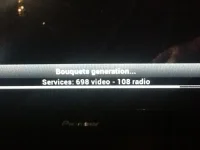
The ABM issue is clearerABM crash.webp. It crashes at 698 on video, about 80% complete. I get the spinning Vix, and box needs to be rebooted. It did this on the day ABM was released too, so I thought I would let things settle. and work on Plan A.

Any input appreciated...thanks :-)

Wayne.
 
can you upload your crash log please?
 
Crash - I should have said "locked up" - I was forced to do a restart. The logs date say none of them are from today. Any use?
 
What I see in your log is:
1- the plugin VPS crashes the box after changing the resolution;
2- a failure to mount //192.168.2.3/movies on /media/net/movies.

What I don't see is AutoBouquetsmaker doing a scan.

Regarding ABM taking a long time: in the next build (build 531) there is a fix for that.
 
Is this log any different?

I am not sure why there was nothing in the log, if this is the same, I will try and duplicate the ABM scan and capture again.

I have disabled VPS, but not uninstalled it. I don't think it is necessary for my setup. And the Netshare issue is a work in progress, so will remove that.

Thanks for looking. My box is flashing for an update, got to do that soon too. But watching TV at the moment - my missus said thats what it is for.....if only.
 

Attachments

I started with a new image, to clean up VPS etc. The ABM installs ok now, seems great.

I still have a question on this:- the bouquets appear to have unusual channel numbers displayed. It doesn't bother or affect my use, as I just select, or remember the correct number. But I'm curious why they are different.

Another, more important one for me, Colour Space within Video Enhancements. I am from the school of "it's an HD Source, less processing the better", so I have most things at default. However, an explanation of the EDID (Auto) default setting would be good.

I calibrate my own display, and this is done to 709 Standard, which appears to be one of the options.

Thanks for any info/help in this area.... :)
 
And a new issue - never seen before Build 534 - but might be a simple one for those in the know.


I am getting white lines at the edge of the screen, on both playback and broadcast TV. If comes in slowly, and gradually fades away too. Then comes back a few minutes later to cycle through again. Very annoying.

I have tried various settings, no change.

An HDMI handshake (change of resolution etc, or switch a device off/on) sees it disappear straight away.

But it keeps coming back.

You noticed anything?

ASIDE:
My setup - VU+Duo feeds the Onkyo AVR809 (In Video bypass) - to Pioneer TV. I only have this issue with the Duo, no other sources.
 

Attachments

  • white lines at edge of screen.webp
    white lines at edge of screen.webp
    57 KB · Views: 14
I believe it is the broadcaster and is why manufacturers implement overscan so you don't see it. It doesn't bother me and I don't get it on all channels.
 

OpenViX Feeds Status

Back
Top