UncleCreepy
Forum Supporter

- Joined
- Feb 4, 2025
- Messages
- 28
- Reaction score
- 6
- Points
- 3
I have been chasing a problem of failed recordings for a while now with no real idea of what's going wrong. What happens is the system appears to run a timer like normal but when it finishes, the process has only created half of the normal files that a successful recording would make.
Normally you would get [videoname].eit, [videoname].ts, [videoname].ts.ap, [videoname].ts.cuts, [videoname].ts.meta and [videoname].ts.sc files for a successful recording. But in these failed recordings I only get [videoname].eit, [videoname].ts (zero bytes) and [videoname].ts.meta files. I have never been able to consistently reproduce the issue, that is until the other night.
I was watching DMAX and had set 2 timers on BLAZE, both of those timers failed. So I started a recording on BLAZE while I was still on the DMAX channel, left it a few minutes, stopped the recording and got the same problem. So then I started a recording on DMAX, switched to BLAZE and the screen was black, there was no signal at all, it showed 0% in the SNR and AGC levels on screen. I then switched to BLAZE and set a recording going, switched back to DMAX and got the same result. What was odd though was that both of the Tuner indicators at the bottom were Yellow, which I think means the box thinks both tuners are recording something but only one recording was active... see screenshot below. I have never looked that deep into the indicator colours or disk state indicators, so this is just a guess.
I suspect that because it thought both tuners were active, it didn't have a free one for DMAX and showed a black screen as a result, or in this case the last image it displayed from the previous channel. My guess is this is what is causing the other failed recordings, it thinks there are no free tuners, tries to record a dead signal and subsequently fails. Is it somehow assigning the same channel to both tuners, causing both tuners to register the recording, leaving none free? I just don't know.
Where this gets further complicated was I got up during the night to do a test. I tried doing everything through OpenVix in my browser. I set a recording on DMAX, then set a recording on BLAZE, left them for a few minutes and stopped them both. Both recordings worked with no problems. Tried it again later straight on the box with the remote, and got a failed recording again. I don't know if it's certain combinations of channels that cause the problem because I can't always remember what was channels were on when it happens because I am usually asleep in bed.
This isn't device specific, I have had it on both a Duo2 and a Uno 4K SE. This isn't Vix version specific, I have had it on 6.6 and 6.7 builds on both boxes. Each tuner connects to a separate dish. I keep meaning to turn on the logs but keep forgetting, is this likely to register in the logs?
Anyone have any ideas on this?
Normally you would get [videoname].eit, [videoname].ts, [videoname].ts.ap, [videoname].ts.cuts, [videoname].ts.meta and [videoname].ts.sc files for a successful recording. But in these failed recordings I only get [videoname].eit, [videoname].ts (zero bytes) and [videoname].ts.meta files. I have never been able to consistently reproduce the issue, that is until the other night.
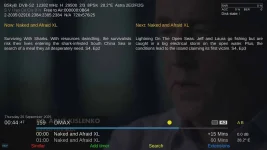
I was watching DMAX and had set 2 timers on BLAZE, both of those timers failed. So I started a recording on BLAZE while I was still on the DMAX channel, left it a few minutes, stopped the recording and got the same problem. So then I started a recording on DMAX, switched to BLAZE and the screen was black, there was no signal at all, it showed 0% in the SNR and AGC levels on screen. I then switched to BLAZE and set a recording going, switched back to DMAX and got the same result. What was odd though was that both of the Tuner indicators at the bottom were Yellow, which I think means the box thinks both tuners are recording something but only one recording was active... see screenshot below. I have never looked that deep into the indicator colours or disk state indicators, so this is just a guess.
I suspect that because it thought both tuners were active, it didn't have a free one for DMAX and showed a black screen as a result, or in this case the last image it displayed from the previous channel. My guess is this is what is causing the other failed recordings, it thinks there are no free tuners, tries to record a dead signal and subsequently fails. Is it somehow assigning the same channel to both tuners, causing both tuners to register the recording, leaving none free? I just don't know.
Where this gets further complicated was I got up during the night to do a test. I tried doing everything through OpenVix in my browser. I set a recording on DMAX, then set a recording on BLAZE, left them for a few minutes and stopped them both. Both recordings worked with no problems. Tried it again later straight on the box with the remote, and got a failed recording again. I don't know if it's certain combinations of channels that cause the problem because I can't always remember what was channels were on when it happens because I am usually asleep in bed.
This isn't device specific, I have had it on both a Duo2 and a Uno 4K SE. This isn't Vix version specific, I have had it on 6.6 and 6.7 builds on both boxes. Each tuner connects to a separate dish. I keep meaning to turn on the logs but keep forgetting, is this likely to register in the logs?
Anyone have any ideas on this?