Superb quality and spec AB-Com PULSe 4K SE. Crazy offer! Only £99! FREE UK DELIVERY! 4K UHD, Enigma 2, Multiboot 4 images & more!...
Superb quality and spec AB-Com PULSe 4K Rev II Twin Satellite tuner only £149! FREE UK DELIVERY! 4K UHD, Enigma 2, SATA HDD facility, Multiboot 4 images & more!...

[VU+ Duo4K SE] Is Multiboot included in Openvix

sandiego69

Forum Supporter
Donated Member
Joined
Jan 26, 2013
Messages
218
Reaction score
0
Points
16
Is Multiboot in Openvix because I am not sure if I have to download the Plugin.
I have downloaded OpenPLI but I cannot see where or how to set this up.

Is there a guide published to correctly do this as there are different and confusing methods?
Some posts have say you dont need to download the Plugin as it is included in OpenVix.

Should the downloaded OpenPLI file be in a different folder to the normal downloads?
I have long pressed the on and off button but no choice is there.

Please help with the method and location of files needed.
 
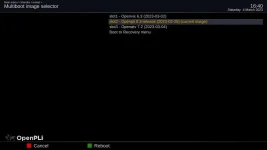
When you first flash vix 6.3.003 or above you can activate vu+multiboot in standby/restart Menu.

Just use this as a base image so fresh flash with no settings restore.

Now you can online flash pli or other images into slots1, 2 or 3

I would flash vix 6.3.003 or your backup image into slot 1 then images into other slots

Once the image has flashed into the slot it should boot into that image and then you should see multiboot in standby/restart to allow you to boot to other images.

Recovery image slot 0 your original vix 6.3.003 will be classed as an emergency image

screenshot_20230304164040 (1).webp
 
Last edited:
As I said there is no choice in the standby/restart options.

Is the Multiboot option built in or do I have to download the Plugin available in the feeds?

I do not have the option of Slot 1 or 2.

Also, does the OpenPLI file stay in the normal downloaded folder?
 
Last edited:
What vix image are you using?

In the view entry info it says vix 6.3.002 vu+multiboot was added in vix 6.3.003
 
Okay. So if I upgrade to 6.3.003 all will be revealed?
 
@sandlgo69
Because you have a Duo4k (?), if you flash OpenPli you will have to copy the attachment to the image for OpenPli to realise its in a multiboot system.
So you will need a PC with Putty & Filezilla (or similar tools).
In putty login to the OpenPli image and type init 4 (space between)
Then copy the attachment to /usr/lib/enigma2/python/Tools
Lastly in putty type init 3 (space between) and you should be good to go.
 

Attachments

@sandlgo69
Because you have a Duo4k (?), if you flash OpenPli you will have to copy the attachment to the image for OpenPli to realise its in a multiboot system.
So you will need a PC with Putty & Filezilla (or similar tools).
In putty login to the OpenPli image and type init 4 (space between)
Then copy the attachment to /usr/lib/enigma2/python/Tools
Lastly in putty type init 3 (space between) and you should be good to go.

Hey twol, I have a Solo4K. Will I also need a file?
 
As long as you just use eMMC then you should be OK … duo4k and zero4k have an issue with finding boot device without the change. .. but if you want to use a usb stick for more images then you need the change
 
Could tell me what eMMC is u have got me on this one and how dose eMMC work could explain how it works
 
Could tell me what eMMC is u have got me on this one and how dose eMMC work could explain how it works

eMMC basically is the integrated memory that comes with the box and holds the firmware and system files..... not something that should normally be changed by users.
 
But would you use it on lower end boxes as thinking it might struggle?
 

OpenViX Feeds Status

Back
Top