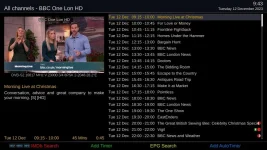
Maybe of use as if i use my Autotimer say on BBC one i press my red button which brings up my 7 day epg and select from what program i want to record on that channel only and not worrying on all the other variations.
But perhaps that is the original poster's problem. Sometimes you have to edit the program title and select a partial match search in order to record a series or an ongoing weekly program with an autotimer. If you set an
exact match for a program called "xxxxxx" the autotimer will not find "xxxxxx : Xmas special"
AND an
exact match for "xxxxxx : Xmas special" will not find "xxxxxx". If the autotimer is restricted to only searching the program on a Monday between 7 and 8pm it will not find it, say, on a bank holiday week when the broadcaster changes it to 6pm to 7pm or changes it to a Tuesday night. Consider what normally happens when a sporting event overruns.
A few years back one that caught me out was Dr Who. Someone decided that in the EPG some episodes had the title "Dr Who" and in other episodes it was "Doctor Who". In this case a partial search for just "who" in the title (case insensitive search) could have brought up too many finds so I had 2 autotimers, one searching for Dr Who and the other for Doctor Who.
There are quite a few reasons why the original poster is missing recording based on autotimer searches of the EPG
A few may be
Incorrect configuration of the search criteria
Conflicting programs due to insufficient tuners to record*
EPG missing.
* Even with terrestrial and satellite tuners BBC Two HD terrestrial is NOT the same as BBC Two HD on satellite. The box knows the difference - it doesn't use the channel name but the broadcast service reference (menu/information/service/press yellow/service reference) Unless you configure the autotimer to search on both versions of BBC Two HD it will only search with the tuner(s) used when setting the autsearch via the EPG..
My method for initially setting a autotimer is to go to the (grig) epg, highlight the program and to press blue (set autotimer). On the first screen I then de-select the options I don't want such as restricting the day of the week and time slot. On the second screen I may edit the title to remove items such as "Xmas Special" etc. I have already configured the defaults in the autotimer settings menu for a partial match and case insensitive search so in most cases I just then press green to save.
Autotimer default settings
menu/timers/autotimers/menu (again)/Edit new timer default