Superb quality and spec AB-Com PULSe 4K SE. Crazy offer! Only £99! FREE UK DELIVERY! 4K UHD, Enigma 2, Multiboot 4 images & more!...
Superb quality and spec AB-Com PULSe 4K Rev II Twin Satellite tuner only £149! FREE UK DELIVERY! 4K UHD, Enigma 2, SATA HDD facility, Multiboot 4 images & more!...

[VU+ Solo2] issues with apollo 37

No reason menus or EPG should stutter or be slower in any way.
What EPG sources are you using? what if any other plugins are you using?

So far, the only bugs I can reproduce that you've listed is the odd distortion on EPG, which is a known & long standing issue & the incorrect help text on some menu items.
I've just opened a bug report on that.
 
so when you load the menu on the recordings page the descriptions are not incorrect?

I am using sherlock, is only plugin downloaded when issue was first noticed. also mgcamd but I enabled mgcamd "after".

skyuk opentv is the epg provider.
 
Descriptions in the media player section are working perfectly here in Apollo Build 037.

The only plugins I have installed currently are CCcam 2.3.0 and OnDemand.
 
I'm getting the same issues on FTA recordings, whereby the recording and playback stutters.
I'm using the same Appollo build 37 image.
I'm using a VU+Duo Box with no cam configuration at the moment.
 
Last edited by a moderator:
Hi
I have only had my Gigablue for about 2 weeks or so, and I have never had a recording playback without being unwatchable at worst due to the corruption and at best, watchable with several jumps/stutters/corruption. I have spent a long time making sure that all external equipment is not responsible (aerial etc) and all is OK there. A recording plays back via streaming without any issues. My old box records/plays back without issue.

I started with 030 and now on 037 still the same.

A PVR primary function in life is to record and replay video - so, when will the Gigablue reach this level of reliability?
 
Last edited:
I'm getting the same issues on FTA recordings, whereby the recording and playback stutters.
I'm using the same Appollo build 37 image.
I'm using a VU+Duo Box with no cam configuration at the moment.

No issues here on any of my Vu+ receivers with playback of recordings on any image for well over two years.

Hi
I have only had my Gigablue for about 2 weeks or so, and I have never had a recording playback without being unwatchable at worst due to the corruption and at best, watchable with several jumps/stutters/corruption. I have spent a long time making sure that all external equipment is not responsible (aerial etc) and all is OK there. A recording plays back via streaming without any issues. My old box records/plays back without issue.

I started with 030 and now on 037 still the same.

A PVR primary function in life is to record and replay video - so, when will the Gigablue reach this level of reliability?

That depends on how fast Gigablue can fix their drivers as it's the drivers that are at fault here.
 
That depends on how fast Gigablue can fix their drivers as it's the drivers that are at fault here.

Hi

So, these issues are nothing to do with the image in use at all - is that correct? How can I get in touch with the Gigablue manufacturers to make a formal complaint?

I may have to consider returning the box for a refund.
 
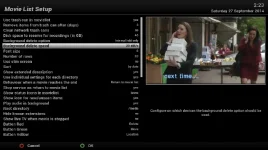
ok here is screengrab of (again) freshly installed build 37 and NO extra plugins installed.

note the description bottom right and what I have selected.
 

Attachments

  • vix-recording-menu.webp
    vix-recording-menu.webp
    33.6 KB · Views: 45
Hi
I have only had my Gigablue for about 2 weeks or so, and I have never had a recording playback without being unwatchable at worst due to the corruption and at best, watchable with several jumps/stutters/corruption. I have spent a long time making sure that all external equipment is not responsible (aerial etc) and all is OK there. A recording plays back via streaming without any issues. My old box records/plays back without issue.

I started with 030 and now on 037 still the same.

A PVR primary function in life is to record and replay video - so, when will the Gigablue reach this level of reliability?

Latest drivers fixed most recording/playback issues on Quad+. Re-flash and setup fresh build 037. Do not restore any backups. When you complete the start up first instal wizard re-initialise your HDD. Menu > Setup > System > Storage Devices > Select your HDD > Press OK > Press RED to initialise. Once complete reboot > Hold down standby button on remote and select Restart on TV.
 
Hi
Thanks for reply.

I will follow your advice above, but with the exception of the HDD initialization, each update I have done was as per the above, including my latest update to 037.

Does the HDD need to be initialized each time?
 
An amateur opinion would be your epg cache is corrupt, stop enigma with init 4 command via Telnet, FTP in and delete your epg.dat and any epg cache files you can find, restart enigma via init 3 and re-run your epg configuration.
 

OpenViX Feeds Status

Back
Top