Superb quality and spec AB-Com PULSe 4K SE. Crazy offer! Only £99! FREE UK DELIVERY! 4K UHD, Enigma 2, Multiboot 4 images & more!...
Superb quality and spec AB-Com PULSe 4K Rev II Twin Satellite tuner only £149! FREE UK DELIVERY! 4K UHD, Enigma 2, SATA HDD facility, Multiboot 4 images & more!...

Lraizer Plugin error since updating to Apollo 15

mskhan01

New member
Joined
Feb 10, 2014
Messages
252
Reaction score
0
Points
0
Location
UK
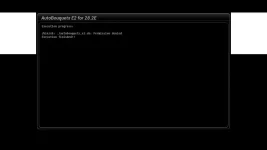
I updated to Apollo version 15 today by doing a fresh flash from version 14 & then restored my settings & plugin from my backup.Now when I try to run my Lraizer autobouquet plugin , I get the following error message

/bin/sh: ./autobouquets_e2.sh: Permission denied
Execution finished!!

Need help please, never had this issue with previous versions.I have tried re installing the plugin but still the same error?
 

Attachments

  • Error plugin.webp
    Error plugin.webp
    4.5 KB · Views: 29
I have tried changing it but it changes back to 777?
 
is there any changelog for the new lraizer autobouquets plugin?
 
Slight modifications by me. Supplement and swap file that I previously uploaded. I'll edit post later.
 
Slight modifications by me. Supplement and swap file that I previously uploaded. I'll edit post later.

I am a bit lost, not sure what are you suggesting? is there a solution?
 
Last edited:
I am a bit lost, not sure what are you suggesting?

He's not suggesting any thing, simply pointing out that the new version of LraiZers plugin on the feeds contains some slight modifications that he added to it him self before asking rob van der does to create the .ipk for the feeds.
 
I am a bit lost, not sure what are you suggesting? is there a solution?
The solution is to chmod 755 the reader and script. 777 has higher rights so that is fine too. Reason it does not run is both files are 644 by default. Not sure which one/s you are editing.
 
I went to bin folder & tried to change sh folder permission, didn't work, then as per your suggestion in the same folder tried to change chmod permission but it reverts back?
Can you please write down the steps to the concerned files?
 
Last edited:
Good old hit & trial, here are the steps for people like myself

user> lib>enigma2>python>plugins>extensions>autobouquet & then change permission for autobouquets_e2.sh & autobouquetsreader files to 755 & it should work
 
Good old hit & trial, here are the steps for people like myself

user> lib>enigma2>python>plugins>extensions>autobouquet & then change permission for autobouquets_e2.sh & autobouquetsreader files to 755 & it should work


worked for me thanks
 
Good old hit & trial, here are the steps for people like myself

user> lib>enigma2>python>plugins>extensions>autobouquet & then change permission for autobouquets_e2.sh & autobouquetsreader files to 755 & it should work

If you are using AutoPicons don't forget to chmod 755 the following file too.
autopicon_convert.sh

I have updated the main thread with changelog and will move this thread to plugin support


Readme file edited to remove perform "scan first"
Added error checking in script. See following thread
Code:
http://www.ukcvs.net/forum/showthread.php?29323-AutoBouquet-E2-28-2E&p=52706&viewfull=1#post52706
Re-ordered the regions
Owing to HD channel changes, supplement file now renames them
custom_sort_3.txt has had the affected channels commented out
ITV regions also named via supplement file
"Custom" relabelled to "custom swap"
Hide PLI place holders defaulted to true
Other/extra defaulted to true
 
Last edited:

OpenViX Feeds Status

Back
Top