Superb quality and spec AB-Com PULSe 4K SE. Crazy offer! Only £99! FREE UK DELIVERY! 4K UHD, Enigma 2, Multiboot 4 images & more!...
Superb quality and spec AB-Com PULSe 4K Rev II Twin Satellite tuner only £149! FREE UK DELIVERY! 4K UHD, Enigma 2, SATA HDD facility, Multiboot 4 images & more!...

Magic HD Skin change

  • Thread starter Thread starter garyblas
  • Start date Start date
G

garyblas

Guest
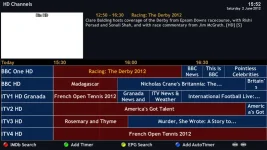
Can anyone tell me how to change the colour cheme in the EPG for the Magic HD night skin.
I have changed some of the text size on other pages but cant find where EPG section is.

I am running crossepg with this skin
 
Tell me what EPG you are referring to exactly. A screenshot maybe?
You know that font-sizes can be changed on several screens by pushing 'Menu'?
 
High Rob,

Im using your skin - Thanks

How do i tell the exact epg.. all i know is it is crossepg?
As for screenshot how do i do this.. I have TSpanel and it has screenshot but never used it
 
You can make a screenshot using a telnet session.


How to enable the default Telnet client in Windows 7 - Click Here


How to Take a screenshot from your satellite receiver
Click Here
 
Screen shot below, Also cant seem to change font size on description

grab.webp
 
OK, there you go:
open the skin.xml with a suitable editor (e.g. PSPad) and look for the sceen with the name 'GraphicalEPGPIG'
In there you can change the following items:
Code:
ServiceFont
    EntryFontGraphical
    EventFontSingle
    EventFontInfobar
    EntryFontAlignment


    ServiceForegroundColor
    ServiceBackgroundColor
    ServiceBackgroundColorNow
    ServiceForegroundColorNow
    Deleted:
	ServiceBackgroundColorSelected
	ServiceForegroundColorSelected
	ServiceBackgroundColorNowSelected
	ServiceForegroundColorNowSelected


    EntryForegroundColor
    EntryForegroundColorSelected
    EntryBackgroundColor
    EntryBackgroundColorSelected
    EntryBackgroundColorNow
    EntryBackgroundColorNowSelected
    EntryForegroundColorNow
    EntryForegroundColorNowSelected


    ServiceBorderColor
    ServiceBorderWidth
    ServiceNamePadding
    EntryBorderColor
    EventBorderWidth
    EventNamePadding


    RecordForegroundColor
    RecordForegroundColorSelected
    RecordBackgroundColor
    RecordBackgroundColorSelected
    ZapForegroundColor
    ZapBackgroundColor
    ZapForegroundColorSelected
    ZapBackgroundColorSelected
You'll have to do a bit of experimenting to find your way around I'm afraid, but that's the way we all learned it......
Good luck, and keep us posted please!
 
Cant find these in skin.xml file

OK, there you go:
open the skin.xml with a suitable editor (e.g. PSPad) and look for the sceen with the name 'GraphicalEPGPIG'
In there you can change the following items:
Code:
ServiceFont
    EntryFontGraphical
    EventFontSingle
    EventFontInfobar
    EntryFontAlignment


    ServiceForegroundColor
    ServiceBackgroundColor
    ServiceBackgroundColorNow
    ServiceForegroundColorNow
    Deleted:
	ServiceBackgroundColorSelected
	ServiceForegroundColorSelected
	ServiceBackgroundColorNowSelected
	ServiceForegroundColorNowSelected


    EntryForegroundColor
    EntryForegroundColorSelected
    EntryBackgroundColor
    EntryBackgroundColorSelected
    EntryBackgroundColorNow
    EntryBackgroundColorNowSelected
    EntryForegroundColorNow
    EntryForegroundColorNowSelected


    ServiceBorderColor
    ServiceBorderWidth
    ServiceNamePadding
    EntryBorderColor
    EventBorderWidth
    EventNamePadding


    RecordForegroundColor
    RecordForegroundColorSelected
    RecordBackgroundColor
    RecordBackgroundColorSelected
    ZapForegroundColor
    ZapBackgroundColor
    ZapForegroundColorSelected
    ZapBackgroundColorSelected
You'll have to do a bit of experimenting to find your way around I'm afraid, but that's the way we all learned it......
Good luck, and keep us posted please!
 
Thats odd...I really have them in Magic HD Night skin.xml

I think you need to take a better look...
 
But you can use them.
Did you find the screen 'GraphicalEPGPIG'? In there is the widget named 'list'. In that widget you can use the above coding.
 
Best way to work is to copy any screen you want to change to a file called skin_user.xml and locate that in etc/enigma2
First of all you won't mess up your skin if something goes wrong (and it will go wrong, I can promise you that), and secondly your screen will never be overwritten by a (skin)update.

Anyway: if thing really go wrong: just delete the skin.xml, restart E2 via telnet, and it wil restart using the default skin. The you can de-install the faulty skin and install it again.
Or more simple: rename the original skin.xml and work only on a copy of it; ICE you can delete the culprit and re-rename the skin.
 
Got my modifications working fine,
One question if i press record the OSD shows flashing R for record. Is their a way of having the Red Record light up on the front display? I know it does on the Vix night skin
 
I assume you have an Ultimo..

VFD isn't defined in skin.xml

You need to look for skin_display_no_picon.xml in share/enigma2 for skinning VFD, which is used regardless which skin one uses.

Also in Vix night it uses the icon from /usr/share/enigma2/lcd/rec.png which is not red.
Code:
		<widget source="session.RecordState" render="Pixmap" pixmap="lcd/rec.png" position="180,0"  size="32,12">
			<convert type="ConditionalShowHide">Blink</convert>
		</widget>
 
Last edited:
I have Vu+ Duo.

Looked in share/enigma2 no sign of skin_display_no_picon.xml ?

Anywhere else

Do i need to copy this code somewhere?
 
I assuemd U used Ultimo

In vuduo there is no skin_display_no_picon.xml

I have nt got vuduo here so I can t see how vfd is defined.
 

OpenViX Feeds Status

Back
Top