Superb quality and spec AB-Com PULSe 4K SE. Crazy offer! Only £129! FREE UK DELIVERY! 4K UHD, Enigma 2, Multiboot 4 images & more!...
Superb quality and spec AB-Com PULSe 4K Rev II Twin Satellite tuner only £179! FREE UK DELIVERY! 4K UHD, Enigma 2, SATA HDD facility, Multiboot 4 images & more!...

[GiGaBlue QUAD] Manual & Auto Scan Menu Disappeared

  • Thread starter Thread starter rido111
  • Start date Start date
R

rido111

Guest
Hi

I open Setup —> Tuner Config menu but i cannot see Manual and Auto Scan menu. Only the items listed below are seen:
Tuner Setup
Miscellaneous
AutoBouquetsMaker
Blind Scan
Fallback Configuration

How can enable or find Manual or Auto Scan menu item?
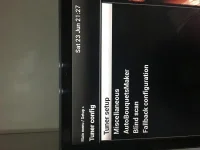
 

Attachments

  • 73588B5C-2E89-4B98-9DFD-A4D6204D05A8.webp
    73588B5C-2E89-4B98-9DFD-A4D6204D05A8.webp
    25.4 KB · Views: 9
What tuner config have you set?

Sent from my Moto G (5S) using Forum Fiend v1.3.3.
 
How can i find what the tuner config set? Could you please help me to answer your question? From where, i can see what tuner config have set?
 
We'll have to look into this. There was a change so that those menus do not show if tuners are not set. You can't scan if tuners are not set. Yours are set.

Can you try a restart?

Sent from my Moto G (5S) using Forum Fiend v1.3.3.
 
I understood that you will look into this. Could you please tell me when you fix that? Thanks.
 
Can you enable debug logs and restart GUI to activate.
Go into the tuner config menu.
Save debug log to PC and attach here


Can you also run this command. A file called mytunerconfig.txt will be created in /tmp/ directory. Attach it here too. Guide in my signature if you need it. You may want to have a look at the screenshots guide too

Code:
cat /etc/enigma2/settings | grep config.Nims > /tmp/mytunerconfig.txt
 
Tuner 1, port C, this is still set to automatic(auto diseqc). Please set it to a satellite.

Tuner 2. This is still not set. Set it as not configured please. Restart using menus and the try again.
 
Hi

I have set a satelitte to port c of tuner 1 and also set “not configured” to tuner 2. After reboot, nothing changed, i have not seen the menus yet.

2CE29ABD-60B0-472B-8350-CB688F2C237D.webp
 
Ohh, it is very difficult for me. Because i have many customization, settings and plugins. Any shortway for this or will you fix this problem?
 
Setup mode is expert. I could not understand that why you need my settings?

Is it bug or not, any opinion?
 
The commit/change is that if tuners are not configured, those two menus will not show. It is not a bug as far as we know. Nobody else has reported the issue.

You said your tuners were configured/set correctly, that file you posted showed otherwise. However, it is a trimmed version of your settings file.

Maybe you should flash image again, do not restore anything after flashing, set your tuners and then try again?
 
Maybe the other users havent yet updated or not recognized. I control updates every time and update when you publish it. So the others may not recognize this problem. Could you check what you checked in the latest change. By the way i am software developer for 15 years. So i understand you but i advice check the code again one more time. Thanks.
 

OpenViX Feeds Status

Back
Top