Superb quality and spec AB-Com PULSe 4K SE. Crazy offer! Only £99! FREE UK DELIVERY! 4K UHD, Enigma 2, Multiboot 4 images & more!...
Superb quality and spec AB-Com PULSe 4K Rev II Twin Satellite tuner only £149! FREE UK DELIVERY! 4K UHD, Enigma 2, SATA HDD facility, Multiboot 4 images & more!...

[OS-mega] Mount a NAS Drive to receiver

kokojnr

Member
Joined
Jul 25, 2016
Messages
320
Reaction score
0
Points
16
I have a 1TB WE Mybooklive NAS, i have tried to mount it and access the files on it(movies/music).

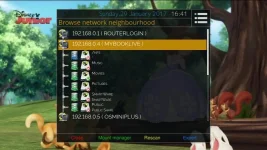
what i ve done so far: menu>setup>system>network>mountsetup>network browser.
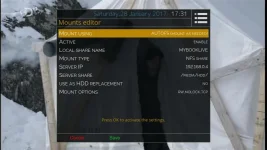
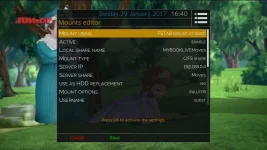
Then did a browse, found the NAS pressed the green button for mount manager, then chose "Add new network mount point", then updated the local share name and server IP details. pressed green button to save. Samba and NFS setup are activated.

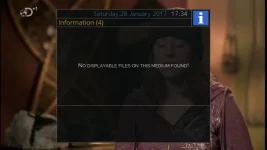
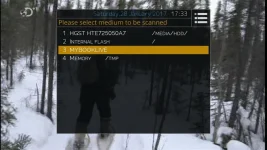
When i go to the media scanner plugin to view files on the NAS, i get message "no displayable files on this medium.

I guess that im doing something wrong but cant figure it out.
1_0_1_183C_7D9_2_11A0000_0_0_0 (1).webp

1_0_1_183C_7D9_2_11A0000_0_0_0 (2).webp

1_0_1_183C_7D9_2_11A0000_0_0_0.webp
 
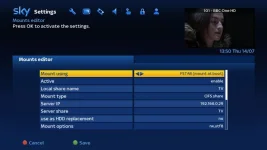
I got mine working with fstab. Couldn't get it to work with autofs at all. These are my settings:

NAS Mounts.webp

Username and password are on the next page.
 
You will probably have to use Cifs (Samba) like willo3092, NFS sharing from a NAS can require extra permissions needing to be set either in the NAS user interface or by Telnet.
 
Problem though, I don't have any username and password set on the nas.
I access it on my mobile via the "mybooklive" app.
So what username and password should I be using please?

Sent from mobile using Tapatalk
 
NFS doesn't use passwords. On your NAS you would need to ensure that it will accept connections from your local network using NFS. There should be settings in the user interface of your NAS for this. Alternatively use Samba/SMB/CIFS as @DaMacFunkin suggests.
 
For some reason im not having any luck with this. just deleted my setup on post #1 and started again
However cant still access the files using media scanner plugin, or is there something else i need to do please?

1_0_1_19D_4_F020_FFFF0000_0_0_0 (1).webp

1_0_1_19D_4_F020_FFFF0000_0_0_0.webp
 
I think you might need to post logs for us to see what is happening. It is almost certainly a permissions error on the NAS.
 
Attached zipped log files
 

Attachments

Last edited:
You should be able to go into the normal file list where you access your recordings and navigate to the new share using the location option.
 
That worked, thanks a lot

Sent from my Moto G (4) using Tapatalk
 

OpenViX Feeds Status

Back
Top