Superb quality and spec AB-Com PULSe 4K SE. Crazy offer! Only £99! FREE UK DELIVERY! 4K UHD, Enigma 2, Multiboot 4 images & more!...
Superb quality and spec AB-Com PULSe 4K Rev II Twin Satellite tuner only £149! FREE UK DELIVERY! 4K UHD, Enigma 2, SATA HDD facility, Multiboot 4 images & more!...

Mounting Hard Drive From Another E2 Box...

pac2000

New member
Joined
Oct 13, 2012
Messages
189
Reaction score
1
Points
0
Hi, I've Just Configured My Quad+ And Setup Network Mounts Between It's HDD And My Duo's HDD...

Problem Is I Want The HDD Movie Folder From The Duo, To Appear As A Directory In The Quad's Movie List, As I Don't Want The Root Of The Duo's Drive To Be Exposed... And Vice-Versa...

Is There Any Way Of Doing This???
 
Have you tried to add a bookmark to the movie folder only?

You have to press menu to switch to file list first.
 
Yeah, But I Was Thinking More Like A Shortcut Link In Windows... Like This

\\GBQUADPLUS\Root\media\autofs\HarddiskVUDUO\movie\Melanie\Neighbours

Is There A Linux Equivalent...
 
Can I Use A Symlink To The Autofs Mount???
 
Bookmark is a shortcut.

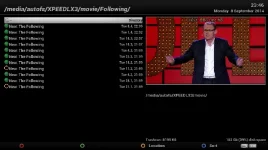
I presume you are using the guide by Pheonix. After you reach page 7 where it says "Scroll to Movie folder....", "mounts 1" in picture attached, press "Menu".
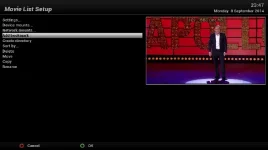
You will be presented with options as pictured in "mounts 2". Scroll down to Add bookmark.

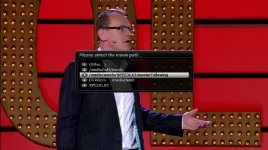
When entering the Media player, you will be offered optons as in "mounts 3" when you press yellow/locations
 

Attachments

  • mounts 1.webp
    mounts 1.webp
    31.2 KB · Views: 18
  • mounts 2.webp
    mounts 2.webp
    19 KB · Views: 17
  • mounts 3.webp
    mounts 3.webp
    39.8 KB · Views: 17
Thanks Abu, I've Found Out How To Mount Directly To A Particular Folder... I Used A NFS Mount Instead Of A CIFS, Which Then Allows You To Select /media/hdd/movie... CIFS Only Allows Access To The Root Of A Drive...
 

OpenViX Feeds Status

Back
Top