- What type of support thread are you creating?
- Support question
- What OpenViX Image build number are you using?
- 6.8.007
- Have you tried re-flashing WITHOUT settings restore?
- NO
- Have you tried re-flashing WITH a settings restore?
- NO
Hi all,
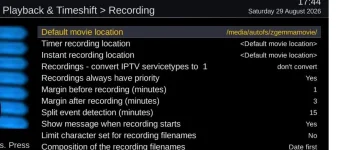
I have (on a secondary box) set it up so it points to the movie files on the main box (zgemma). I setup a share for this and it works very well. I can see the movie files on the remote box, play them and delete them etc.).
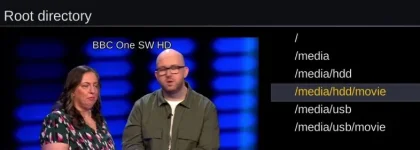
I wanted to implement the restricted view where you can modify the "Root Directory" value in the settings of the Movie List to remove the two dots at the top of the list so other users don't accidentally navigate to the main hard drive folders. I did this on the main box (zgemma) by setting it to the movie folder but I can't see a way to set it on the slave box so it points to the share location (which is the movie folder of the zgemma).
Is it possible to modify the settings file to make it point to the share (in my case /media/autofs/zgemmamovie).
thanks
Paul
I have (on a secondary box) set it up so it points to the movie files on the main box (zgemma). I setup a share for this and it works very well. I can see the movie files on the remote box, play them and delete them etc.).
I wanted to implement the restricted view where you can modify the "Root Directory" value in the settings of the Movie List to remove the two dots at the top of the list so other users don't accidentally navigate to the main hard drive folders. I did this on the main box (zgemma) by setting it to the movie folder but I can't see a way to set it on the slave box so it points to the share location (which is the movie folder of the zgemma).
Is it possible to modify the settings file to make it point to the share (in my case /media/autofs/zgemmamovie).
thanks
Paul