H
hyperjase
Guest
Following an update (through the Update option in the menu), I've noticed a few issues, primarily with the IP not showing correctly.
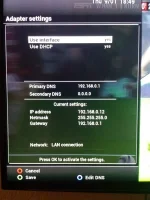
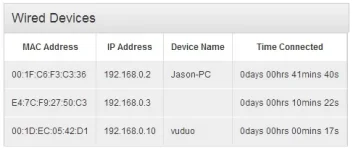
Screenshot showing the IP the box thinks it has, but it's actually on 192.168.0.10 (usually, this shows up on my Virgin media Superhub page, but it's not showing up at all) - I've connected through FTP and confirmed this is the correct IP.
Also noticed DLNA keeps shutting down intermittently, sometimes during playback on remote device.
Network appears to operate OK on the Duo itself, checked for updates and nothing there - box is all up to date.
Screenshot showing the IP the box thinks it has, but it's actually on 192.168.0.10 (usually, this shows up on my Virgin media Superhub page, but it's not showing up at all) - I've connected through FTP and confirmed this is the correct IP.
Also noticed DLNA keeps shutting down intermittently, sometimes during playback on remote device.
Network appears to operate OK on the Duo itself, checked for updates and nothing there - box is all up to date.