Superb quality and spec AB-Com PULSe 4K SE. Crazy offer! Only £99! FREE UK DELIVERY! 4K UHD, Enigma 2, Multiboot 4 images & more!...
Superb quality and spec AB-Com PULSe 4K Rev II Twin Satellite tuner only £149! FREE UK DELIVERY! 4K UHD, Enigma 2, SATA HDD facility, Multiboot 4 images & more!...

New SF8008 detect devices: Hard disk

Aust-VAST

Forum Supporter
Donated Member
Joined
Jan 4, 2018
Messages
95
Reaction score
4
Points
8
Location
Central NSW Australia
Hi all,

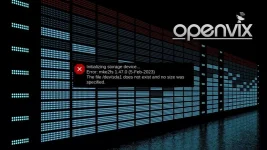
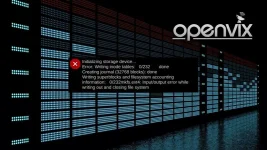
Have a new SF8008 on the bench here and after a week I tried it today, no internal hard disk (NVME) detected or present, when it was working previously with a few recordings and backup files.

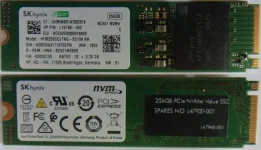
The disk is from a new HP workstation (Hynix, 256GB SSD) and I also removed a working one from another workstation from the same stock, but also not detected.

Have tried other O/s with the same result and cleared the drive in diskpart to no effect, always powered off from deep standby and earthed out before touching internals, so any help appreciated.

Was going to buy a new 1TB NVME but glad I haven't so far.
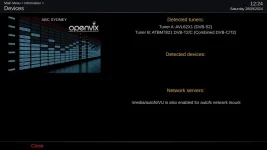
1_0_2_2AD_223_1010_6400000_0_0_0_20240928122401.webp
 
Well I tend to use my sf8008 as a door stop, which I guess represents my view of this box…
However, trying to be helpful whats in dmesg? Because debug log doesn,t show a lot……don,t have the box with the NVME… is this removable? If so try remove and see if this is causing an issue.
lastly remove all disks and try a usb stick and see if that works as a hdd.
 
you need a special kind of HDD : M.2 SSD: M KEY – PCIE NVME
 
Well I tend to use my sf8008 as a door stop, which I guess represents my view of this box…
However, trying to be helpful whats in dmesg? Because debug log doesn,t show a lot……don,t have the box with the NVME… is this removable? If so try remove and see if this is causing an issue.
lastly remove all disks and try a usb stick and see if that works as a hdd.

Thanks, yes the NVME is removable and the cabinet was fitted over the week gap between, then it wasn't detected.

When I first installed the drive,


  • powered off, remove all cables, remove cabinet, earth to frame
  • remove drive fastener, earth to frame
  • install the NVME into the socket
  • gently fasten with spacer under drive as per spec
  • install cabinet
  • power on

then, it took at least one reboot to detect the drive and it did accept recordings and backups.

A week later I turned it on and no drive detected, so I have restored to factory in ATV with no benefit, as expected.

Yes the external USB stick does work.

you need a special kind of HDD : M.2 SSD: M KEY – PCIE NVME

This looks correct and it did work for a few hours in the SF8008 and swapping in another from a new HP workstation didn't improve the outcome!
256GB-Hynix-NVME.webp
 
I'm just throwing it out there as a suggestion - maybe NVME is not properly supported and you might need to use SATA instead? Both types use (can use if keyed the same) M2 form factor.
 
Good Joe, yes I have a SATA variant and the result was the same, even then I only used it as a last resort to eliminate, as a variable.

Over the years of service work in comms, design and build electronics, consumer tv/ radio (when we used to fix things...), it becomes a process of elimination as you point out. :)
 
Last edited:
@Aust-VASt must admit thought the later box came with the internal memory device already fitted - but maybe thats just European market.
 
@Aust-VASt must admit thought the later box came with the internal memory device already fitted - but maybe thats just European market.

Yes the NVME is added by the user.

Having a tune around with this decoder and can anyone tell me why the audio is 'soft return' to the selected level between services / changing channel.

I prefer the audio returns to the level set by the user, unless there is some sort of switching pulse being damped out?
 
Yes the NVME is added by the user.

Having a tune around with this decoder and can anyone tell me why the audio is 'soft return' to the selected level between services / changing channel.

I prefer the audio returns to the level set by the user, unless there is some sort of switching pulse being damped out?
Seems to be a feature of the box (or maybe some HiSi boxes in general). Mine is the same. No way to adjust.
 

OpenViX Feeds Status

Back
Top