Superb quality and spec AB-Com PULSe 4K SE. Crazy offer! Only £129! FREE UK DELIVERY! 4K UHD, Enigma 2, Multiboot 4 images & more!...
Superb quality and spec AB-Com PULSe 4K Rev II Twin Satellite tuner only £179! FREE UK DELIVERY! 4K UHD, Enigma 2, SATA HDD facility, Multiboot 4 images & more!...

New skin: Simple Ten Eighty

Should be added in the plugin.

Code:
self["key_menu"] = StaticText(_("MENU"))
self["key_info"] = StaticText(_("INFO"))
 
Hello,

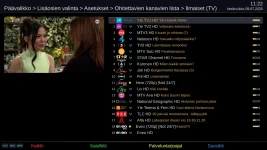
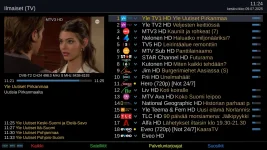
How to set font size and item height bigger at 'filtersServicesSelection' screen ? Compared to 'ChannelSelection' screen.

EDIT: Got it ! Use same widget 'list' than at 'ChannelSelection".
 

Attachments

  • filtersServicesSelection.webp
    filtersServicesSelection.webp
    90.5 KB · Views: 49
  • ChannelSelection.webp
    ChannelSelection.webp
    113.5 KB · Views: 48
Last edited:
Hello,

The skin is very pretty, is there any way to make it a bit more transparent?

Thanks.
 
Redefine the colours and save them in /etc/enigma2/skin_user.xml
 
@asnews , have you tried to change parameter of "User interface visibility" ? "This option lets you adjust the transparency of the user interface"
 
@Huevos,

Hello, can you add more space for skin_templates.xml --> (when remaining/elapsed time is selected, elapsed is not seen)

<widget source="session.Event_Now" render="Label" position="1430,978" size="210,45" backgroundColor="secondBG" transparent="1" zPosition="1" foregroundColor="foreground" font="Regular;36" halign="right">
<convert type="EventTime">Remaining</convert>
<convert type="RemainingToText">InMinutes</convert>
</widget>

Thank you.
 
@Orlandox, you are welcome to send a PR if it doesn't make a mess of the layout.

In the display skins there are also combinations that don't fit. But I don't see an easy fix as the space is limited. I guess users need to choose appropriate settings.
 
Hi in Graphical EPG screen where can I find widget for the bouquet title?

1080.webp
 
Hi, can somebody have a look to the secondinfobar? it shows not the title of the next event. But in ESS it looks right there.
Openvix 6.9.003 on Vu+ Uno 4k

infobar.webpinfobar_ESS.webp
 
Last edited:
Hi, can somebody have a look to the secondinfobar? it shows not the title of the next event. But in ESS it looks right there.
Openvix 6.9.003 on Vu+ Uno 4k

View attachment 69129View attachment 69130
Fixed last week, so you either need to wait patiently for the next release, or build your own.

 
Fixed last week, so you either need to wait patiently for the next release, or build your own.

ok, thx. perhaps you can help at another question. I like the VU+ logos in the e2-darkos skin and want the shutdown/restart screen in simpleteneighty too, but i can´t find that special vu+ png or mvi in the e2-darkos skinfolder?
 
They are not in the skin folder. They come in the box-logos package.
 
ok, thx. perhaps you can help at another question. I like the VU+ logos in the e2-darkos skin and want the shutdown/restart screen in simpleteneighty too, but i can´t find that special vu+ png or mvi in the e2-darkos skinfolder?
Do you mean this \usr\share\enigma2\logos ? boxlogo.svg is the logo of your Vu+ box.
 
Do you mean this \usr\share\enigma2\logos ? boxlogo.svg is the logo of your Vu+ box.
Ah, yes.
But i don`t know, how to implement it in the menu Screen or the shutdown Screen of simpleteneighty like in e2-darkos. I could Not find where to edit this in ESS.1000309953.webp1000309948.webp


EDIT: for the shutdown screen i found the right line to edit in skin.xml:

<!-- QuitMainloopScreen -->

<screen name="QuitMainloopScreen" position="fill" flags="wfNoBorder" backgroundColor="#000000" zPosition="100">
<widget source="global.CurrentTime" render="BoxLogo" position="center,c-65" size="302,65" zPosition="10" alphatest="blend" />
<widget name="text" position="c-885,c+15" size="1770,150" font="Regular;30" halign="center" backgroundColor="#00000000"/>
</screen>
 
Last edited:
If it were possible to implement this when the image is updated, that would be absolutely ideal
 

OpenViX Feeds Status

Back
Top