Superb quality and spec AB-Com PULSe 4K SE. Crazy offer! Only £99! FREE UK DELIVERY! 4K UHD, Enigma 2, Multiboot 4 images & more!...
Superb quality and spec AB-Com PULSe 4K Rev II Twin Satellite tuner only £149! FREE UK DELIVERY! 4K UHD, Enigma 2, SATA HDD facility, Multiboot 4 images & more!...

[VU+ Uno] New VIX Image and Video Mode Problem

Sanjhere

Forum Supporter
Donated Member
Joined
Oct 21, 2011
Messages
195
Reaction score
0
Points
0
Good Morning All,

Further to the advice to flash the new image, I have encountered a few problems with this.

I have tried flashing the new image via the ImageManager and USB flash pen. Through the ImageManager, the Uno just gets stuck at "Reflash in Progress".

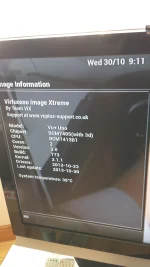
I have tried to flash through the USB but I cannot even get the unit to read the USB to flash pen to flash from it. I have tried different images and different flash pens. I have noticed this morning though that the Image Version on my Uno is showing as 770 but I do not know if a full flash occurred as I had to turn the unit off at the mains and restart it as it was stuck on reflash in progress for about 10 hours.

The only change I have made after the "flash" was change the "Video Mode" HDMI.

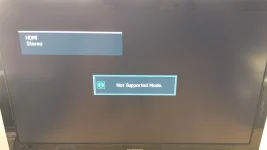
I am now getting "Mode not supported" on SD channels, the picture will appear for a second then it will go blank and the "Mode not Supported" message will come up. I am not sure if this is to do with the unit not flashing properly or other settings that need to be changed.

I have checked the error and debug logs but there is nothing in there apart from one item for enigma as I restarted it to see if that would solve the problem.

Any help, advice or suggestions please?

Thank you.
Sanj
 
Pictures Attached showing Build

Hello Lgleave,

I have done the update and still the same problem . . . .
 

Attachments

  • Build Version.webp
    Build Version.webp
    599.4 KB · Views: 60
  • Not Supported Mode.webp
    Not Supported Mode.webp
    504.7 KB · Views: 57
Hello Lgleave,

I have done the update and still the same problem . . . .

Those messages are from your TV not the receiver, you must make sure your using the correct settings for your TV.
 
Video is set at HDMI.
Automatic Disabled . . although I have tried all resolutions as well.
Just scale
Just scale
 
Hello Phoenix,

I have an old Samsung LCD, not much to change on the video settings there. Hdmi, scart, component; etc; etc.

What other settings can I change on the TV?
 
Last edited:
Hello again Lgleave and Phoenix,

I have been messing about with the box and think I have found a fix.

I set the automatic resolution to "Only HD" and that seems to have sorted out the SD channels. I am still getting the screen blackout for a few seconds before the video kicks in but can at least watch the SD channels.

Hopefully this might help others who are having the same problem.

Thank you for your help and advice. Much appreciated.
 
Hello Rob,

I tried the disabled setting, my SD channels don't work then.

With AR set for HD only, I am only getting a refresh rate of 25hz on the channels but at least they are viewable. On all the other settings I get "Mode not supported".

I have also noticed that the picons I downloaded for 28.2 have disappeared. I can't find them in the remove or download plugin's section. Small thing that I'll try and sort out another day.

Thank you
 
Hello Rob,

Video Output is HDMI
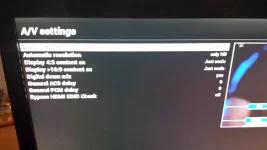
AR is now only HD
Display 4:3 and 16:9 is just scale
Digital down mix is yes
General AC3 and PCM delays is 0
Bypass HDMI EDID check is off.
 
But I was interested in the settings with AR disabled; after all that's when you have an issue.

Besides: some settings are missing in your overview. Or are you on an old build? I would update to the actual build 773.
 
Hello Rob,

Okay, sorry that has gone my head. I posted a picture that shows the information about the image and build? I can take screenshots if you tell me what you need.

I have only changed "Only HD" on the AV menu, the rest of the settings are left the same to create the non viewing of the SD channels.
 
If you disable AR you have an issue. Correct?
So I'm interested in your settings; they might give a clue about the cause of the issue.

And yeah: screenshot of settings is fine.

Please make sure you're on build 773.
 
Vix AV Issue

Hello Rob,

I have attached a couple of screenshot pictures.

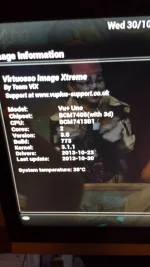
I am on Build 773.

Yes, if I have the AR setting on anything other than "Only HD" I get the "Mode not Supported" message on the SD Channels.

That is where the problem is, I cannot view the SD channels.

If I have it on Disabled the SD channels do not work.

Sorry the pictures are a bit blurry - its getting dark and my camera is very sensitive.
 

Attachments

  • AV Settings.webp
    AV Settings.webp
    307.6 KB · Views: 33
  • Image Build 773.webp
    Image Build 773.webp
    434.9 KB · Views: 32
Yes, if I have the AR setting on anything other than "Only HD" I get the "Mode not Supported" message on the SD Channels.
That's why I want to see your settings then. This is not going to help, as you post settings that do work.

Please:
1- Make a screenshot via the WEB-IF
2- You can make all settings via the remote on the WEB-IF


Surely there's a settings that your TV doesn't support (resolution too high is a likely one).
 
Okay, that has again gone above my head . . . sorry.

I see open webif in the plugins section. What do I need to do to send the information to you Rob?
 
Last edited:
Box Info

Hello Judge - WOW!

I learned something new today! - Thank you . . . .

I need to work out how to save the screenshots that are needed now but have copied and pasted the Box Info on a word document . . . . Will this do for now?
 
Last edited by a moderator:

OpenViX Feeds Status

Back
Top