

Superb quality and spec AB-Com PULSe 4K SE. Crazy offer! Only £99! FREE UK DELIVERY! 4K UHD, Enigma 2, Multiboot 4 images & more!...
Superb quality and spec AB-Com PULSe 4K Rev II Twin Satellite tuner only £149! FREE UK DELIVERY! 4K UHD, Enigma 2, SATA HDD facility, Multiboot 4 images & more!...
You are using an out of date browser. It may not display this or other websites correctly.
You should upgrade or use an alternative browser.
You should upgrade or use an alternative browser.
[ET9x00] New ViX Team ET 9x00 OE3.0 Release Discussion
- Thread starter Maxwell
- Start date

Hello All,
I have installed the latest version of OE3 that was downloadable from the site, I have just done the update from the system menu after changing the setting to unstable updates, and it has been stuck in booting mode for the last 20 minutes. Every so often the VIX sign comes up in the top left corner for 5 secs or so then goes off for 2.
Should I re-flash to the last stable image?
Ta.
FP.
I have installed the latest version of OE3 that was downloadable from the site, I have just done the update from the system menu after changing the setting to unstable updates, and it has been stuck in booting mode for the last 20 minutes. Every so often the VIX sign comes up in the top left corner for 5 secs or so then goes off for 2.
Should I re-flash to the last stable image?
Ta.
FP.

basilyoung
V.I.P - R.I.P - Will never be forgotten...
- Joined
- Jul 10, 2010
- Messages
- 3,233
- Reaction score
- 11
- Points
- 0
yes reflash, a few of us got caught out, including myself
we need to wait for the stable update/fix
we need to wait for the stable update/fix

Larry-G
V.I.P ,
- Joined
- May 19, 2010
- Messages
- 32,540
- Reaction score
- 405
- Points
- 0
- Age
- 48
The latest image on the feeds is unstable and results in a bootloop, for now download and flash build 268, but do not update any further until we can get a new build out with the necessary fixes. We will make a announcement when the time comes that the fix is available.
Rob van der Does
ViX Beta Tester
Or do what's been suggested in http://www.world-of-satellite.com/s...ase-Discussion&p=157203&viewfull=1#post157203; just one post above yours 
enigma2-plugin-extensions-subtitleplayer_3.20_mipsel.ipk
I was try to install this important plugin for me, but after install, it is not visible in plugin browser. this 3.20 ver is created for new 3.0 image, and on pli works good.
I was try to install this important plugin for me, but after install, it is not visible in plugin browser. this 3.20 ver is created for new 3.0 image, and on pli works good.
Attachments
Rob van der Does
ViX Beta Tester
There should be a working version on our feeds: did you try that?
no, but just found that problem with my dvbt usb stick it913x is not solved again, even your image use latest driver for it913x chip, kernel-module-dvb-usb-913x linux-etxx00 version 3.4.3.-r1.8.
again "usb disconnect" error:
it913x: Chip Version=01 Chip Type=9135
it913x: Remote HID mode NOT SUPPORTED
it913x: Dual mode=0 Tuner Type=0
dvb-usb: found a 'ITE 9135(9006) Generic' in cold state, will try to load a firm
ware
dvb-usb: downloading firmware from file 'dvb-usb-it9135-01.fw'
it913x: FRM Starting Firmware Download
it913x: FRM Firmware Download Completed - Resetting Device
it913x: Chip Version=01 Chip Type=9135
it913x: Firmware Version 204869120
dvb-usb: found a 'ITE 9135(9006) Generic' in warm state.
dvb-usb: will pass the complete MPEG2 transport stream to the software demuxer.
DVB: registering new adapter (ITE 9135(9006) Generic)
it913x-fe: ADF table value :00
it913x-fe: Crystal Frequency :12000000 Adc Frequency :20250000 ADC X2: 01
it913x-fe: Tuner LNA type :38
DVB: registering adapter 1 frontend 0 (ITE 9135(9006) Generic_1)...
dvb-usb: ITE 9135(9006) Generic successfully initialized and connected.
it913x: DEV registering device driver
usbcore: registered new interface driver it913x
NET: Registered protocol family 10
rtw driver version=v3.3.0_2971.20111128
usbcore: registered new interface driver rtl8192cu
r8712u: module is from the staging directory, the quality is unknown, you have b
een warned.
usbcore: registered new interface driver r8712u
usbcore: registered new interface driver rt2500usb
usbcore: registered new interface driver rt2800usb
usbcore: registered new interface driver rt73usb
usbcore: registered new interface driver rtl8187
usbcore: registered new interface driver zd1211rw
Console: switching to colour dummy device 80x25
DVB: registering adapter 0 frontend 2 (vtuner)...
prune_queue: c=b438ce16
eth0: no IPv6 routers present
prune_queue: c=bcc6a2ee
prune_queue: c=bcc709a0
ehci-brcm ehci-brcm.0: force halt; handshake b0480314 00004000 00000000 -> -145
ehci-brcm ehci-brcm.0: HC died; cleaning up
usb 1-2: USB disconnect, device number 3
prune_queue: c=7a8447d8
problem is in kernel 3.3 and above, so I have to return to "old" 3.2.2.
just installed old image where all I need works fine, dddamir sub player and my usb dvbt stick.
I was ask for a help about this problem on many forums, but nobody help me. it is common problem for all it913x chipset owner, not only mine .
something is dramaticly changed in kernel module whitch couse usb disconnect issue after few minutes, but can't find out what.
when I take time, I'll install again your image ( my favorite, must say ) and test subtitle player from feed.
again "usb disconnect" error:
it913x: Chip Version=01 Chip Type=9135
it913x: Remote HID mode NOT SUPPORTED
it913x: Dual mode=0 Tuner Type=0
dvb-usb: found a 'ITE 9135(9006) Generic' in cold state, will try to load a firm
ware
dvb-usb: downloading firmware from file 'dvb-usb-it9135-01.fw'
it913x: FRM Starting Firmware Download
it913x: FRM Firmware Download Completed - Resetting Device
it913x: Chip Version=01 Chip Type=9135
it913x: Firmware Version 204869120
dvb-usb: found a 'ITE 9135(9006) Generic' in warm state.
dvb-usb: will pass the complete MPEG2 transport stream to the software demuxer.
DVB: registering new adapter (ITE 9135(9006) Generic)
it913x-fe: ADF table value :00
it913x-fe: Crystal Frequency :12000000 Adc Frequency :20250000 ADC X2: 01
it913x-fe: Tuner LNA type :38
DVB: registering adapter 1 frontend 0 (ITE 9135(9006) Generic_1)...
dvb-usb: ITE 9135(9006) Generic successfully initialized and connected.
it913x: DEV registering device driver
usbcore: registered new interface driver it913x
NET: Registered protocol family 10
rtw driver version=v3.3.0_2971.20111128
usbcore: registered new interface driver rtl8192cu
r8712u: module is from the staging directory, the quality is unknown, you have b
een warned.
usbcore: registered new interface driver r8712u
usbcore: registered new interface driver rt2500usb
usbcore: registered new interface driver rt2800usb
usbcore: registered new interface driver rt73usb
usbcore: registered new interface driver rtl8187
usbcore: registered new interface driver zd1211rw
Console: switching to colour dummy device 80x25
DVB: registering adapter 0 frontend 2 (vtuner)...
prune_queue: c=b438ce16
eth0: no IPv6 routers present
prune_queue: c=bcc6a2ee
prune_queue: c=bcc709a0
ehci-brcm ehci-brcm.0: force halt; handshake b0480314 00004000 00000000 -> -145
ehci-brcm ehci-brcm.0: HC died; cleaning up
usb 1-2: USB disconnect, device number 3
prune_queue: c=7a8447d8
problem is in kernel 3.3 and above, so I have to return to "old" 3.2.2.
just installed old image where all I need works fine, dddamir sub player and my usb dvbt stick.
I was ask for a help about this problem on many forums, but nobody help me. it is common problem for all it913x chipset owner, not only mine .
something is dramaticly changed in kernel module whitch couse usb disconnect issue after few minutes, but can't find out what.
when I take time, I'll install again your image ( my favorite, must say ) and test subtitle player from feed.
Larry-G
V.I.P ,
- Joined
- May 19, 2010
- Messages
- 32,540
- Reaction score
- 405
- Points
- 0
- Age
- 48
View attachment 19863
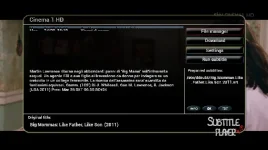
subtitle player works, but there is a problem in epg window as you can see on picture
Which skin is it that your using ?, and have you tried any of the skins specifically written for ViX such as the Day and Night skins or the magic skins ? to see if your problem exists on them.
View attachment 19863
subtitle player works, but there is a problem in epg window as you can see on picture
I don't install any other skin, this is default skin.
I'll try now magic skin
subtitle player works, but there is a problem in epg window as you can see on picture
I don't install any other skin, this is default skin.
I'll try now magic skin
Rob van der Does
ViX Beta Tester
Could you please try the skin Magic-HD and see how that goes? It has support for the player.
Rob van der Does
ViX Beta Tester
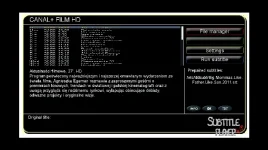
If the above picture is from Magic-HD you're on a 2.x image; update to ViX 3.0 and you'll see a different screen.picture above is from magic hd
Rob van der Does
ViX Beta Tester
Well, as I created Magic-HD myself, I have a pretty good idea of what's in it. If you would be using the system as you say, you would see a completely different screen. And I just checked again..........
Rob van der Does
ViX Beta Tester
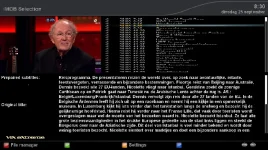
To elaborate a bit on that: the screen you showed us, is the screen tha's been built in in the plugin. If you would be using Magic-HD you would see the screen that's in Magic-HD (see my screenie).
But: the problem remains the same. As this is a flaw in the plugin, I can't repair that in the skin. I'll give it another shot shortly.
But: the problem remains the same. As this is a flaw in the plugin, I can't repair that in the skin. I'll give it another shot shortly.
Attachments
Rob van der Does
ViX Beta Tester
Fixed in next update.
D
Deleted member 23324
Guest
Tried to update to VIX 3.0 369 but the box gets stuck on booting. Working good as used my back up but just to let other forum users know
