
Superb quality and spec AB-Com PULSe 4K SE. Crazy offer! Only £129! FREE UK DELIVERY! 4K UHD, Enigma 2, Multiboot 4 images & more!...
Superb quality and spec AB-Com PULSe 4K Rev II Twin Satellite tuner only £179! FREE UK DELIVERY! 4K UHD, Enigma 2, SATA HDD facility, Multiboot 4 images & more!...
You are using an out of date browser. It may not display this or other websites correctly.
You should upgrade or use an alternative browser.
You should upgrade or use an alternative browser.
[VU+ Duo] New ViX Team VU+ Duo OE3.0 Discussion
- Thread starter Maxwell
- Start date

- Status
- Not open for further replies.

satmanbasil
V.I.P
Hi
Nice work by the team working fine on both solo and duo boxes one quick question with regards to CCcam info on channel banner info does not give hops is this possible to tweek so this info shows as well
regards
Nice work by the team working fine on both solo and duo boxes one quick question with regards to CCcam info on channel banner info does not give hops is this possible to tweek so this info shows as well
regards

H
hanman
Guest
got this working perfectly on my duo... its a real visual treat.. well done to all those who put such an amazing image together..
quick config question: im missing the CCCam details in the info bar.. i thought they may be in the OSD settings under Customise but nothing seems to show.. where is the setting to get this visible once more?
quick config question: im missing the CCCam details in the info bar.. i thought they may be in the OSD settings under Customise but nothing seems to show.. where is the setting to get this visible once more?

D
davew1
Guest
Nice work, all up and running without any issues so far, noticed that picon width in epg cant be resized to 100 so got white edges on either side.
same for me bally.
updated duo and solo, everything up and running fine. however I too have the white bars along side the picons when in epg. hopefully there is some way of changing the width like in the last version.
Anyway, loving the new image from what i've seen so far. keep up the great work fellas.
Cheers, Dave.

andyblac
Administrator ,
- Joined
- Apr 21, 2010
- Messages
- 12,698
- Reaction score
- 96
- Points
- 0
- Age
- 52
same for me bally.
updated duo and solo, everything up and running fine. however I too have the white bars along side the picons when in epg. hopefully there is some way of changing the width like in the last version.
Anyway, loving the new image from what i've seen so far. keep up the great work fellas.
Cheers, Dave.
can i see a screen grab ?, also what size are your picons ?
D
davew1
Guest
Hi Andy. How do i make a screen grab 
im using BLACK 28.2E by MMCMedia picons if that helps. had the same issue on the vix 2.4 image but there was an option to adjust size by adjusting the service width to 100. as far as i can see there is no service width option in the new image.
cheers, Dave
im using BLACK 28.2E by MMCMedia picons if that helps. had the same issue on the vix 2.4 image but there was an option to adjust size by adjusting the service width to 100. as far as i can see there is no service width option in the new image.
cheers, Dave
T
tomcoleman
Guest
any screenshots of the default gui etc
G
garyblas
Guest
Can someone put some general screenshots on , so i can decide whether to upgrade to new image.
Preferably EPG, Channel select etc.
Thanks
Preferably EPG, Channel select etc.
Thanks
Trial
Moderator
Hi,
ciao
connect your PC with the web interface of the box and there you will have the option to make a screen shot.Hi Andy. How do i make a screen grab
ciao
G
garyblas
Guest
Can someone tell me per note below for this new image.
If you cannot restore image what is the point of doing a full image backup.. and how do i do this?
All Users - A full flash is required
You can not use backup restore or online update from 2.4 with this image
In this image the core has been extensively rewritten by Andy in conjunction with the OE Alliance.
You are advised to take a full image backup of your previous image before flashing.
If you cannot restore image what is the point of doing a full image backup.. and how do i do this?
All Users - A full flash is required
You can not use backup restore or online update from 2.4 with this image
In this image the core has been extensively rewritten by Andy in conjunction with the OE Alliance.
You are advised to take a full image backup of your previous image before flashing.

Larry-G
V.I.P ,
- Joined
- May 19, 2010
- Messages
- 32,540
- Reaction score
- 405
- Points
- 0
- Age
- 48
Can someone tell me per note below for this new image.
If you cannot restore image what is the point of doing a full image backup.. and how do i do this?
All Users - A full flash is required
You can not use backup restore or online update from 2.4 with this image
In this image the core has been extensively rewritten by Andy in conjunction with the OE Alliance.
You are advised to take a full image backup of your previous image before flashing.
you can still create a full image backup using the image manager and if needed reflash this to restore your current setup. you can not however create a settings backup from the backup manager then use that backup to restore settings and plugins to the 3.0 image from a erlier image.
to create a full image backup.
blue button> ViX> image manager.
D
davew1
Guest
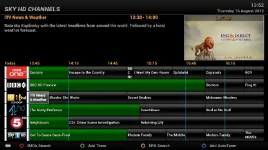
white bars at side of picons
G
garyblas
Guest
Any other images i.e channel select and normal viewing info bar?
bally12345
Member
- Joined
- Mar 3, 2011
- Messages
- 153
- Reaction score
- 0
- Points
- 16
can i see a screen grab ?, also what size are your picons ?
picon size = 100x60
In ViX 2.4 you could set the "Service Title Width" (thats what I think it was called) from 180 to 100 I have always changed the default view from 8 to 6 to make sure the picons display correctly.
Attachments
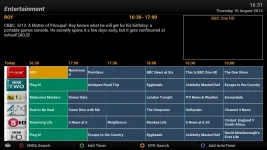
bally12345
Member
- Joined
- Mar 3, 2011
- Messages
- 153
- Reaction score
- 0
- Points
- 16
Every so often I keep getting "Timeshift not possible" error

Rob van der Does
ViX Beta Tester
Please tell us you Timeshift settings, and post a debuglog.Every so often I keep getting "Timeshift not possible" error
- Status
- Not open for further replies.
