goosegog
Forum Supporter

ha ha i thought you were well screwed
haha yeah defo,i tried to take a screen grab using telnet but it only showed the tv picture and not the settings,so i used an old photo off my phone:thumbsup:


ha ha i thought you were well screwed

If you are using automount (==autofs), which I'm assuming that everyone is, then the "refresh" will have no effect as automounts are only mounted when in use (well, that's the intent anyway...).The NFS share often disappears randomly in spite of the refresh every 1 hr in the software.
I agree this is a problem.
If you are using automount (==autofs), which I'm assuming that everyone is, then the "refresh" will have no effect as automounts are only mounted when in use (well, that's the intent anyway...).
Agreed.Point taken ... but the fact that the nfs mount is randomly disappearing is the real point here.
You're running an NFS client on MS Windows?!?as in my case I can ALWAYS see the NFS share on my windows computers, even when it disappears from the VU Solo2 box shares.
Whoops sorry.... Omit the nfs word... I can see the share active on Windows even when it disappears on the VU box. OK??You're running an NFS client on MS Windows?!?
Yes I know but at least it shows that the NAS drive hardware is working correctly.Yes but it is immaterial as windows will be using a cifs share.

Anyone out there have nfs share working without having to do a reboot every now an again as im keen on what settings anyone has or if samba works ok?
Sent from my iPhone using Tapatalk
root@et9x00:~# cat /etc/exports
/media/hdd/ 192.168.0.0/255.255.0.0(rw,no_root_squash,sync,no_subtree_check)
/media/hdd2/ 192.168.0.0/255.255.0.0(rw,no_root_squash,sync,no_subtree_check)
/media/usb/ 192.168.0.0/255.255.0.0(rw,no_root_squash,sync,no_subtree_check)
root@et9x00:~#root@et4x00:~# cat /etc/fstab
rootfs / auto defaults 1 1
proc /proc proc defaults 0 0
devpts /dev/pts devpts mode=0620,gid=5 0 0
usbdevfs /proc/bus/usb usbdevfs noauto 0 0
tmpfs /var/volatile tmpfs defaults 0 0
usbfs /proc/bus/usb usbfs defaults 0 0
UUID=79cf3e3c-eef3-478d-bf4f-8cd77ce4e747 /media/usb auto defaults 0 0
192.168.X.XX:/media/hdd /media/hdd nfs _netdev,rw,nolock,tcp,nfsvers=3,rsize=8192,wsize=8192,timeo=14,fg,soft,intr 0 0
root@et4x00:~#Anyone out there have nfs share working without having to do a reboot every now an again as im keen on what settings anyone has or if samba works ok?
Sent from my iPhone using Tapatalk
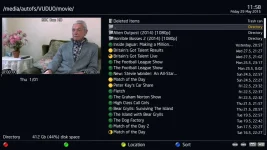
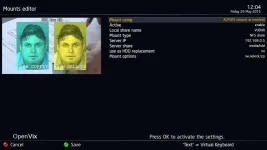
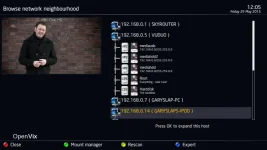
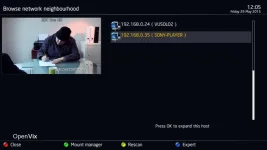
View attachment 42860View attachment 42861View attachment 42862View attachment 42863
thanks for replies ive tried setting a static ip but i couldnt mount either way ive went back to using DHCP and everything is sharing ok can anyone tell me if my settings are correct in mounts editor and in the other pic do the red crosses mean anything as when i done this a year or so back im sure they where green ticks,cifs share from my lap top never fails
thanks
