Superb quality and spec AB-Com PULSe 4K SE. Crazy offer! Only £129! FREE UK DELIVERY! 4K UHD, Enigma 2, Multiboot 4 images & more!...
Superb quality and spec AB-Com PULSe 4K Rev II Twin Satellite tuner only £179! FREE UK DELIVERY! 4K UHD, Enigma 2, SATA HDD facility, Multiboot 4 images & more!...

[VU+ Ultimo4K] No progress bar on video playback front panel

thecaretaker

Forum Supporter
Donated Member
Joined
Apr 22, 2012
Messages
327
Reaction score
4
Points
18
Location
Southern UK
Website
www.thecaretakers.co.uk
On the front panel using the default front panel skins (currently using the full screen picon skin), when playing a video file (of any format), I don't see the progress bar working. Not a major issue, but could this be a bug with the VIX images? Not worked on last 2 VIX images (031, 032) for me.
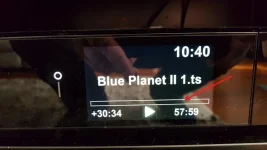
20171102_104048.webp

PS: I get the progress bar during tuner TV viewing. Just not on media files.
 
Last edited:
Is this a downloaded or recorded file?

Which exact front panel skin are you using?
 
This happens with all 3 built in skins (default, default with picon and default with picon fullscreen)

With recorded TV programmes I get a 100% filled in progress bar (all white) all the time during playback.
With downloaded files I get a 0% filled progress bar (all black) all the time during playback.

The time remaining/duration text under the progress bar shows correctly.

The progress bar on the onscreen info bar works correctly irrespective of whether it is a downloaded or recorded file. It is just the front panel of the Ultimo4K that isn't showing correctly.
 
Last edited:
Thanks for clarification. Some testers have the device, I'll ask them to investigate.
 

OpenViX Feeds Status

Back
Top