R
Rayne
Guest
I've been using the Vu+ Player app to stream from my TM-Nano over Wifi successfully for a long time.
It was working fine about a 3 months ago; but when I tried again today the Vu+ app (on iOS) keeps saying "please check your wifi connection and entered data".
I can access Openwebif on my laptop and also stream to my laptop. My Openwebif settings are:
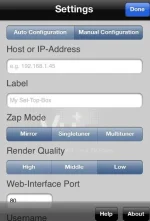
My Vu+ Player app settings are:
I know i'm using an old Vix version (Apollo 131) - but it's stable and i'm very happy with it. I've done a factory reset and no luck. Also removed and re-downloaded OpenWebIf - but still no luck. Also used the app on different phones with no luck.
Has anyone had this problem; or could anyone advise how to get wifi streaming back?
Thanks!!
It was working fine about a 3 months ago; but when I tried again today the Vu+ app (on iOS) keeps saying "please check your wifi connection and entered data".
I can access Openwebif on my laptop and also stream to my laptop. My Openwebif settings are:
OpenWebInterface Enabled - Yes
Show box name in header - Yes
Use custom box name - No
HTTP Port - 00080
Enable HTTP Authentication - No
Enable HTTPS - No
Smart services renaing for XBMC - No
Enable parental control - yes
Add service name to stream information - yes
My Vu+ Player app settings are:
Manual Configuration
IP Address - 192.168.1.X
Zap mode - Multituner
Web-interface port - 80
Username - Root
Password - Blank
Cache - 2500
I know i'm using an old Vix version (Apollo 131) - but it's stable and i'm very happy with it. I've done a factory reset and no luck. Also removed and re-downloaded OpenWebIf - but still no luck. Also used the app on different phones with no luck.
Has anyone had this problem; or could anyone advise how to get wifi streaming back?
Thanks!!