Superb quality and spec AB-Com PULSe 4K SE. Crazy offer! Only £129! FREE UK DELIVERY! 4K UHD, Enigma 2, Multiboot 4 images & more!...
Superb quality and spec AB-Com PULSe 4K Rev II Twin Satellite tuner only £179! FREE UK DELIVERY! 4K UHD, Enigma 2, SATA HDD facility, Multiboot 4 images & more!...

[VU+ Duo2] Noise around the TV picture

d2mac

Member
Joined
Oct 6, 2013
Messages
81
Reaction score
0
Points
6
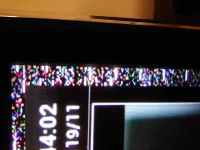
A quite often noise frame is generated around UI frames (like Graph.EPG). The noise frame also stay around (or 1-2 sides) the picture (though much narrower)
Funny thing is that screen capture doesn't capture phenomenon, there for the photo is included.DSC_1081.webp
No logs generated.
 
Turn off overscan on your TV?
Depends on what it is as to how you have to do it...
 
You’ve messed about with the Display settings in the User Infer-face section on ViX. Put it back to default.


Sent from my iPhone using Tapatalk
 
Overscan is off. Obviously if it's one then the noise frame is cut out.

My UI has been years ViV-Night-HD, I downloaded & tested 'Default1080' as well.

The ViX chance the TV display mode and UI is smaller and noise frame (or part of it) will be formed on the areas not lay-out by UI

On Picture&Audio menu have Auto resolution-All
If the value is Not in use i.e. the TV's resolution doesn't change based on original material the noise is not generated.

Was the Auto resolution-All with 5.x or -Not in use, I'm not sure. Though, I think that the noise frames are not generated by TV but ViX because restart of UI clears the screen.
 
Last edited:
Hi,
you must set the OSD settings to default. There you can make the OSD smaller so that it works with overscan on and the rest outside this area will be the noise.

Ralf
 

OpenViX Feeds Status

Back
Top