Superb quality and spec AB-Com PULSe 4K SE. Crazy offer! Only £99! FREE UK DELIVERY! 4K UHD, Enigma 2, Multiboot 4 images & more!...
Superb quality and spec AB-Com PULSe 4K Rev II Twin Satellite tuner only £149! FREE UK DELIVERY! 4K UHD, Enigma 2, SATA HDD facility, Multiboot 4 images & more!...

[OS-mio+] opkg fails on openvix 6.4

pinkiepie

Forum Supporter
Donated Member
Joined
Nov 18, 2023
Messages
28
Reaction score
1
Points
3
What type of support thread are you creating?
Support question
What OpenViX Image build number are you using?
6.4
Have you tried re-flashing WITHOUT settings restore?
NO
Have you tried re-flashing WITH a settings restore?
NO
Hi,

Running 6.4 on an Edision MIO+ 4K, but the repository looks out of date. Where can I get the right repos for 6.4 from?

Code:
root@osmio4kplus:~# opkg update
Downloading http://www.openvix.co.uk/feeds/openvix/release/6.4/osmio4kplus/3rdparty/Packages.gz.
 * opkg_download_backend: Failed to download http://www.openvix.co.uk/feeds/openvix/release/6.4/osmio4kplus/3rdparty/Packages.gz, wget returned 8.
Downloading http://www.openvix.co.uk/feeds/openvix/release/6.4/osmio4kplus/all/Packages.gz.
 * opkg_download_backend: Failed to download http://www.openvix.co.uk/feeds/openvix/release/6.4/osmio4kplus/all/Packages.gz, wget returned 8.
Downloading http://www.openvix.co.uk/feeds/openvix/release/6.4/osmio4kplus/cortexa15hf-neon-vfpv4/Packages.gz.
 * opkg_download_backend: Failed to download http://www.openvix.co.uk/feeds/openvix/release/6.4/osmio4kplus/cortexa15hf-neon-vfpv4/Packages.gz, wget returned 8.
Downloading https://raw.githubusercontent.com/oe-alliance/oe-alliance-settings-feed/master/feed/Packages.gz.
 * opkg_download_backend: Failed to download https://raw.githubusercontent.com/oe-alliance/oe-alliance-settings-feed/master/feed/Packages.gz, wget returned 8.
Downloading http://www.openvix.co.uk/feeds/picon/Packages.gz.
Updated source 'openvix-picon-feed'.
Downloading http://www.openvix.co.uk/feeds/openvix/release/6.4/osmio4kplus/osmio4kplus/Packages.gz.
 * opkg_download_backend: Failed to download http://www.openvix.co.uk/feeds/openvix/release/6.4/osmio4kplus/osmio4kplus/Packages.gz, wget returned 8.
Downloading http://www.openvix.co.uk/feeds/openvix/release/6.4/osmio4kplus/osmio4kplus_3rdparty/Packages.gz.
 * opkg_download_backend: Failed to download http://www.openvix.co.uk/feeds/openvix/release/6.4/osmio4kplus/osmio4kplus_3rdparty/Packages.gz, wget returned 8.
Downloading http://www.openvix.co.uk/feeds/openvix-static/6.4/static-cortexa15hf-neon-vfpv4/Packages.gz.
 * opkg_download_backend: Failed to download http://www.openvix.co.uk/feeds/openvix-static/6.4/static-cortexa15hf-neon-vfpv4/Packages.gz, wget returned 8.
Downloading http://www.openvix.co.uk/feeds/openvix-static/6.4/static-osmio4kplus/Packages.gz.
 * opkg_download_backend: Failed to download http://www.openvix.co.uk/feeds/openvix-static/6.4/static-osmio4kplus/Packages.gz, wget returned 8.


Cheers!
 
Flash to latest with imagemanager afrer settings backup….there are no issues I am aware of doing that….
 
Which files should I backup before a flash?

I have got lots of lnb settings, and oscam settings in etc/tuxbox/

Or can I mirror the 6.7 packages and update my 6.4 to 6.7 from my local http server?
 
Do not do a software upgrade, flash with ImageManager.
BackupManager will backup current settings including those in tuxbox, uless you have special folders e.g. for ipk (use yellow button to add those to backup)
BackupManager should automatically be called by ImageManager by default, but just in case ---> blue button -> ViX-> BackupManager and backup to HDD or usb (press Menu button to check where its backing up)
But its a multboot box so flash to another slot and restore settings on reboot, that way you have the new image and old still around in its original slot.
 
Last edited:
It is an Edision MIO+ box. I have never used multiboot slots.

"blue button -> ViX-> BackupManager "

Is this from within the ImageMaker programme?
Because I have not seen this on my openvix 6.4 before.
 
It is an Edision MIO+ box. I have never used multiboot slots.

"blue button -> ViX-> BackupManager "

Is this from within the ImageMaker programme?
Because I have not seen this on my openvix 6.4 before.
So I have the Edision osmio4kplus and as far as I remember it always has had mutiboot slots and if you look at or post here a debug log then you should see the multiboot posts in the first couple of pages of the debug log.
.... and Yes, there was some playing around with the number of slots...... but it should be multiboot ... post a debug log
 
Last edited:
if you are not shure do first imagebackup and then normal backup.Copy your files to a PC also. Think for multiboot you need to activate it also .Had to do that on my SF8008 combo also. THen if you do a flash atleast you have a full backup of al your files on PC (config oscam etc)
 
if you are not shure do first imagebackup and then normal backup.Copy your files to a PC also. Think for multiboot you need to activate it also .Had to do that on my SF8008 combo also. THen if you do a flash atleast you have a full backup of al your files on PC (config oscam etc)
1) multiboot on the Osmio4k is not activated - its built into the image build - only the recent chkroot/ubi multiboot function and Vu+ boxes need "activation" as such.
2) I am just updating imagebackup for the osmio4k boxes as there is an issue - but it should not be necessary.

@pinkiepie - just post a debug log (menu/system/logs/settings - enable, save not to flash, local time) and I will confirm that you have multiboot slots on the device
 
1

@pinkiepie - just post a debug log (menu/system/logs/settings - enable, save not to flash, local time) and I will confirm that you have multiboot slots on the device
Hi,

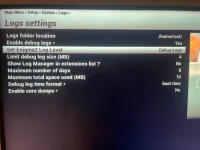
There is not an option "Save not to Flash" .
Photo enclosed
 

Attachments

  • IMG_5350.webp
    IMG_5350.webp
    68.2 KB · Views: 10
Do you have a storage device (USB flash drive or internal HDD) connected and mounted? You won't be offered another storage location if doesn't exist. You need to highlight the top line with the location and press right/left to change it.

As an aside, please see here for screenshots if you want
Code:
https://world-of-satellite.com/threads/how-to-take-screen-shots-how-to-attach-files.44054/
 
No other disc installed etc.,

It defaults to /home/root, but I can put it into /tmp and limit the log size to 1Mb, if this is ok?
 
Last edited:
Location of logs is not of significant concern, so long as you can get to it.

You have not answered the question about storage device A backup will not be created if you do not have a storage device connected. Please issue this command and post back the result.
df -Th
 
Sorry.


Code:
root@osmio4kplus:~# df -hT
Filesystem           Type            Size      Used Available Use% Mounted on
/dev/root            ext4            1.7G    581.0M      1.0G  36% /
devtmpfs             devtmpfs      591.2M      4.0K    591.2M   0% /dev
tmpfs                tmpfs          64.0K         0     64.0K   0% /media
/dev/mmcblk1p1       vfat            3.0M     10.0K      3.0M   0% /boot
tmpfs                tmpfs         784.2M    456.0K    783.7M   0% /var/volatile
root@osmio4kplus:~#
 
Get a USB stick. Put the receiver in deep standby, insert the USB and then boot receiver. You should hopefully be able to create a settings backup and also flash an image after that.
 
Hello,
It's completely understandable that the old feeds (<6.7) are no longer available, so opkg fails.
I have a request - can someone share the old ipk of the tcpdump package? mips platform (solo2), openvix 6.4, version tcpdump_4.99.4-r0_mips32el.ipk
Unfortunately, the version available in feed 6.7 and 6.8 is tcpdump_4.99.5-r0_mips32el.ipk, which requires libc6 (>= 2.40+git0+626c048f32), libcrypto3 (>= 3.3.1), and libpcap1 (>= 1.10.5) (and in 6.4 I have libc6 - 2.37-r1, libcrypto3 - 3.1.0-r0.1, and libpcap1 - 1.10.4-r0).
I know, I should update to version 6.8, but I can't at the moment, and I want to quickly debug something.
Can anyone help?
thx
 
Hello,
It's completely understandable that the old feeds (<6.7) are no longer available, so opkg fails.
I have a request - can someone share the old ipk of the tcpdump package? mips platform (solo2), openvix 6.4, version tcpdump_4.99.4-r0_mips32el.ipk
Unfortunately, the version available in feed 6.7 and 6.8 is tcpdump_4.99.5-r0_mips32el.ipk, which requires libc6 (>= 2.40+git0+626c048f32), libcrypto3 (>= 3.3.1), and libpcap1 (>= 1.10.5) (and in 6.4 I have libc6 - 2.37-r1, libcrypto3 - 3.1.0-r0.1, and libpcap1 - 1.10.4-r0).
I know, I should update to version 6.8, but I can't at the moment, and I want to quickly debug something.
Can anyone help?
thx
And you want to maintain defunct version for what reason.
 

OpenViX Feeds Status

Back
Top