Superb quality and spec AB-Com PULSe 4K SE. Crazy offer! Only £99! FREE UK DELIVERY! 4K UHD, Enigma 2, Multiboot 4 images & more!...
Superb quality and spec AB-Com PULSe 4K Rev II Twin Satellite tuner only £149! FREE UK DELIVERY! 4K UHD, Enigma 2, SATA HDD facility, Multiboot 4 images & more!...

[DM920] Patch for signal on AGC bar in Dreambox devices

kalkan99

New member
Joined
Aug 8, 2026
Messages
3
Reaction score
0
Points
1
What type of support thread are you creating?
Support question
What OpenViX Image build number are you using?
6.9.001
Have you tried re-flashing WITHOUT settings restore?
NO
Have you tried re-flashing WITH a settings restore?
NO
I would like to thank everyone involved in this software, which I am using flawlessly on my DreamBox 920.
Is it possible to add a patch to the software to make the signal appear on the "AGC" bar?
We would be very happy if you could help us with this.
Thank you in advance.
 
I think he is asking about these ATV commits.


Might as well as check this if we dont have it.
 
I don't get it. AGC is just an amplifier. It increases signal and noise by the same amount and therefore SNR doesn't change. So extracting AGC from SNR is not possible.
 
i looked at the agc calculation (snr to agc). it looks like a fahrenheit to celsius conversion to me... no added value.
 
As a long-time Dreambox user, this noticeable signal increase on the AGC bar was something we hadn't seen in a long time, which made us a little excited.
Hopefully, we'll be happy to see that same thing in the OpenVIX software.
 
@kalkan99 - I live in a very marginal area for 28.2E and the ONLY value that matters in trying to obtain a signal is SNR - the fact that this commit calculates the AGC from the SNR value make it even more irrelevant - and I could also say the same about BER.
 
As a long-time Dreambox user, this noticeable signal increase on the AGC bar was something we hadn't seen in a long time, which made us a little excited.
Hopefully, we'll be happy to see that same thing in the OpenVIX software.
Why are you exited to see a fake value on the AGC bar? AGC is the level of the signal amplifier, nothing to do with SNR.
 
i looked at the agc calculation (snr to agc). it looks like a fahrenheit to celsius conversion to me... no added value.

AGC = automatic gain control
SNR = signal to noise ratio

The two are, at best, only loosely connected and the relationship is likely to be very non-linear. Try inserting a 10dB attenuator is the input line and the AGC in many cases will not change.

The important parameters are SNR and BER (Bit Error Rate). Ideally the BER should always be zero and that is usually achieved if your signal is strong enough and the noise level is low.

The AGC value conveys little information of value. A high input signal level is likely to give a low AGC value and visa-versa but the SNR is not necessarily an indication of input signal strength - just the ratio of signal to noise. An input signal level of X and a noise level of Y will give the same SNR as increasing the input signal level by a factor of 10 and also increasing the noise level by a factor of 10.
 
Last edited:
thanks for the explanation which supports my statement that a non-linear conversion snr to agc doesn't make sense.
 
The Celsius to Fahrenheit conversion comment was referring to creating a bogus AGC from SNR.
 
This is what I was trying to explain in my first message:
it's about showing a signal on the AGC bar, just like "SNR" on the information bar.
dreambox 920
 

Attachments

  • AGC bilgi barı.webp
    AGC bilgi barı.webp
    51.2 KB · Views: 6
AGC bar does not show signal. It shows amplifier gain. That is the opposite. i.e. strong signal should show zero AGC and vice versa. But if the drivers do not expose amplifier gain, this can't be created out of thin air, and certainly not from SNR.

SNR is signal to noise. e.g. signal 20dB, noise 10dB, SNR 10dB. Or signal 35dB, noise 25dB, SNR 10dB. From this you can see SNR has no knowledge of gross signal or amplifier gain.
 
I think you could modify the Si2166D driver which is probably a .ko file to show AGC. The problem is there are no sources for Si2166D that I can find to modify. Avalink drivers for the Edision 4K receivers are available and can be built or modified to show AGC, but even then, the value is of limited use.

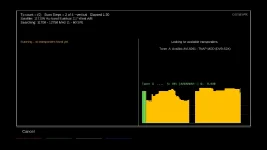
AGC will show you if the lnb is disconnected from the receiver, and AGC may show an unusual value when a lnb is broken. AGC will move up and down a little bit when a satellite signal is present, even if the transponder frequency is not correct. If you can successfully uncover the AGC, you can graph it in a blindscan and show it going up and down as the signal changes during the scan. And AGC can be graphed to a degree and show a motorized dish moving through the satellite arc over a long distance.

Other than what is mentioned above, I do not find any other uses for AGC. I wonder what their Si2166D AGC patch would look like on a blindscan graph? I bet it would be flat and not change. I will see if I get the time...

Shown below is an AGC graph in satellite blindscan. The value as a whole is widely misunderstood, and has limited use in a FTA receiver. Would have been nice though if SiLabs would have included it.

AGC-graph-blindscan_20260822110305.webp
 

OpenViX Feeds Status

Back
Top