Method 2b. Using an FTP client
From time to time, you will need to transfer files to the receiver. Best to learn how to do this. Make an image backup if you are afraid you will mess things up. You can flash your backup image If you make a mistake.
Install your chosen FTP client program. Be cautious of what you click when installing. Depending on where you download from, you get bundled rubbish.
The receiver must be connected to the same network as your receiver. There is no need for a direct connection between the receiver and PC/Laptop. You will need the receiver’s IP address. To find this out,
Menu > Information > Network
Using FileZilla as an example,
Host = Receiver’s IP address
Username = root (Not “Root”. Remember Linux is case sensitive!)
Password = This is whatever you set. From OpenViX 5.4 onwards, you must set a password in the network menu for FTP access.
Port = Leave this blank. (FYI: It will be port 21 unless you changed it)
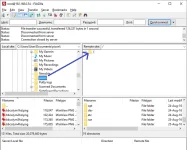
When you open FileZilla, it will look like this.
 Info:
Info:
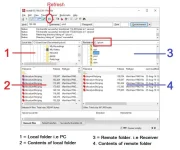
Window 1 shows the folder you are working with on PC.
Window 2 will show what is in that folder on PC.
Window 3 shows the folder you are working with on the Receiver.
Window 2 will show what is in that folder on the Receiver.
Whatever you double click in 2 will be sent to 4.
Whatever you double click in 4 will be sent to 2.
However, it is easier to drag and drop, especially if you have lots of files to transfer.
Time for action!
In window 1, select the location where your picon folder is located.
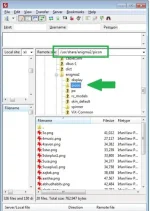
In window 3, click at the very top. All the folders should be closed. As you can see on address bar (red arrow), no folders are selected.
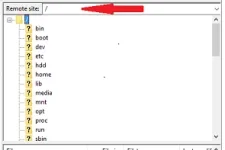
Select the picon folder in window 1. Drag it to window 3 and let go. Make sure you do not access/go into any other folder.
 Adding/Replacing picons
When you need to top up/add to your picon collection, window 2 should be your updated picons. Expand/open the picon folder in window 3.
It can be any of the locations mentioned earlier.
Drag and drop the picons you want from window 2 to window 4. You
will be prompted to overwrite if there is an existing file.