Superb quality and spec AB-Com PULSe 4K SE. Crazy offer! Only £99! FREE UK DELIVERY! 4K UHD, Enigma 2, Multiboot 4 images & more!...
Superb quality and spec AB-Com PULSe 4K Rev II Twin Satellite tuner only £149! FREE UK DELIVERY! 4K UHD, Enigma 2, SATA HDD facility, Multiboot 4 images & more!...

[ViX_Misc] Picons not showing

  • Thread starter Thread starter matt007
  • Start date Start date
M

matt007

Guest
Hi I wanted to store picons on the flash memory so I have put the picons folder into the following location:
Code:
/usr/share/enigma2/picon

I have enabled them in the settings but they still don't show. I have also restarted the system. Any help?
 
Can you post a screen shot of the location and contents please?

EDIT: Can you also telnet following command and post results.
Code:
find / -name picon
 
Last edited:
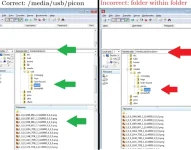
I thought picons had to go in top folder/directory of whatever drive you're wanting to use. I use root drive itself ("/picon") but I thought if I wanted to use my HDD I would put the folder in the top folder/directory of that eg "/media/hdd/picon". For USB mounted, it would be "/media/usb/picon"
 
"/usr/share/enigma2/picon/" & "/picon/" on internal memory will work.

Or on root of storage device such as
"/media/usb/picon/", "/media/hdd/picon/", "/media/cf/picon/"
 
Hope these help. Important things to note:
1. Folder called "picon", not "picons" or "Picon"
2. No sub-folders

If using a storage device such as a USB stck.
Note: If there is no physical HDD and only a USB stick is present, it would be mounted as HDD. This is perfectly fine.

picon layout usb.webp

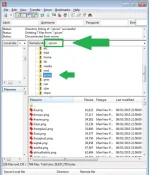
On root of internal memory
picon layout root internal.webp

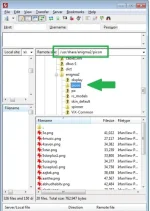
On internal memory, long version.
/usr/share/enigma2/picon
picon layout internal long.webp
 

OpenViX Feeds Status

Back
Top