
Superb quality and spec AB-Com PULSe 4K SE. Crazy offer! Only £99! FREE UK DELIVERY! 4K UHD, Enigma 2, Multiboot 4 images & more!...
Superb quality and spec AB-Com PULSe 4K Rev II Twin Satellite tuner only £149! FREE UK DELIVERY! 4K UHD, Enigma 2, SATA HDD facility, Multiboot 4 images & more!...
You are using an out of date browser. It may not display this or other websites correctly.
You should upgrade or use an alternative browser.
You should upgrade or use an alternative browser.


nsw9154
V.I.P,
No such problem with my New QBQ+ on SD 

Larry-G
V.I.P ,
- Joined
- May 19, 2010
- Messages
- 32,540
- Reaction score
- 405
- Points
- 0
- Age
- 48
There are no telnet commands to install the receivers hardware drivers on their own. You either install them manually via FTP or as part of a general image update. As above I have no issues with PQ on my GB Quad and sky UK SD channels.I updated to 124 but still bad picture.
What are the commands please
Sent from my U65GT using Tapatalk
Sent from my SM-G900F using Tapatalk
There are no telnet commands to install the receivers hardware drivers on their own. You either install them manually via FTP or as part of a general image update. As above I have no issues with PQ on my GB Quad and sky UK SD channels.
Sent from my SM-G900F using Tapatalk
found it in the meantime : INIT
Sent from my U65GT using Tapatalk

Rob van der Does
ViX Beta Tester
- Joined
- Apr 17, 2010
- Messages
- 36,522
- Reaction score
- 125
- Points
- 63
- Age
- 74
- Location
- The Netherlands & France
That is wrong then, as init 3 only starts E2 and doesn't reboot the box. So:
Manually copy the drivers to the box, then do "init 6" (or via the GUI of the box: restart).
Manually copy the drivers to the box, then do "init 6" (or via the GUI of the box: restart).
Sometimes it helps with PQ, if videoenhancement plugin is installed from systemplugins. There it`s possible for example to adjust scaler sharpness. After installing it can be found from system-> Video Enhancement Settings.
Last edited:
0
007xico
Guest
Sometimes it helps with PQ, if videoenhancement plugin is installed from systemplugins. There it`s possible for example to adjust scaler sharpness. After installing it can be found from system-> Video Enhancement Settings.
When I press video Enhancement nothing shows on screen
Ye I agree that the picture is worse now, noticably so, especially so with larger screen TV, even HD is poor compared to how it used to be, I believe from a source last year that to have so many so called HD channels the bandwidth had to reduce on most channels thus reducing picture quality on all channels
I believe the picture on HD nowadays to be not much better than standard on analogue satellite 20 years ago
I believe the picture on HD nowadays to be not much better than standard on analogue satellite 20 years ago
Rob van der Does
ViX Beta Tester
- Joined
- Apr 17, 2010
- Messages
- 36,522
- Reaction score
- 125
- Points
- 63
- Age
- 74
- Location
- The Netherlands & France
This proves that something is wrong at your end; either a hardware fault or wrong settings.Ye I agree that the picture is worse now, noticably so, especially so with larger screen TV, even HD is poor compared to how it used to be,
For HD it's actually quite simple: the picture provided by the box is 100% the same as it is in the air. Nothing is being changed to it (unless you use the 'Video Enhancement' plugin, and provided the channel is in 1080i and the output of your box is also 1080i).
Please make sure that all so called 'video enhancers' of your telly have been disabled for the input you use for your box.
Pardon my French, but this is utterly nonsense. Just play one of your VHS-tapes and you'll agree with me.I believe the picture on HD nowadays to be not much better than standard on analogue satellite 20 years ago
M
msr
Guest
I think it mainly depends on the tv being used, i find some lcds simply are rubbish at viewing sd pictures, and some sd pictures work well on.
So for me the answer to ops question, is that some lcds are awful at sd picture, so i would think there answer is the tv they have.
So for me the answer to ops question, is that some lcds are awful at sd picture, so i would think there answer is the tv they have.

pac2000
New member
- Joined
- Oct 13, 2012
- Messages
- 189
- Reaction score
- 1
- Points
- 0
If You're Output Is 1080p, The SD Video Needs To Be Multiplied By Nearly 3 Horizontally And By 2 Vertically...
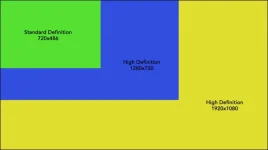
Just Out Of Interest, Have You Tried Outputting In 720p From The Quad To See If The SD Is Any Better???
I Set Mine To 1080i, Because The 1080p Makes The Video Look Less Sharp On My TV...
Just Out Of Interest, Have You Tried Outputting In 720p From The Quad To See If The SD Is Any Better???
I Set Mine To 1080i, Because The 1080p Makes The Video Look Less Sharp On My TV...
Rob van der Does
ViX Beta Tester
- Joined
- Apr 17, 2010
- Messages
- 36,522
- Reaction score
- 125
- Points
- 63
- Age
- 74
- Location
- The Netherlands & France
The difference between outputting 1080i and p is using the de-interlacer of the TV or of the box.
Using 720p means first upscaling by the box, and than again by the TV; this can never be a good solution. Than you would better use Autoresolution, so upscaling is only done once (by the TV).
Using 720p means first upscaling by the box, and than again by the TV; this can never be a good solution. Than you would better use Autoresolution, so upscaling is only done once (by the TV).
pac2000
New member
- Joined
- Oct 13, 2012
- Messages
- 189
- Reaction score
- 1
- Points
- 0
The TV Should Be Able To Display A 720p Image Quite Well... The Quad Can Easily Upscale From Sd To 720... Infact 1080i Isn't Recommended By Industry Standards As It's About The Same Bitrate As 720p But 720p Is More Stable... Only 1080p Supercedes 720p... I Remember Interlace Modes From The Old Amiga Computer... It's A Method Of Getting Double Height Pixels By Alternating Between Even And Odd Lines Every Frame... So You're Kidding Yourself If You Think 720p Is Any Different To 1080i... Both Are 3 Times The Size Of SD In Terms Of Decompressed Bitrate And Dataset...
So Try Different Modes, One May Suit Both HD And SD Better Than Others With Your Particular Setup... AutoResolution Adds Time To Channel Change(If The Resolution Changes Too)... And Can Cause Other Problems... At The End Of The Day It's Down To Personal Preference... But I Would Also Advise Checking To See If Your TV Has A Sharpness Setting...
So Try Different Modes, One May Suit Both HD And SD Better Than Others With Your Particular Setup... AutoResolution Adds Time To Channel Change(If The Resolution Changes Too)... And Can Cause Other Problems... At The End Of The Day It's Down To Personal Preference... But I Would Also Advise Checking To See If Your TV Has A Sharpness Setting...
Code:
http://en.m.wikipedia.org/wiki/Interlaced_videoRob van der Does
ViX Beta Tester
- Joined
- Apr 17, 2010
- Messages
- 36,522
- Reaction score
- 125
- Points
- 63
- Age
- 74
- Location
- The Netherlands & France
Using a capital for every single word makes your post unreadable, so I'm not able to react.
Rob van der Does
ViX Beta Tester
- Joined
- Apr 17, 2010
- Messages
- 36,522
- Reaction score
- 125
- Points
- 63
- Age
- 74
- Location
- The Netherlands & France
In this link I can't find any information that is relevant to OP's issue.Code:http://en.m.wikipedia.org/wiki/Interlaced_video
I think it mainly depends on the tv being used, i find some lcds simply are rubbish at viewing sd pictures, and some sd pictures work well on.
So for me the answer to ops question, is that some lcds are awful at sd picture, so i would think there answer is the tv they have.
It's not about the tv, I'm saying that with the same setup, system, same tv and with no changes in my system, there is a significant degradation of picture quality in SD only.
Sent from my U65GT using Tapatalk
Similar threads
- Replies
- 2
- Views
- 2K

