
Superb quality and spec AB-Com PULSe 4K SE. Crazy offer! Only £99! FREE UK DELIVERY! 4K UHD, Enigma 2, Multiboot 4 images & more!...
Superb quality and spec AB-Com PULSe 4K Rev II Twin Satellite tuner only £149! FREE UK DELIVERY! 4K UHD, Enigma 2, SATA HDD facility, Multiboot 4 images & more!...
You are using an out of date browser. It may not display this or other websites correctly.
You should upgrade or use an alternative browser.
You should upgrade or use an alternative browser.
Probleem met kanaal zoeken
- Thread starter edsel
- Start date


abu baniaz
Moderator
Last software check:
When you change tuner configuration, some entries remain. To exclude any "Advanced" settings you had previously used, try one of the following:
1. Flash the image again, do not restore settings after it restarts. Ensure you set tuner with the signal wire as simple, single, 13e
2. Stop enigma2 with "init 4" command. Edit the file called "settings" in /etc/enigma2/ by deleting all the lines that have "nim" in them. Transfer back, restart with "init 3". Ensure you set tuner with the signal wire as simple, single, 13e
When you change tuner configuration, some entries remain. To exclude any "Advanced" settings you had previously used, try one of the following:
1. Flash the image again, do not restore settings after it restarts. Ensure you set tuner with the signal wire as simple, single, 13e
2. Stop enigma2 with "init 4" command. Edit the file called "settings" in /etc/enigma2/ by deleting all the lines that have "nim" in them. Transfer back, restart with "init 3". Ensure you set tuner with the signal wire as simple, single, 13e
@abu baniaz
Here follows the screenshot of the scan settings:
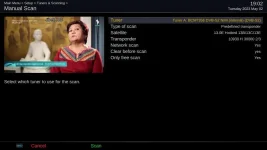
I disconnected the internal harddisc, just in case it took too much power, and measured the current and voltage during a scan.
The voltage was stable around 12.2 V and the current around 1.15 A. During boot was the current around 700 mA.
I saw your last message only now and I will make the software check you propose. I come back with that tomorrow.
Thanks again.
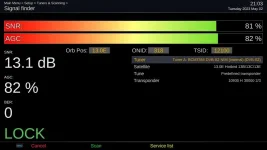
Here follows the screenshot of the scan settings:
I disconnected the internal harddisc, just in case it took too much power, and measured the current and voltage during a scan.
The voltage was stable around 12.2 V and the current around 1.15 A. During boot was the current around 700 mA.
I saw your last message only now and I will make the software check you propose. I come back with that tomorrow.
Thanks again.

Joe_90
Moderator
@edsel - you are only scanning one transponder! (predefined transponder). Click the "Type of scan" settings (use right arrow) until it reads single satellite and then scan.
abu baniaz
Moderator
@joe_90
He had tried autodiseqc earlier and it did not find 13e. Can you please double check that these are still correct? We are checking transponder for Rai1
He had tried autodiseqc earlier and it did not find 13e. Can you please double check that these are still correct? We are checking transponder for Rai1
Code:
        # Hotbird 13.0E Rai 1
        (
            10992,
            27500,
            eDVBFrontendParametersSatellite.Polarisation_Vertical,
            eDVBFrontendParametersSatellite.FEC_2_3,
            eDVBFrontendParametersSatellite.Inversion_Off,
            130,
            eDVBFrontendParametersSatellite.System_DVB_S,
            eDVBFrontendParametersSatellite.Modulation_Auto,
            eDVBFrontendParametersSatellite.RollOff_auto,
            eDVBFrontendParametersSatellite.Pilot_Unknown,
            eDVBFrontendParametersSatellite.No_Stream_Id_Filter,
            eDVBFrontendParametersSatellite.PLS_Gold,
            eDVBFrontendParametersSatellite.PLS_Default_Gold_Code,
            eDVBFrontendParametersSatellite.No_T2MI_PLP_Id,
            eDVBFrontendParametersSatellite.T2MI_Default_Pid,
            12400,
            318,
            "Hotbird 13.0e"),
Code:
https://github.com/OpenViX/enigma2/blob/Developer/lib/python/Screens/AutoDiseqc.py#L80:L99@joe_90
I have now scanned with type of scan: Single Satellite
it gives the same result, the same 23 channels.
It is strange that every time I go back to Manual Scan, the type is changed again to Predefined Transponder.
@abu baniaz
I have stopped Enigma2, deleted all the lines with "Nims" in /etc/enigma2/ , restarted and made a scan but it did not change anything.
I guess the next thing to do is to exchange the LNB.
I have now scanned with type of scan: Single Satellite
it gives the same result, the same 23 channels.
It is strange that every time I go back to Manual Scan, the type is changed again to Predefined Transponder.
@abu baniaz
I have stopped Enigma2, deleted all the lines with "Nims" in /etc/enigma2/ , restarted and made a scan but it did not change anything.
I guess the next thing to do is to exchange the LNB.
Joe_90
Moderator
@joe_90
He had tried autodiseqc earlier and it did not find 13e. Can you please double check that these are still correct? We are checking transponder for Rai1
Code:# Hotbird 13.0E Rai 1 ( 10992, 27500, eDVBFrontendParametersSatellite.Polarisation_Vertical, eDVBFrontendParametersSatellite.FEC_2_3, eDVBFrontendParametersSatellite.Inversion_Off, 130, eDVBFrontendParametersSatellite.System_DVB_S, eDVBFrontendParametersSatellite.Modulation_Auto, eDVBFrontendParametersSatellite.RollOff_auto, eDVBFrontendParametersSatellite.Pilot_Unknown, eDVBFrontendParametersSatellite.No_Stream_Id_Filter, eDVBFrontendParametersSatellite.PLS_Gold, eDVBFrontendParametersSatellite.PLS_Default_Gold_Code, eDVBFrontendParametersSatellite.No_T2MI_PLP_Id, eDVBFrontendParametersSatellite.T2MI_Default_Pid, 12400, 318, "Hotbird 13.0e"),
Code:https://github.com/OpenViX/enigma2/blob/Developer/lib/python/Screens/AutoDiseqc.py#L80:L99
Can't actually check right now, but I used default Vix settings and got all the RAI HD channels (except for the encrypted ones of course). Over 900 channels tuned in.
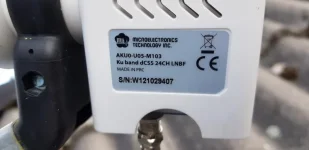
abu baniaz
Moderator
That is not a universal LNB, it is a unicable LNB. The brand is not really important it is the frequency/scr channels that it uses.
Pdf:
Have a look at the existing unicable file and pick one that has matching bands.
One guide to setting unicable LNB:
https://www.world-of-satellite.com/showthread.php?60640-GT-Sat-GT-dLNB1DY-and-tuner-configuration
Pdf:
Code:
https://www.mtigroup.com/upload/media/products/03_Satellite-TV-Solution/MTI_dCSS_24UB_LNB_AKU0_U05_M103_Spec.pdf
Code:
https://github.com/OpenViX/enigma2/blob/Developer/data/unicable.xmlOne guide to setting unicable LNB:
https://www.world-of-satellite.com/showthread.php?60640-GT-Sat-GT-dLNB1DY-and-tuner-configuration
Last edited:
abu baniaz
Moderator
Use same settings as:
Inverto
IDLU-24UL40-UNMOO-OPP
It has following bands that match your LNB
<product name="IDLU-24UL40-UNMOO-OPP" positions="4" format="jess" bootuptime="800" scrs="1210,1420,1680,2040,1005,1050,1095,1140,1260,1305,1350,1475,1520,1565,1610,1725,1770,1815,1860,1905,1950,1995,2085,2130"/>
We will add the device to the unicable file later, but that is not too important. Receiver just needs to know what frequency to communicate with LNB.
Edit: Please hook up wire to Tuner B and configure that tuner only.
Leave tuner A as not configured for now. I have a test for you to do after we have you working fine.
Inverto
IDLU-24UL40-UNMOO-OPP
It has following bands that match your LNB
<product name="IDLU-24UL40-UNMOO-OPP" positions="4" format="jess" bootuptime="800" scrs="1210,1420,1680,2040,1005,1050,1095,1140,1260,1305,1350,1475,1520,1565,1610,1725,1770,1815,1860,1905,1950,1995,2085,2130"/>
We will add the device to the unicable file later, but that is not too important. Receiver just needs to know what frequency to communicate with LNB.
Edit: Please hook up wire to Tuner B and configure that tuner only.
Leave tuner A as not configured for now. I have a test for you to do after we have you working fine.
Last edited:
Ok, thank you. But what is a better solution? I have some of these LNB's (see picture).
What do you advise me? To continue with the Unicable LNB and make the changes you have suggested or put the old 'Black' LNB?
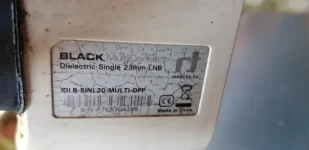
BTW Sorry that I thought it was a Universal LNB that was mounted.
What do you advise me? To continue with the Unicable LNB and make the changes you have suggested or put the old 'Black' LNB?
BTW Sorry that I thought it was a Universal LNB that was mounted.
abu baniaz
Moderator
No need to be sorry. Golden rule of tuner configuration is that it must match hardware. Finding out the LNB type is important. Well done and thankyou for getting a pciture.
Why did you remove the old LNB?
What other LNBs do you have installed?
What is the complete setup?
From what I can see, the old one is the narrow one that allows closer fitting. It is universal. As you have fitted the wider/standard one, that is not an issue.
If you are going to add 13e to a diseqc switch, you will need a universal one. There is a thread on another forum about using diseqc switches with unicable LNBs, I obviously can't post a link to other forums otherwise I will get an infraction. If you are not going to use a diseqc switch I would keep the unicable one. The test I was going to suggest will/should allow you to configure both tuners for 13e. But let's not confuse things, one step at a time
Why did you remove the old LNB?
What other LNBs do you have installed?
What is the complete setup?
From what I can see, the old one is the narrow one that allows closer fitting. It is universal. As you have fitted the wider/standard one, that is not an issue.
If you are going to add 13e to a diseqc switch, you will need a universal one. There is a thread on another forum about using diseqc switches with unicable LNBs, I obviously can't post a link to other forums otherwise I will get an infraction. If you are not going to use a diseqc switch I would keep the unicable one. The test I was going to suggest will/should allow you to configure both tuners for 13e. But let's not confuse things, one step at a time
Thank you for your explanation. Then I will continue with this LNB until I need a diseqc swith.
I have not yet changed the changes in the unicable file but just made a scan with Unicable - Inverto and it has already given 730 free channels!
After changing the unicable file it will give all the channels.
You asked about the other LNB's, for some years ago I had an other receiver and used these LNB's for different satellites. The equipment was old and had problems and I bought a new receiver, the Solo2, but it has stayed in the package for several years. Until for some weeks ago when I got help with adjusting the parabole and a new LNB. The fact that my neighbours (in south direction) have cut som really high trees has helped me in that decision.
Thank you very much both, @abu baniaz and @Joe_90! I have learned a lot and the results are that the satellite receiver now works.
Great with such a help!
You will meet me more on this forum.
I have not yet changed the changes in the unicable file but just made a scan with Unicable - Inverto and it has already given 730 free channels!
After changing the unicable file it will give all the channels.
You asked about the other LNB's, for some years ago I had an other receiver and used these LNB's for different satellites. The equipment was old and had problems and I bought a new receiver, the Solo2, but it has stayed in the package for several years. Until for some weeks ago when I got help with adjusting the parabole and a new LNB. The fact that my neighbours (in south direction) have cut som really high trees has helped me in that decision.
Thank you very much both, @abu baniaz and @Joe_90! I have learned a lot and the results are that the satellite receiver now works.
Great with such a help!
You will meet me more on this forum.
abu baniaz
Moderator
Compare with your neighbours/friends nearby and see how many services they get. They must scan using same parameters as you. If there is a massive difference, you may need to tweak the dish.
Changing the xml file won't make a real difference. The only possible difference is the boot up time. Basically, the receiver sends a request before the LNB wakes up. You can modify that (by improving boot time), restart and scan again. The file should be in /etc/tuxbox. Or install satellite equipment control plugin which will allow you to alter the delay.
Can you now configure tuner A. The options/settings will be similar to what you have set for B.
However, Tuner A does not have its own signal wire, you are going through another tuner. So set connected to yes. You are going through tuner A, so that is the one it is connected to. If it does not show these, then no problem. You should then be able to use both tuners independently. This is why I always stress Unicable technology and FBC technologies are independent.
Changing the xml file won't make a real difference. The only possible difference is the boot up time. Basically, the receiver sends a request before the LNB wakes up. You can modify that (by improving boot time), restart and scan again. The file should be in /etc/tuxbox. Or install satellite equipment control plugin which will allow you to alter the delay.
Can you now configure tuner A. The options/settings will be similar to what you have set for B.
However, Tuner A does not have its own signal wire, you are going through another tuner. So set connected to yes. You are going through tuner A, so that is the one it is connected to. If it does not show these, then no problem. You should then be able to use both tuners independently. This is why I always stress Unicable technology and FBC technologies are independent.
abu baniaz
Moderator
I did not say to use loop-through after we established it is a unicable LNB. I said: "The options/settings will be similar to what you have set for B." Just to clarify, set tuner A (which has no signal wire) as:
Advanced, unicable LNB, connected = yes, connected to Tuner B
Advanced, unicable LNB, connected = yes, connected to Tuner B
Use same settings as:
Inverto
IDLU-24UL40-UNMOO-OPP
It has following bands that match your LNB
<product name="IDLU-24UL40-UNMOO-OPP" positions="4" format="jess" bootuptime="800" scrs="1210,1420,1680,2040,1005,1050,1095,1140,1260,1305,1350,1475,1520,1565,1610,1725,1770,1815,1860,1905,1950,1995,2085,2130"/>
We will add the device to the unicable file later, but that is not too important. Receiver just needs to know what frequency to communicate with LNB.
Edit: Please hook up wire to Tuner B and configure that tuner only.
Leave tuner A as not configured for now. I have a test for you to do after we have you working fine.
@abu baniaz
I can't find this file.
In /etc/tuxbox I have only the files
atsc.xml
cables.xml
satellites.xml
terrestrial.xml
timezone.xml
In none of these files I can find "Inverto".
What should the filename be?
abu baniaz
Moderator
My apologies, the unicable.xml file is in
/usr/share/enigma2
There are two sections, one for switches and one for LNBs.
/usr/share/enigma2
There are two sections, one for switches and one for LNBs.
Last edited:
My apologies, the unicable.xml file is in
/usr/share/enigma2
There are two sections, one for switches and one for LNBs.
No problem. Thank you!
abu baniaz
Moderator
On second thoughts , it is a better match to the Megasat diablo because it is not progammable and also has the longer boot time. So easiest option is to just do that.
I have added the LNB here:
You can download updated file it by right click, saving as.
I have added the LNB here:
Code:
https://github.com/OpenViX/enigma2/commit/15e9047fb11e29e561c16472668cfabab635f010You can download updated file it by right click, saving as.
Code:
https://raw.githubusercontent.com/OpenViX/enigma2/15e9047fb11e29e561c16472668cfabab635f010/data/unicable.xmlSimilar threads
C
- Replies
- 1
- Views
- 9K
C
