Superb quality and spec AB-Com PULSe 4K SE. Crazy offer! Only £129! FREE UK DELIVERY! 4K UHD, Enigma 2, Multiboot 4 images & more!...
Superb quality and spec AB-Com PULSe 4K Rev II Twin Satellite tuner only £179! FREE UK DELIVERY! 4K UHD, Enigma 2, SATA HDD facility, Multiboot 4 images & more!...

[GiGaBlue UHD QUAD 4K] Problem initialing Hard Drive

KuchKuch

New member
Joined
Jan 20, 2018
Messages
92
Reaction score
0
Points
0
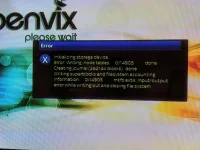
I'm trying to setup my Giga Blue satellite receiver and get the following error message whenever I try to initialise the hard drive:
Error Writing inode tables: 0/14905 done
Mkfs ext4: input/output error while writing out and closing file system.

Any suggestions on how to resolve?
 

Attachments
  • MVIMG_20191215_230144.webp
    MVIMG_20191215_230144.webp
    82.6 KB · Views: 32
Last edited:
You are best initialising the disk straight after the FIW on a fresh install of image (with no restores).


Sent from my iPhone using Tapatalk
 
I'm not trying to do a restore.

Shall I just do factory reset and try again?
 
Not a factory reset no. Use Image Manager to download the latest image and the flash that, also using Image Manager. Once you’ve completed the FIW and you are presented with the Menu, proceed to Storage and Initialise your HDD.


Sent from my iPhone using Tapatalk
 
Looks like a hardware issue to me. Have you used this HDD before or did it come pre-installed in the box ?
 
I haven't used the HDD before. Bought it last week from Scan
 
Just tried Image manager and have no luck. It says " Device None available; Press Menu to select storage device". I can't seem to select Downloads or Flash either.
 
You cant use image manager if you don't have a correctly mounted storage device attached. If you cant initialise a new hard drive send it back.
 
I haven't used the HDD before. Bought it last week from Scan

As Ronand has mentioned, its probably not initialised - so use the Windows storage services or in linux gparted to initilise the disk.
 
Is the drive spinning up when you power up the receiver? Making clicking noises? Apart from a faulty power or data cable connection to the drive, I would assume it's "dead on arrival" and return it as faulty. Have you used a HDD in the receiver before? You need to isolate whether it's the box or the drive with the problem.
 
As Ronand has mentioned, its probably not initialised - so use the Windows storage services or in linux gparted to initilise the disk.

Will give this a shot - What's the best file system to format to for use on OpenVix? Fat32?
 
Is the drive spinning up when you power up the receiver? Making clicking noises? Apart from a faulty power or data cable connection to the drive, I would assume it's "dead on arrival" and return it as faulty. Have you used a HDD in the receiver before? You need to isolate whether it's the box or the drive with the problem.

I'm gonna connect the HDD to my PC, which will hopefully tell me if it is DOA or not.
 
I can't find my HDD docking station or screwdrivers, so I don't know how to test the HDD at the moment.

I did find that on Mount Manager the Size, Mount and Type of my HDD is listed as None or Unavailable.

Should that mean anything?
 
I had a problem with a HDD today getting stuck at 51 percent when initialising.
I think it was previously formatted to NTFS.

I used a Windows application called MiniTool Partition Wizard to format it to EXT4 and the problem went away.
I'd give that a go before sending it back
 
Also, you can download Vix to a USB key to flash a new image
 
Not sure what I did, but the HDD now works. I somehow managed to get it initialized and can see it in Mount Manager with its full storage capacity and everything.

Thanks to everyone for their help.
 
Well I thought this issue had been resolved, but I had to move my box and now I can't see the hard drive at all.

Been trying to reboot at least 10 times. In some instances I would see Storage in the setup menu, but in the majority of cases it's not there. Even when it is there I can't see the storage amount or initialize the hard drive.

Worryingly when I have been trying to reboot on some instances the box is stuck on the Gigablue splash screen and I have had to switch off from the mains.

I need to check the hard drive, but I am wondering if I should raise the issue with WoS, which is where I got my box from just under 2 weeks back in case the box is faulty.
 
I think you need to check the drive in a PC or in an external caddy to eliminate whether the disk or the GB box is faulty. Do you have any other disk you could install into the GB box?
 
I think you need to check the drive in a PC or in an external caddy to eliminate whether the disk or the GB box is faulty. Do you have any other disk you could install into the GB box?

Got another hard drive from scan yesterday. It is a 3.5 inch, but I'm hoping I can still use it to test it. Will do that tomorrow and report back.
 

OpenViX Feeds Status

Back
Top