Superb quality and spec AB-Com PULSe 4K SE. Crazy offer! Only £129! FREE UK DELIVERY! 4K UHD, Enigma 2, Multiboot 4 images & more!...
Superb quality and spec AB-Com PULSe 4K Rev II Twin Satellite tuner only £179! FREE UK DELIVERY! 4K UHD, Enigma 2, SATA HDD facility, Multiboot 4 images & more!...

[VU+ Solo SE] Problem Mounting NAS drive

  • Thread starter Thread starter bartjunited
  • Start date Start date
B

bartjunited

Guest
I have had a look online as this question has been asked before but I couldnt find the answer.

I am trying to mount my NAS drive to the Solo so that i can watch videos etc from it.
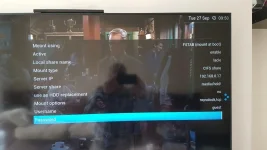
sat 2.webp

Attached is a screenshot of my settings that i used to mount it with

When I go into the file list to view it I get teh following error

directory/media/autofs/lacie does not exist

what am i doing wrong?
 
Server share should be the folder name on your NAS.
 
The share and folder name on my drive is called "family" so I changed the server share to /family but still got the same message as above?

Sent from my SM-G935F using Tapatalk
 
... try family without the "/".
 
Tried that too and same result

Sent from my SM-G935F using Tapatalk
 
Did you use the Network Browser to locate the NAS? If not, give that a go.
 
I did and it shows up in the mount locations. I'll remove it, rescan and try again

Sent from my SM-G935F using Tapatalk
 
If you're selecting "mount at boot", maybe you'll need to reboot to activate the mount once you've set it up..
 
You mean reboot the solo? I don't have the NAS on all the time so do I need to choose mount on boot?
I'm sure I restarted the solo too to check it wasnt that but I've tried so many variables I might need to just start again and ensure I change the folder name part

Sent from my SM-G935F using Tapatalk
 
Yes, rebooting the solo. I've got mine set to AUTOFS (mount as needed), which I think you'd be best with if the NAS isn't on all the time.
That settting connects straight away when you configure it, without any rebooting.
In fact, I disable the mount when not needed to avoid any possible delays/problems when booting vix.
 
Last edited:
Ah OK good idea about the disabling. I'll only be using the NAS occasionally when I need to download something to it or want to access some content from it so once I'll get it sorted I'll disable it when not in use

Sent from my SM-G935F using Tapatalk
 
I had problems with the password - & (and probably < and >, and maybe others) don't work, and maybe a null password could be an issue if that's what you're using??
 
Last edited:
Managed to sort it. Dunno how though :). Deleted the mount and started again. Changed local share and server share name to family which is the name of the folder. Family then came up in the locations and I was able to browse the folders.
Playback of the content didn't seem too good. Will need to do some testing to see if it's just the quality of the downloads. Thanks for your help

Sent from my SM-G935F using Tapatalk
 
I had problems with the password - & (and probably < and >, and maybe others) don't work
3 characters which are "active shell characters" - which may be significant.
They also all need to be "escaped" in xml (well, the "&" might not - but often is).
I haven't had a chance to do any testing on what the issue here is yet.
 
Then it's best not to mount it in fstab (which is the option you have selected) . Use autofs (?automount?) instead.

AUTOFS (mount as needed), FSTAB (mount at boot), Enigma2 (mount using enigma2), Enigma2 old format (mount using linux) are the options.

I am currently wrestling with USB mounts over a wireless setup between an MBtwinplus and an osmini, I'll post when I have resolved it all or got stuck.
 

OpenViX Feeds Status

Back
Top