Superb quality and spec AB-Com PULSe 4K SE. Crazy offer! Only £99! FREE UK DELIVERY! 4K UHD, Enigma 2, Multiboot 4 images & more!...
Superb quality and spec AB-Com PULSe 4K Rev II Twin Satellite tuner only £149! FREE UK DELIVERY! 4K UHD, Enigma 2, SATA HDD facility, Multiboot 4 images & more!...

Problems setting the Default Bouquet for EPG

sbreen

New member
Joined
Nov 24, 2024
Messages
6
Reaction score
0
Points
1
Hey everyone,

I've recently updated to Openvix Ver 6.7 on my Edision OS mio+ PLUS 4K; I use a custom Bouquet (to combine DTV & Sat channel) and I've set the bouquet maker to update automatically each night.

I'm regularly finding that when I open the EPG or the quick access program guide it is pointing to the 'FTA Channels' bouquet - not the custom one I always use. I've searched everywhere but I can't seem to find a way to set the default EPG bouquet to be the custom one instead of defaulting to 'FTA Channels'.

Thanks for any help that ppl can give me on this; it's not a major issue, just an inconvenience.
 
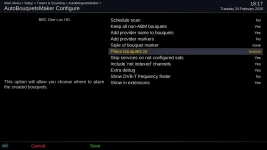
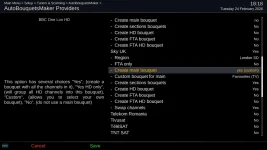
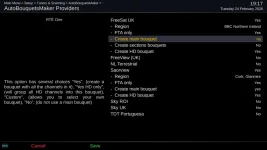
ABM's default is to be on top. You can either change that to bottom. Or, in the provide menu of ABM, make the "main" bouquet" be your favourite one.

Ideally, you should make a custom mix or favourite file so ABM updates your favourite bouquet.

Best not to combine EPG issues with Bouquet issues. As you have asked, when you initiate the EPG screens, they will open the last Bouquet that was used to select the channel. If things have changed, it will use the first bouquet. Until you get used to it, It's always better to use the channel selection screens for selecting channels. Once accustomed, by all means use the EPG screens to navigate around/select channels.
 
Some screenshots to show the options I mentioned. Pick one that you prefer. I think that ABM position will be better choice

ABM position, change to bottom:
abm_bottom.webp

Main bouquet = favourites
abm_custom_main.webp
 
I had already placed my custom bouquet on top; it seems to default to a bouquet placed in the centre of the list.

I have it set to use the 'last bouquet' each time; but it seems to default back to a random on regularly - I will try the AABM position set to Bottom.

I can't select my custom bouquet from the list
 
Last scanned bouquet is a system and dynamic bouquet, it changes. Don't use that for selection. As I said, please dont use the EPG screens for navigation until you are more experienced. Once you use the channel selection, it will find its place and the EPG screen will be "normal".

What is the name of your custom bouquet? Please post a screenshot of what you are seeing. Guide to screenshots here if you need it
Code:
https://world-of-satellite.com/threads/how-to-take-screen-shots-how-to-attach-files.44054/

Some reading for you:
Code:
https://world-of-satellite.com/threads/bouquets-epg-channel-navigation.63049/
 
Thsi

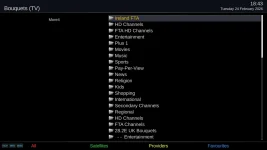
Here is my list of Bouquets; I always want 'Ireland FTA' to be my default bouquet.
List of Bouquets.webp

I don't seem to be able to choose the Custom as my main bouquet.

Custom Bouquet is not an option.webp
 
You are missing some screenshots. It will be the the one in provider menu, saying create main bouquet, Go up a bit until it is like what I showed.
 
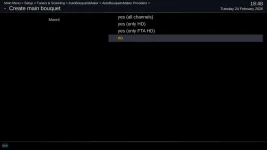
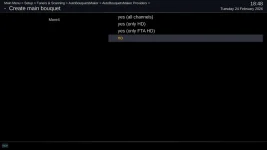
I don't have the option to select 'yes (custom)' here:

Create Main Bouquet.webp
 
Change that main bouquet option from no to yes (custom). A new line will show below it where you can choose which bouquet to use.
 
For some reason 'Yes (Custom)' is not available to me; I can only choose from these:

Custom Bouquet is not an option.webp

I will see how it behaves over the next few days.

Thanks for your help.
 
Last edited:
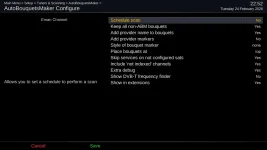
I think there might be another option that needs to be enabled. I'm not sure which though. Hopefully someone will chime in.
 
Here are my options. Please try them.

Also, I hope that the bouquet is one you created, not one that was originally created by ABM, but you have modified it.
 

Attachments

  • abm config.webp
    abm config.webp
    38.3 KB · Views: 3

OpenViX Feeds Status

Back
Top