Superb quality and spec AB-Com PULSe 4K SE. Crazy offer! Only £99! FREE UK DELIVERY! 4K UHD, Enigma 2, Multiboot 4 images & more!...
Superb quality and spec AB-Com PULSe 4K Rev II Twin Satellite tuner only £149! FREE UK DELIVERY! 4K UHD, Enigma 2, SATA HDD facility, Multiboot 4 images & more!...

[VU+ Duo2] Recording notice on EPG

bellejt

Forum Supporter
Donated Member
Joined
Dec 24, 2013
Messages
2,254
Reaction score
53
Points
48
Age
65
if I go to the EPG channel listing and use the red ball button I add a timer to the box in EPG and see a red "R" in the graffics EPG.Would it be possible to have the same little R when a autotimer is in use ? Now you do not see anything in the graffic EPG list.
 
if I go to the EPG channel listing and use the red ball button I add a timer to the box in EPG and see a red "R" in the graffics EPG.Would it be possible to have the same little R when a autotimer is in use ? Now you do not see anything in the graffic EPG list.

There is already a graphic in place for auto timers in the EPG screen different to the one recordings use.


Sent from my iPad Air using Tapatalk HD
 
oke.I had to refresh the list.Now I see the green "I" coming up also beside the red "R" .Thx for fast reply.
 
Last edited:
It should not need activating, it should be automatic. Unless it was also broke when the ATV team deleted all of andy's auto timers upgrades from the GIT a few weeks ago, while trying to improve something in the openweb interface.


Sent from my iPad Air using Tapatalk HD
 
I noticed that the AutoTimer function was not working tried it a few times lately and never got it to work, just tried again and still only finding 1 episode when the program is on every day about 4 times repeated
 
I will keep an eye on it the next few days.
 
I noticed that the AutoTimer function was not working tried it a few times lately and never got it to work, just tried again and still only finding 1 episode when the program is on every day about 4 times repeated

ATV fixed the issue they caused and that fix was included in build 028 I believe. but it is possible it also broke other as yet undiscovered things.
 
atv split up the autotimers, so vix would still be using the old one.
they messed around with it.
 
atv split up the autotimers, so vix would still be using the old one.
they messed around with it.

yes but first they actually deleted a whole years worth of work forcing us to reverse their commit, then they came up with the idea of branching off their own version rather than blindly deleting things without thinking of how it would affect other images.
 
ye i seen all the discussion about it.
im not sure whats happening next tho. do we still use the vixautotimer or go back to original autotimer?
 
that is what I see now on the epg.A green and red icon.Is working fine on apollo 24.I am not updating the image because I had problems with remote stream convertor to my OS1 (with ATV 4.2).If I have time I wil try the new apollo 30 during the weekend.If all is well I will set it on the forum.
Also had to go to CCcam 2.3.0 because 2.1 was not working anymore for dual decoding an streaming.Seems a general problem with CCcam.Give the advice to several users with different boxes and they al got it working by going to 2.3.0.
 
we are using the ViX auto timer that andy spent over a year updating and improving, ATV have moved to the original one for their image. It's still possible that something has been broken in the ViX version but only andy would really know as he coded it and knows whats what.
 
ye i seen all the discussion about it.
im not sure whats happening next tho. do we still use the vixautotimer or go back to original autotimer?

Are you able to run a build with the original please? Test if Green/Yellow buttons presses work? Also some stuff in webif to check. If your able to run a build I'll test the issues we had. Job tasks should be fixed in original.
 
aye no worries building now with original autotimer
"hopefully" :)
 
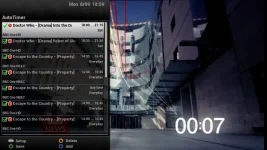
I think it is working now pheonix but I will have to see if it records as when I do Green Button Long press I get the menu showing my recordings set up but when i check the EPG it is showing no recordings being set is that correct as I thought they would show up in the EPG :confused:

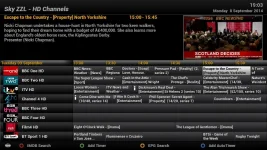
AutoTimers.webp AutoTimers 2.webp
 
you should see the green autotimers icon in the graphical EPG wth the red record icon to show that you have a timer set to record (as shown in the link above that I posted). cant say when I last noticed them so not sure when or if they are broken.
 
That is what is confusing me I do not get them icons any more so I presume that they will not record I only did them as a test but I keep forgetting to set Dr WHO till on the day lol:eek:
 
That is what is confusing me I do not get them icons any more so I presume that they will not record I only did them as a test but I keep forgetting to set Dr WHO till on the day lol:eek:

No it wont affect the actual recording it self, just it's not showing in the G-EPG for some reason that recordings are set ??. simply hitting the green button however will show what timers you do have set and for when.
 

OpenViX Feeds Status

Back
Top