better now to change number of rows to 15.
i cannot edit the first post.
in channel selection and movie selection press menu and change the option in there.
you can use however many rows you want, but for best effect, use 15.
Hi rossi2000
Loving the skin, great work, just one question, i still have the vix spiner when the box boots up, i ftp'd the skin to the correct posistion. do i have to remove the spiner file that is allready in that location?
Thanks in advance
Mike
if you want the default vix spinner, then yes delete the spinner folder in the skin.
if you want the red-hd spinner, leave the spinner directory in the skin.
Hello rossi I have just loaded in your Red HD skin again, I tried it when you first released it but went back to the Vix-Night-HD because I am used to that one
But I have to say you have done a cracking job smoothing out it's few problems from the 1st release :thumbsup: I am going to stick with this now
it seems to respond faster than vix-night but like a few others have mentioned I really liked the original VIX logo is their any way that I can put that back in
but not really bothered but it would be nice, one other question how do I ftp the on demand and transcoding tweeks that you downloaded yesterday
as I am still learning to do things with my LX3 & Duo2 boxes and I don't have a clue what to do
any way keep up the good work on this cracking skin
Thanks rossi it worked a treat I like the fact that it shows what tuner is being used nice one :thumbsup:
just noticed that i still have the red circle and not the vix spinner i must have done something wrong but it's not a problem i will re install it later and see what happens
Hi Rossi2000
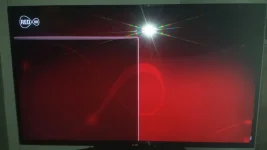
When i go into my recordings folder ie media hdd and mount locations there is just a red screen and no files. i have downloaded from the feeds and it is a fresh insall?
Sorry mate didn't explain myself properly, I have installed the latest skin from the feeds on my solo and installed v1.6 via FTP on my solo2, both are doing the same, just a red screen
hmm
can i have a screenshot please, just looking at the code on github and i cant see anything to cause a problem.
i should be able to tell you something from the screenshot
This site uses cookies to help personalise content, tailor your experience and to keep you logged in if you register.
By continuing to use this site, you are consenting to our use of cookies.