Superb quality and spec AB-Com PULSe 4K SE. Crazy offer! Only £129! FREE UK DELIVERY! 4K UHD, Enigma 2, Multiboot 4 images & more!...
Superb quality and spec AB-Com PULSe 4K Rev II Twin Satellite tuner only £179! FREE UK DELIVERY! 4K UHD, Enigma 2, SATA HDD facility, Multiboot 4 images & more!...

[GiGaBlue HD800SE] Setting up EPG on Vix

iba

New member
Joined
Aug 15, 2013
Messages
63
Reaction score
0
Points
0
Location
Ireland
When you press EPG, you open the bouquet of current channel otherwise first bouquet. You can navigate to different bouquets, including "all channels" by using < and > on number pad.
 
When you press EPG, you open the bouquet of current channel otherwise first bouquet. You can navigate to different bouquets, including "all channels" by using < and > on number pad.

Thanks for your help but I do not really understand.

I am using a premade sat list from that I downloaded from the Plugin menu. It is one for a motorised dish.

So I am watching BBC1 which is on Astra 28 sat. When I press EPG and then the < or > key, it just moves to the next programme on the lsit for BBC1. For example I am watching Air Force 1 on BBC1 now, when I press EPG and press the > it ust moves to the next programme which is The two Mr Kissels.

Regards
 
iba said:
I am using a premade sat list from that I downloaded from the Plugin menu. It is one for a motorised dish.
Does not matter which bouquet list you are using. One you make yourself or a downloaded one.
iba said:
So I am watching BBC1 which is on Astra 28 sat. When I press EPG and then the < or > key, it just moves to the next programme on the lsit for BBC1. For example I am watching Air Force 1 on BBC1 now, when I press EPG and press the > it ust moves to the next programme which is The two Mr Kissels.
< and > next to OK button will do that.
Use the < and > next to 0 (zero) on the number pad

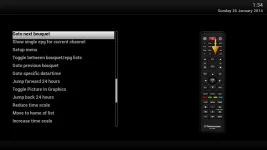
While in EPG, press help to learn the different functions.
 

Attachments

  • epg help.webp
    epg help.webp
    15.8 KB · Views: 31
Does not matter which bouquet list you are using. One you make yourself or a downloaded one.

< and > next to OK button will do that.
Use the < and > next to 0 (zero) on the number pad

While in EPG, press help to learn the different functions.

Thank you very much Abu.

I use a Logitech Harmony remote and could not do that. And I can not find the < or > button on it.

Got the Gigablue remote out and now I understand what you mean.

Thanks a lot
 
Several people use the Harmony remotes. I'm sure someone will advice how they do it.
 
On any Harmony remote all buttons can be added. If any button isn't available, you can learn it.

I use Harmony's for all my boxes and never have any issue.
 

OpenViX Feeds Status

Back
Top