Superb quality and spec AB-Com PULSe 4K SE. Crazy offer! Only £129! FREE UK DELIVERY! 4K UHD, Enigma 2, Multiboot 4 images & more!...
Superb quality and spec AB-Com PULSe 4K Rev II Twin Satellite tuner only £179! FREE UK DELIVERY! 4K UHD, Enigma 2, SATA HDD facility, Multiboot 4 images & more!...

[MB Premium Ultra] Settings Menu too wide

The manual is easily found on the internet. However it is not a 1080hd set so probably does not have this function. However try as Abu advises as that option is in the menu.
 
Thank you fro your reply, CCS. I have looked at the position screen again. Resolution is not on it, but, overscan is and as are the arrows with various numbers referring to the screen resolution. Which parameters do I change to move the display to the right and to narrow it?
I think the different options are fairly self explanatory - try them, there's a defaults button to get back to the beginning.

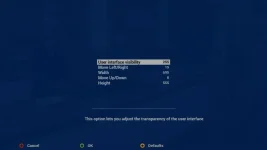
When I'm in the position setup screen, I don't see a grid to work with, just a pale blue, slightly transparent background.
Image attached, Vix-Night-HD skin, ET10K.

(The parameters are actually enclosed in a box, only the bottom line is showing, I guess the picture was being refreshed as I grabbed the image.)
 

Attachments

  • position_setup.webp
    position_setup.webp
    10 KB · Views: 14
Last edited:

OpenViX Feeds Status

Back
Top